


Support our independent tech coverage. Chrome Unboxed is written by real people, for real people—not search algorithms. Join Chrome Unboxed Plus for just $2 a month to get an ad-free experience, access to our private Discord, and more. Learn more about membership here.
START FREE TRIAL (MONTHLY)START FREE TRIAL (ANNUAL)
A wild, new Chromebook concept has been submitted to the United States Patent & Trademark Office (USPTO) by Google, and it shows off something we’ve never quite seen before. You know how some Chromebooks feature a 4-in-1 design where the keyboard flips backward so that you’re only left with the screen?
Well, the latest thing the company has cooked up is a rotating keyboard – no, seriously. Before we get started, it’s worth noting that this patent was created back in August of 2020, but it was submitted just in the beginning of February, so whether or not Google ever releases something like this is anyone’s guess.
Also, do keep in mind that a patent never truly means a product will hit the market. Companies always submit patents, and most of their ideas never make it past the cutting room floor (Remember that time Google tried to hide the keyboard in a compartment with a flap?), but looking at their ideas gives us a behind-the-scenes idea of what level they’re thinking on.
Chromebooks have consistently innovated in their design and feature set in a way that Microsoft has done less so with Windows over the last few years, and I believe that’s because Google is truly trying to create a Chromebook for every type of user.
Alright, let’s take a look, shall we? This report comes to us from Patently Apple, a website dedicated to rounding up and reviewing Apple patents, but it sometimes reports on other companies too, like Google. One last disclaimer – the patent we’ll be discussing has not yet popped up anywhere else, and I couldn’t locate it for myself on the USPTO search, but we’ve reached out to Patently Apple for a link to the source material.
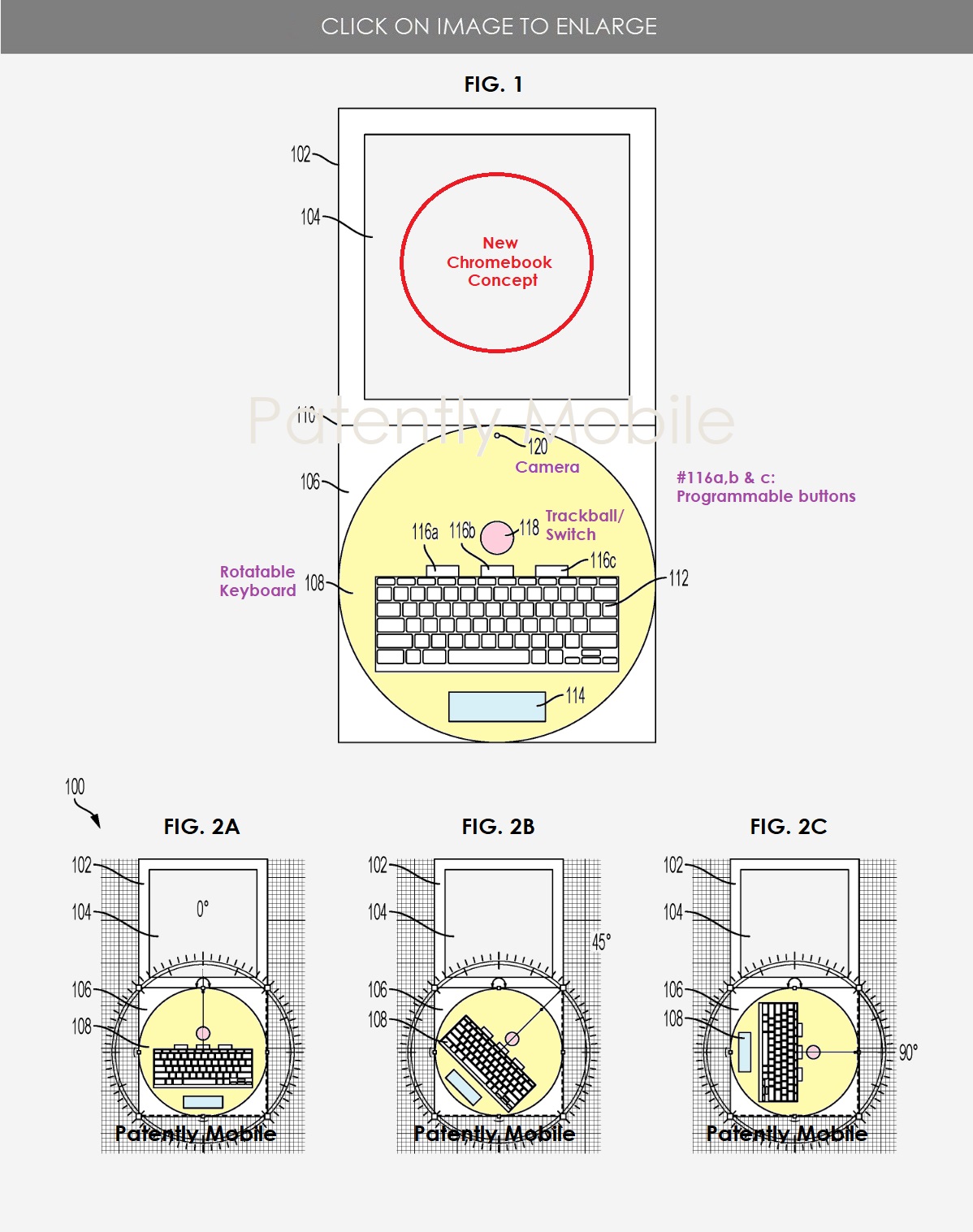
For now, I’ll be reporting on it clearly out of interest in the concept. We’ll let you know if we hear back from Patently Apple and we’ll update this article with a patent link. So, as you can see below in the figure drawing, the Chromebook concept shows off an almost turntable-style rotating base where the keyboard would rotate while the hardware would remain put.
Google notes in their patent background that computing devices are not well established for creative use or non-keyboard text entry or screen manipulation. For example, computing devices do not provide a good lay flat experience that emulates a sketchbook or heavy touch and tap screen interaction that also keeps the keyboard available for more detailed control. Such computing devices may lack the versatility desired for creative users and the flexibility to accommodate both right-handed and left-handed users. Computing devices also may lack assistive controls for users desiring and/or needing non-text entry input methods.
Patently Apple
It’s clear that Google is trying to target creative users when it comes to Chromebooks, even going so far as to make certain the device lays flat while someone is drawing or sketching with a stylus, while not sacrificing keyboard shortcuts necessary to manipulate a drawing in many art software or apps. In essence, your keyboard and screen would be side-by-side with one another and you’d have no additional bulk from a folded over keyboard while you sketch.
The drawing we have here even shows a trackball in addition to the trackpad (Useful for 3D modeling depending on who you ask), as well as three programmable buttons. These will likely emulate the buttons you can program for specific tasks like switching artistic brushes, the undo function and more on a graphics tablet like the One by Wacom. The only difference here is that they would be built directly into the Chromebook itself – cool.
In one of the drawings, there’s an includes camera on the rotatable portion, and the compass overlay you see shows the keyboard’s rotation capability. Patently Apple states that the hinge of the device separating the screen from the keyboard does rotate 360 degrees in one drawing, but that one was not provided. Additionally, another rotation mechanic sees the screen and keyboard base rotate to lay horizontally next to one another…I’m not really sure how that would work, but it sounds wacky.
At the end of the day, this shouldn’t be taken too seriously, as back in 2019, a patent revealed that Google Assistant would have an actual robot body to assist around the home and the house, and as terrifying as that sounds to Terminator fans, don’t worry – the company sold off Boston Dynamics two years ago, so for the time being, there’s nothing to worry about. Again, patents are just ideas submitted for review, not for production. We hope you had fun looking at this with us! We’ll keep you posted if it pops up again.
SUBSCRIBE TO UPSTREAM
Get Chrome Unboxed delivered straight to your inbox
Upstream is our flagship, curated newsletter with the top stories, most click-worthy deals, giveaways, and trending articles from Chrome Unboxed sent directly to your inbox a few times a week. Join 31,000+ subscribers.

