

Support our independent tech coverage. Chrome Unboxed is written by real people, for real people—not search algorithms. Join Chrome Unboxed Plus for just $2 a month to get an ad-free experience, access to our private Discord, and more. Learn more about membership here.
START FREE TRIAL (MONTHLY)START FREE TRIAL (ANNUAL)

Like it or not, our favorite OS is growing up. Chromebooks have successfully taken the crown in the education sector and are now shifting their focus to you, the consumer. Unfortunately, in the world we live in today, it takes more than a good product to capture the masses. There are so many factors that can cause a (fill-in-the-blank) to rise or fall based on the public’s response.
All of the excitement around Chromebooks like the Samsung Pro and the upcoming Chromebook ‘Eve’ is almost tangible when you look at where Chrome OS came from a mere 6 years ago. However, if Chromebooks are going to flex any muscle in the consumer segment, the resume will have to be polished a bit.
John Q. Public may want something new, something different but one thing OEMs are very familiar with when it comes to a new product is the “fear factor.” Probably 90% of the questions I see in the Google Product forum, our site comments and emails from readers are basic in nature and stem from an elementary lack of product knowledge. That’s not a shot at the consumer. It’s just a simple matter of logistics.
A perfect example from my own life is the attempt to set up mail and some other features for a friend on a MacBook a few weeks ago. For the better part of 30 minutes I felt like a caveman trying to crack a coconut. Not to say I didn’t figure it out (Thanks, Google) but the moral of the story is that, while I am not an idiot, I do not use MacOS. Like, ever. It was completely foreign to me. I am sure, with a few weeks of use, the system would become easier to use and more comfortable to navigate. On the flip side, had I gone out and purchased a new MacBook for myself, I can imagine my initial frustration trying to use an operating system that was alien to me.
What does this all have to do with a Chromebook or it’s Files App?
UI or user interface is where the rubber meets the road for the majority of consumers. If a product isn’t user-friendly, it isn’t worth its weight. If a device is unfamiliar, this creates a large hill to climb when trying to enter a market that is, for all intents and purposes, Windows or MAC. (Please don’t take offense Linux users. I’m talking to the average consumer like the neighbor who has a 3-year-old cell phone and wants to buy his 12-year-old a computer.)
With that being said, I can imagine a lifelong Windows user buying a shiny, new Chromebook, powering it up, logging in and then? Lost. As an exclusive Chrome OS user this may sound ludicrous but is it, really? Chromebooks have bits and pieces that may be similar to other operating systems but it is certainly a different creature overall.
Sure, Google has done a decent job of implementing tutorials and walk-through in Chrome OS but seriously, how many of us use those. I know I don’t. (probably why I got so frustrated with the Mac) So, how does Google and the manufactures of Chromebooks prepare for a retail push of a product that isn’t “new” to the majority of consumers?
Familiarity
A friend posted this Imgur photo on G+ the other day and, as funny as it is, it encompasses the mindset of most consumers. When we make the jump into a new system, form-factor or other foreign technology, there comes a certain degree of anxiety surrounding the “learning phase” of new toys.
Google has been very active in making these learning transitions less painful with the implementation of Material Design across multiple platforms and the web. We have seen many additions of the concept in Chrome OS over the last few months and more are coming. The changes to the UI of Chromebooks give it a look that many users may feel more comfortable with as they have seen similar design on Android devices as well as web-based services from Google.
What better way to make your emerging OS look and feel like home than to add features that over 2 billion monthly users are accustomed to?
I’m talking about Android here.
 If you have used Google’s mobile operating system at all you are likely familiar with this symbol. It is the “Share” button. When clicked, you can share in countless ways, countless things with countless people depending on the app you’re using. Now, it would appear, this feature is coming to Chrome OS.
Obviously, with the addition of the Play Store to Chromebooks, this function will be available in some form via Android Apps but that’s Android. They are, of course, two systems running together.
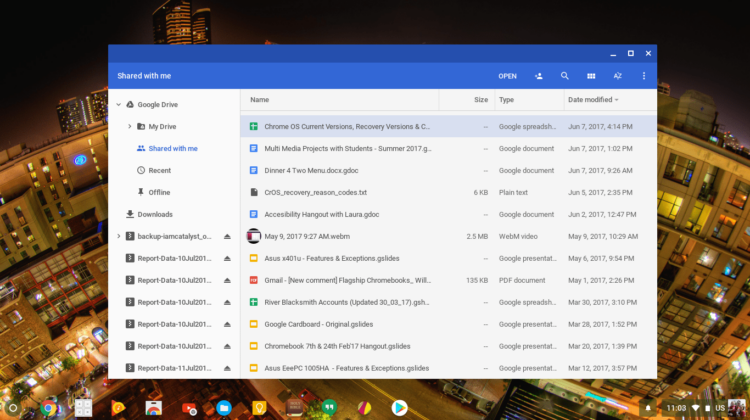
Recent commits in the Chromium repository point to the Share button being added to the Files App of Chrome OS. Currently, you can share a file via usual icon that many of you will recognize. (it’s the little silhouette of a human with a plus sign on it) If you happen to have a Chromebook with Android Apps enabled you may have seen the ability to utilize specific apps via the “Open” menu in the Files App.

According to the commit, these functions and others not related to actually “opening” the file will be separated and accessed via the Share button.
The OPEN combubutton should have only open tasks, and the new option menu should have the other tasks. The new option menu has share icon as most of the tasks should be SHARE_WITH tasks, but other kind of tasks (e.g. PACK_WITH) can also be included.
Chromium repository
Here you can find a deeper look into the upcoming addition to Chrome OS including the actual Share icon.
Another update to the Files App will bring options like cut, copy and zip selection to the 3-dot menu in the top-right corner of the Chrome OS file manager. Again, familiarity. Windows and Mac users alike expect to find functions across the top bar of applications. If you are unfamiliar with a new OS, likely you would look here first. These additions don’t add any new functionality but they do create more recognizable landmarks to new users.
I know this may seem insignificant and I’ve probably bored many of you to tears by now but I am really excited about this kind of stuff. Chrome OS is maturing. We are seeing new hardware that rivals some of the nicest devices from other platforms and an ever-evolving OS that has joined with Android to create a user-friendly ecosystem that can cater to the needs of almost anyone.
That’s exciting and I can’t wait to see whats next.

