


Support our independent tech coverage. Chrome Unboxed is written by real people, for real people—not search algorithms. Join Chrome Unboxed Plus for just $2 a month to get an ad-free experience, access to our private Discord, and more. Learn more about membership here.
START FREE TRIAL (MONTHLY)START FREE TRIAL (ANNUAL)
Recently, the Chrome development team gave a second function to the browser’s bookmarking star icon and it upset a lot of people. Instead of simply bookmarking the current page as it’s done since, well, forever, it currently pulls up an option to either do what it was designed to do or to place it into the new Reading List storage for later. Reading List was introduced not long ago to help users clean out and transform the way they use bookmarks. Instead of having loads of current events and news stories as bookmarks, they would instead be placed into their own place so that traditional bookmarks could be left alone. Why they ever decided to mix and match the functionality of the star icon then is anyone’s guess. I suppose it makes sense on a whiteboard, but not in practice.
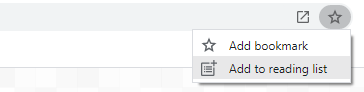
Anyway, our Reading List is now showing an ‘Add current tab’ button near the top that will allow users to store the current page there with just one click. Around the same time as our discovery, Reddit user Leopeva64 also reached out with the news. He’s been all over the situation with Reading list since its inception. Ideally, Google will remove the ‘Add to reading list’ button from the star icon and allow it to simply bookmark pages in the near future, but the addition of the new button in the Reading list panel shows an iterative effort toward untangling the two.
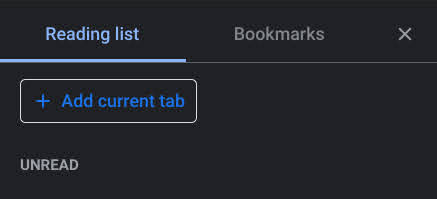
Read later: add flag for moving the add entry point from the omnibox to the list.
Remove the reading list option from the omnibox star when the flag is enabled. Update the “add current page” button to match UX specs and enable it when the flag is enabled or if side panel is enabled.
Still todo: the button should change to “remove current page” when the current page is already in the unread list. Add a disabled state for pages that cannot be added to the reading list. Update the empty state.
Chromium Repository
As you can see, this is currently only a flag on Chrome Canary, but it seems practical enough that it should make its way out of development and into the hands of the many. The fact that the bookmark star icon could add things to the Reading list to begin with was clearly just a development idea that had no chance of sticking around forever. Luckily, the company has been listening to user feedback quite a bit lately with these features, (thank you for changing that ugly Tab Search icon!) so I wouldn’t get too up in arms about these smaller changes unless one of them ends up being set in stone.
However, bookmarks have become sacred, hallowed ground over the past few decades, and Google messed with the wrong feature and I think it realized that. Despite this, I applaud them for trying to modernize bookmarks and streamline the long-held tradition of tossing everything into one bucket. Do you use Reading list at all, or would you prefer Google got rid of it entirely? I personally love it, and don’t want things to go back to the way they were, but I’m probably in the minority.
SUBSCRIBE TO UPSTREAM
Get Chrome Unboxed delivered straight to your inbox
Upstream is our flagship, curated newsletter with the top stories, most click-worthy deals, giveaways, and trending articles from Chrome Unboxed sent directly to your inbox a few times a week. Join 31,000+ subscribers.


