


Support our independent tech coverage. Chrome Unboxed is written by real people, for real people—not search algorithms. Join Chrome Unboxed Plus for just $2 a month to get an ad-free experience, access to our private Discord, and more. Learn more about membership here.
START FREE TRIAL (MONTHLY)START FREE TRIAL (ANNUAL)
A recent Tweet by Leopeva64 has revealed a new feature in development for Chrome’s password manager that will allow you to share your passwords with others. Previously, Google focused on internal storage and editing, but given the growing popularity of third-party password managers like LastPass and Dashlane that offer the ability to share, it only seemed like a matter of time before Google’s minimalist tool would eventually incorporate more advanced features.
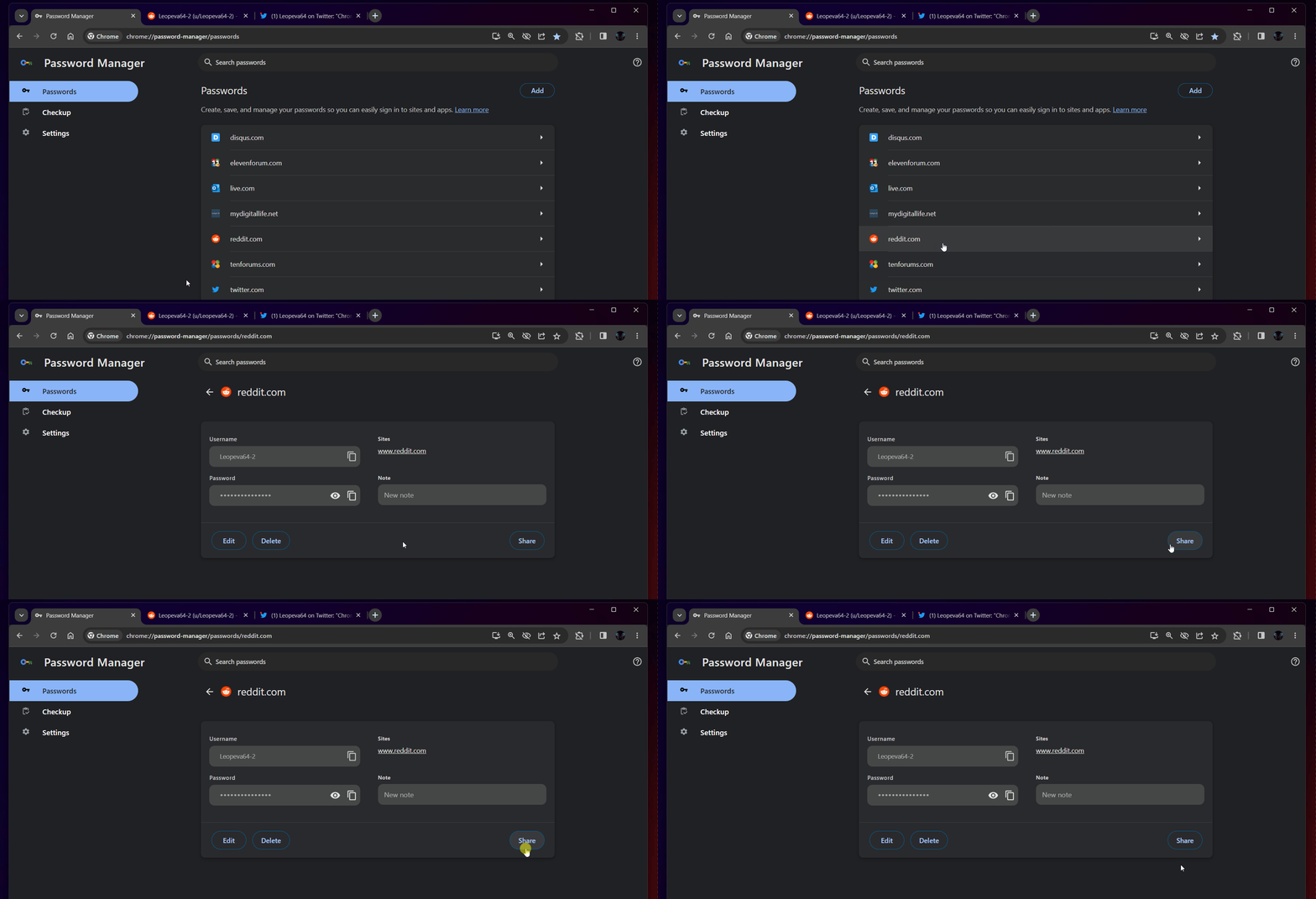
Alongside this potentially upcoming update (there is always still the chance it doesn’t make it past the cutting room floor), Chrome’s Password Manager has seen other improvements like the ability to add notes, a dedicated Chrome web app shortcut icon, and even support for desktop biometric authentication, which was only available on mobile prior.
The new “share” button discovered by Leopeva64 currently does nothing, but once it works, I expect it to let you share your passwords as plaintext with third-party applications or to your device’s clipboard. It’s important to exercise caution and be selective in choosing who you share your passwords with, as humans remain the weakest link in security (sorry, but it’s true!). By adding password sharing after such a long stretch of avoiding doing so, Google is basically trusting you and saying “Here, it’s up to you now, just don’t screw it up.”
As with anything, I at least feel the need to remind you to be careful with whom you share your passwords. While it may seem obvious to most, a friendly word of wisdom never killed anyone, right? Only share passwords with individuals or services that you trust and whom have a legitimate need for access. Also, be sure to review a list of who you’ve shared with regularly, and swap out your passwords for more secure ones as often as it makes sense to for you.
At this point, you may be wondering why you’d share this kind of information with anyone at all, ever. It’s a legitimate question, but passwords can be used across a handful of different people for various reasons. Better than raw password sharing would be the ability to generate and hand out unique passwords for one account similar to how LastPass does, but I estimate it will be years before Google even considers adding something this tailored. Oh well, I guess it’s still good to have a basic iteration for now, right?
SUBSCRIBE TO UPSTREAM
Get Chrome Unboxed delivered straight to your inbox
Upstream is our flagship, curated newsletter with the top stories, most click-worthy deals, giveaways, and trending articles from Chrome Unboxed sent directly to your inbox a few times a week. Join 31,000+ subscribers.

