
• Skip to main content
  • Skip to primary sidebar
  • Deals
  • Features
  • Guides
  • Chromebooks
  • Videos
  • Podcast
  • More +
    • Reviews
    • Unboxing
    • Upcoming Devices
    • Chromebook Plus
    • Chrome
    • ChromeOS
    • Chrome OS Flex
  • Search
  • Sign Up
  • Log In
Chrome Unboxed – The Latest Chrome OS News

Chrome Unboxed - The Latest Chrome OS News

A Space for All Things Chrome, Google, and More!

  • Deals
  • Features
  • Guides
  • Chromebooks
  • Videos
  • Podcast
  • More +
    • Reviews
    • Unboxing
    • Upcoming Devices
    • Chromebook Plus
    • Chrome
    • ChromeOS
    • Chrome OS Flex
  • Search
  • Sign Up
  • Log In

ChromeOS Gallery app gets a vibrant new icon color as well as built-in use case graphics

April 24, 2022 By Michael Perrigo View Comments

Support our independent tech coverage. Chrome Unboxed is written by real people, for real people—not search algorithms. Join Chrome Unboxed Plus for just $2 a month to get an ad-free experience, access to our private Discord, and more. Learn more about membership here.
START FREE TRIAL (MONTHLY)START FREE TRIAL (ANNUAL)

Google hasn’t really shown the Chromebook Gallery app much love over the years as it’s meant to be quite utilitarian, and sure, it does its job, but I’ve been excited to see recent investments into its functionality expand. For example, not long ago, it picked up the responsibility of managing not only audio, video and image files, but also of giving users the ability to mark up PDFs and images in much the same way that Keep does.

Now, on Chrome OS Canary 103, the Gallery app is receiving somewhat of a refresh – well, sort of. First, its icon is going from a Google red to a vibrant purple or “Fuchsia” color. I have to admit, that’s a strange choice, but perhaps the company is looking for ways to differentiate its many red apps from one another.

Xremove ads

YouTube, YouTube Music, YouTube Kids, Gallery and Canvas don’t really seem like all that much, especially as the latter two aren’t really related much to YouTube as a brand, but I really can’t think of another reason why they would wash out its color in exchange for something that stands out so much.
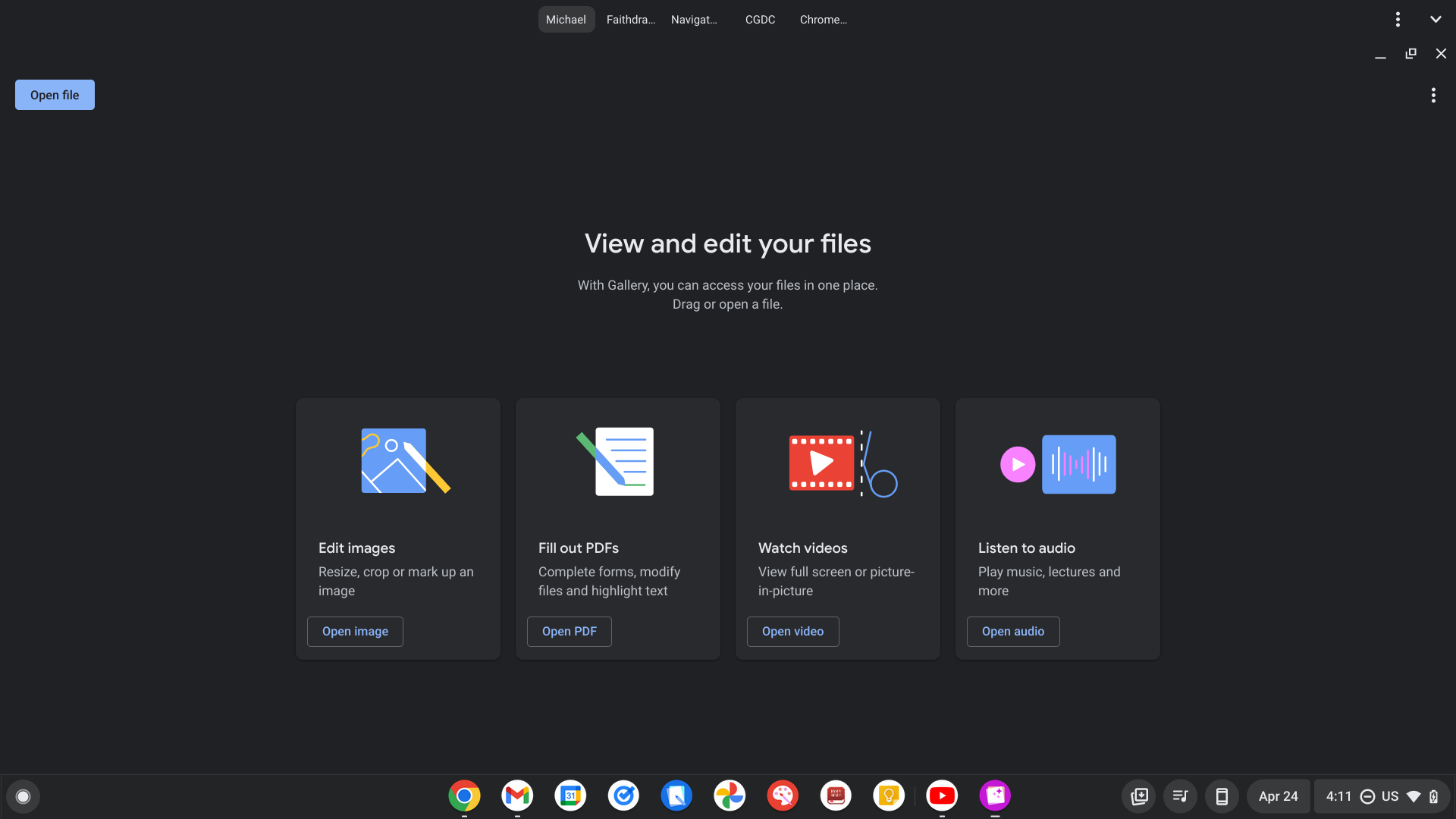
More importantly, the app now features four Googley graphics which give users use cases for the Gallery itself. Many people probably already knew you could open images in it, but most aren’t aware that you can now fill out PDFs right on your device without having to download Adobe Acrobat. Others still are likely completely oblivious to the idea of modifying images or watching videos and even listening to music and lectures on ChromeOS without the need for a third party application!

Featured Videos

Xremove ads

Well, fear not! These new graphics, while really simple, give some direction and could help inspire your creativity. Clicking the “Open…” button on each graphic takes you to the Files app, but unfortunately, it doesn’t pre-filter out your file types based on the clicked graphic, even though that would be really cool.

This update is probably still in development, so Google could add more to beef up the Gallery app, as evidenced by what looks like Google Photos (and video) experiments and a potentially upcoming eyedropper tool. You can also right-click any image when it’s open and search with Lens too – something I hadn’t thought to try, even though it’s a PWA, so there’s plenty more happening under the hood than I initially thought.

SUBSCRIBE TO UPSTREAM

Get Chrome Unboxed delivered straight to your inbox

Upstream is our flagship, curated newsletter with the top stories, most click-worthy deals, giveaways, and trending articles from Chrome Unboxed sent directly to your inbox a few times a week. Join 31,000+ subscribers.

Xremove ads
SUBSCRIBE HERE!

Filed Under: ChromeOS, New & Upcoming Features, News, Updates

About Michael Perrigo

Known as "Google Mike" to his customers, Michael worked at Best Buy as a Chromebook Expert who dedicated his time to understanding the user experience from a regular Chromebook owner's perspective. Having spent nearly 20 years meeting you face-to-face, he strives to help you understand your technology through carefully crafted guides and coverage, relentlessly seeking out the spark in what's new and exciting about ChromeOS.

Primary Sidebar

Xremove ads

Deals

The Lenovo Chromebook Slim 3 is the one to get, starting at just $139 right now

By Robby Payne
March 6, 2026

The best Chromebook deals today

By Robby Payne
March 6, 2026

The fantastic $599 deal on the Samsung Galaxy Chromebook Plus has returned

By Robby Payne
February 25, 2026

There are some great Pixel 10a pre-order offers right now: Here are my 2 favorite deals

By Joseph Humphrey
February 25, 2026

Save up to 25% off the Gemini-powered Nest Cam Indoor

By Joseph Humphrey
February 19, 2026

More Deals

Xremove ads

Reviews

Acer Chromebook Plus Spin 514 Review: Kompanio Ultra power in a convertible

By Robby Payne
December 24, 2025

My review after 6 weeks with the Lenovo Chromebook Plus 14 [VIDEO]

By Robby Payne
August 11, 2025

One week with the best small Android tablet you can buy, and I’m sold

By Robby Payne
May 9, 2025

Best Chromebooks of 2024 [VIDEO]

By Robby Payne
November 28, 2024

Samsung Galaxy Chromebook Plus Review: Samsung is back! [VIDEO]

By Robby Payne
October 28, 2024

More Reviews

Xremove ads

Guides

This Chromebook trackpad shortcut is definitely not new, but is blowing my mind

By Robby Payne
March 11, 2024

How to reduce broadcast delay on YouTube TV to stop live spoilers

By Robby Payne
December 8, 2023

Windows PC keyboard and Chromebook

How to use a Windows keyboard with a Chromebook

By Joseph Humphrey
December 8, 2023

How reset and revert your Chromebook to the previous version of Chrome OS

By Robby Payne
November 29, 2023

My Chromebook Plus features disappeared: here’s how I fixed it

By Robby Payne
November 24, 2023

More Guides

TWITTER · FACEBOOK · INSTAGRAM · YOUTUBE · EMAIL · ABOUT

Copyright © 2026 · Chrome Unboxed · Chrome is a registered trademark of Google Inc.
We are participants in various affiliate advertising programs designed to provide a means for us to earn fees by linking to affiliated sites.

PRIVACY POLICY