

Support our independent tech coverage. Chrome Unboxed is written by real people, for real people—not search algorithms. Join Chrome Unboxed Plus for just $2 a month to get an ad-free experience, access to our private Discord, and more. Learn more about membership here.
START FREE TRIAL (MONTHLY)START FREE TRIAL (ANNUAL)
Chrome OS, for many users, is a completely new computing experience. Along with a new paradigm of computing, cloud-first thinking, and a different user interface than what most people are used to, Chrome OS brings a rather novel concept of simple, approachable access to multiple development and testing channels for those of us who are a bit more curious than others about upcoming features still in development.
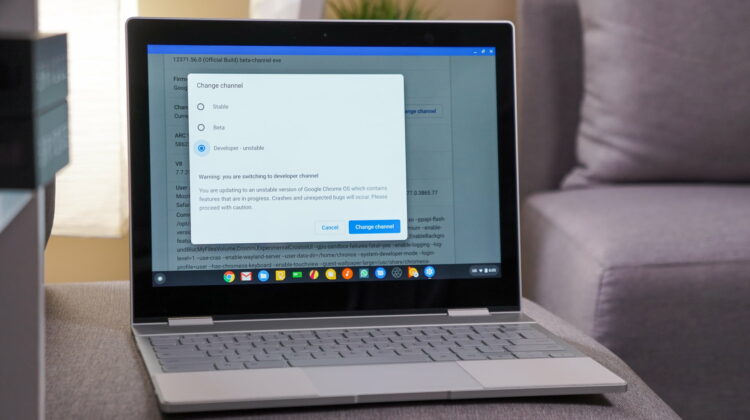
Those channels are the Beta Channel and Developer Channel and though putting your device into a potentially unstable version of its core software sounds a tad scary, you can rest assured that it really isn’t. In fact, because of the way Chrome OS is built from the ground up, moving between these channels is not only simple: it is completely harmless.
If the idea of trying out new features before others ever see them or getting a glimpse of new UI elements before they are ready for the prime time excites you, then you may be someone who would benefit greatly from moving to one of the development channels of Chrome OS. Sure, we here at Chrome Unboxed move through the channels on a daily basis, but that doesn’t mean that we have some special knowledge of how to utilize them. We simply know from experience that the worst thing that can happen is the need to roll back to the Stable Channel and risk losing locally stored files.
SUBSCRIBE TO UPSTREAM
Get Chrome Unboxed delivered straight to your inbox
Upstream is our flagship, curated newsletter with the top stories, most click-worthy deals, giveaways, and trending articles from Chrome Unboxed sent directly to your inbox a few times a week. Join 31,000+ subscribers.
That’s really the only risk you take and, frankly, with Chrome OS you should really be leveraging Google Drive for file management anyway. If you simply set your default downloads folder to a specified Google Drive folder, you can basically operate without worry of local file loss. That’s a subject for another video or article; you just need to know that you won’t ruin your device or break anything by trying out these other channels of Chrome OS.
So, if you are at all interested in trying things early that you see us report on here at Chrome Unboxed, we’d encourage you to give it a try! If things are too wonky and you have issues, simply follow the process below and head back to the safety of the Stable Channel. Oh, and please don’t attempt to hit up the Chrome help forums if you are outside the Stable Channel. You won’t get help until you get back to Stable.
I know that for me, this ability has truly enhanced my overall experience by letting me leverage new functionality like Virtual Desks and their attached gesture navigation months before any of it will ever hit the Stable Channel. Moving to different channels can be a game-changer from time to time, and lately the ability to live in the Developer Channel for a while has really helped me get to leverage my highly-anticipated Virtual Desks much sooner than I really should have. Perhaps it could do the same for you.
How To Change Channels
We’ve outlined this countless time in other articles and will continue to, but here it is again in case you’ve never had the urge to hop over to Beta or Developer Channel. Simply open your settings and click About Chrome OS > Detailed build information > Change channel > select your channel > Change channel and then head back to your About Chrome OS screen to watch your new update downlaod and install. When it’s done, click the button to restart and you’ll be in your new channel in a handful of seconds. Just remember, heading back a channel will always clear your storage, so be prepared and enjoy!

