
• Skip to main content
  • Skip to primary sidebar
  • Deals
  • Features
  • Guides
  • Chromebooks
  • Videos
  • Podcast
  • More +
    • Reviews
    • Unboxing
    • Upcoming Devices
    • Chromebook Plus
    • Chrome
    • ChromeOS
    • Chrome OS Flex
  • Search
  • Sign Up
  • Log In
Chrome Unboxed – The Latest Chrome OS News

Chrome Unboxed - The Latest Chrome OS News

A Space for All Things Chrome, Google, and More!

  • Deals
  • Features
  • Guides
  • Chromebooks
  • Videos
  • Podcast
  • More +
    • Reviews
    • Unboxing
    • Upcoming Devices
    • Chromebook Plus
    • Chrome
    • ChromeOS
    • Chrome OS Flex
  • Search
  • Sign Up
  • Log In

Chrome OS adding WIFI networks to the sync settings menu

August 9, 2019 By Gabriel Brangers View Comments

Support our independent tech coverage. Chrome Unboxed is written by real people, for real people—not search algorithms. Join Chrome Unboxed Plus for just $2 a month to get an ad-free experience, access to our private Discord, and more. Learn more about membership here.
START FREE TRIAL (MONTHLY)START FREE TRIAL (ANNUAL)

Back in May, 9to5Google’s Kyle Bradshaw uncovered evidence that Chrome OS could soon sync WIFI configurations across devices. The commit in question added a feature flag to Chrome OS which will allow WIFI sync specifically for Chrome OS and it was attached to a public CRBug thread where the ongoing work is being curated.

Add a feature flag to gate Wi-Fi sync for ChromeOS.

Original WIFI sync commit

It now appears that this feature will become an integrated part of the Chrome OS sync settings menu. According to the latest commit, a “WIFI networks” option will be added to the sync page.

Xremove ads

Add a “Wi-Fi networks” toggle to the Sync settings page on ChromeOS.

Chromium commit

Chrome’s sync settings are a very useful tool for users living in the Google ecosystem. Sync allows users to have their personal settings such as history, bookmarks, extensions, and most importantly, passwords carry across most devices that are logged into the users Google account. This makes transitions from mobile to desktop quite handy especially if you are in the habit of using multiple Chrome on multiple devices.
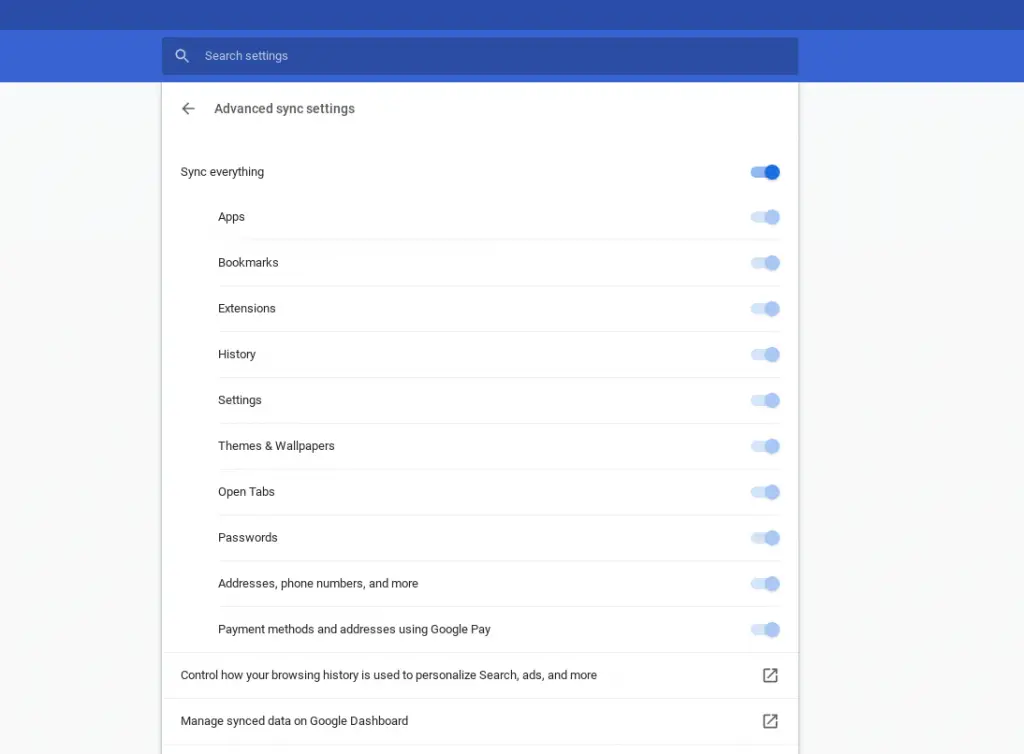
Chrome OS sync settings
Check out Gaming Unboxed
GamingUnboxed Check out Gaming Unboxed

It is intriguing that this feature appears to be exclusive to Chrome OS at the moment. Although, given the nature of Chrome OS, WIFI sync will be a welcome addition for users like us who handle multiple devices on a daily basis. Not to mention the fact that, as Mr. Bradshaw points out, this will eliminate a setup step for new or power washed devices. So long as your account has previously accessed a given network, you should be able to automatically connect to a synced WIFI during the out-of-box setup process.

Featured Videos

Xremove ads

There doesn’t appear to be any specific Chrome OS build targeted for this feature at the moment but it is listed as “priority 1” which places it relatively high on the radar. I will keep my eyes peeled with each Canary update in the hopes that we can get a ballpark of when WIFI sync could be headed our way.

SUBSCRIBE TO UPSTREAM

Get Chrome Unboxed delivered straight to your inbox

Upstream is our flagship, curated newsletter with the top stories, most click-worthy deals, giveaways, and trending articles from Chrome Unboxed sent directly to your inbox a few times a week. Join 31,000+ subscribers.

SUBSCRIBE HERE!

Filed Under: Chromebooks, ChromeOS, News

About Gabriel Brangers

Lover of all things coffee. Foodie for life. Passionate drummer, hobby guitar player, Web designer and proud Army Veteran. I have come to drink coffee and tell the world of all things Chrome. "Whatever you do, Carpe the heck out of that Diem" - Roman poet, Horace. Slightly paraphrased.

Primary Sidebar

Xremove ads

Deals

The Pixel 10a just dropped to $449, but here’s why you should buy the Pixel 10 instead

By Joseph Humphrey
April 13, 2026

Save up to $200 on the two best Chromebooks on the market

By Robby Payne
April 13, 2026

The best Chromebook deals today

By Robby Payne
April 13, 2026

You can grab the battery-powered Nest Doorbell for just $129.99 right now

By Joseph Humphrey
April 11, 2026

Deal Alert: the excellent Lenovo Chromebook Plus 2-in-1 drops to $429

By Robby Payne
April 10, 2026

More Deals

Xremove ads

Reviews

Acer Chromebook Plus Spin 514 Review: Kompanio Ultra power in a convertible

By Robby Payne
December 24, 2025

My review after 6 weeks with the Lenovo Chromebook Plus 14 [VIDEO]

By Robby Payne
August 11, 2025

One week with the best small Android tablet you can buy, and I’m sold

By Robby Payne
May 9, 2025

Best Chromebooks of 2024 [VIDEO]

By Robby Payne
November 28, 2024

Samsung Galaxy Chromebook Plus Review: Samsung is back! [VIDEO]

By Robby Payne
October 28, 2024

More Reviews

Xremove ads

Guides

This Chromebook trackpad shortcut is definitely not new, but is blowing my mind

By Robby Payne
March 11, 2024

How to reduce broadcast delay on YouTube TV to stop live spoilers

By Robby Payne
December 8, 2023

Windows PC keyboard and Chromebook

How to use a Windows keyboard with a Chromebook

By Joseph Humphrey
December 8, 2023

How reset and revert your Chromebook to the previous version of Chrome OS

By Robby Payne
November 29, 2023

My Chromebook Plus features disappeared: here’s how I fixed it

By Robby Payne
November 24, 2023

More Guides

TWITTER · FACEBOOK · INSTAGRAM · YOUTUBE · EMAIL · ABOUT

Copyright © 2026 · Chrome Unboxed · Chrome is a registered trademark of Google Inc.
We are participants in various affiliate advertising programs designed to provide a means for us to earn fees by linking to affiliated sites.

PRIVACY POLICY