
• Skip to main content
  • Skip to primary sidebar
  • Deals
  • Features
  • Guides
  • Chromebooks
  • Videos
  • Podcast
  • More +
    • Reviews
    • Unboxing
    • Upcoming Devices
    • Chromebook Plus
    • Chrome
    • ChromeOS
    • Chrome OS Flex
  • Search
  • Sign Up
  • Log In
Chrome Unboxed – The Latest Chrome OS News

Chrome Unboxed - The Latest Chrome OS News

A Space for All Things Chrome, Google, and More!

  • Deals
  • Features
  • Guides
  • Chromebooks
  • Videos
  • Podcast
  • More +
    • Reviews
    • Unboxing
    • Upcoming Devices
    • Chromebook Plus
    • Chrome
    • ChromeOS
    • Chrome OS Flex
  • Search
  • Sign Up
  • Log In

Google pushes a fix for the recently borked Chrome OS 91 update

July 22, 2021 By Gabriel Brangers View Comments

It has been a rough few weeks for Google and Chrome OS users. July started off with an incremental update that inadvertently crushed the CPUs on a wide range of Chromebooks. Google quickly halted the update but that resulted in the unintended breaking of the Linux container. For most users, this unfortunate situation was easily navigated with a few, simple tricks. While the actual bug behind the issue was never officially reported, Google quickly patched the problem and pushed the fixed version out with relatively little fuss.

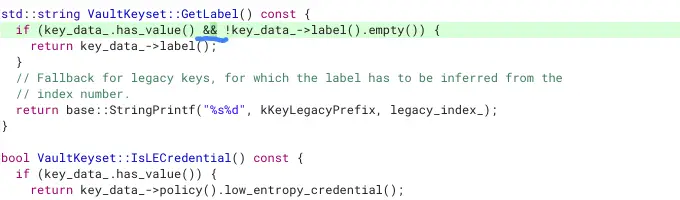
Unfortunately, last week brought another minor update brought with it a tiny code error that caused catastrophic headaches for countless users. The culprit was a single line of code in the file that allows Chrome OS to decrypt your login information. One tiny “&” left out of a conditional statement brought down the entire OS for users and the only fix was to revert Chrome OS which results in a full power wash and the loss of any local data saved on the device. For some, that’s not an issue as many of us accustomed to living in the Google ecosystem keep things synced to the cloud. That said, this isn’t the case for a lot of users. This presented a serious conundrum. Wait for a fix or power wash and chalk up the loss.
Xremove ads
The missing “&” that took down Chrome OS 91

Thankfully, as Android Police reported, Google has already rolled out a fix to the borked code and you can update your device without actually logging into your Google account. Version 91.0.4472.167 began rolling out to all eligible devices today and it contains the corrected line of code to fix the login issue. If you were one of the patient ones that waited for Google to push a fix, you can now take the latest update by entering Guest Mode on your device through the button at the bottom-left of the login screen. From there, click the system tray and the gear icon to access the Chrome OS settings.

In the settings, click “About Chrome OS” and press the “check for updates” button. Once the update has been downloaded, you’ll be prompted to restart your device. At this point, if all goes well, you should be able to log into your Chromebook with your main credentials. As I mentioned, it appears that most eligible Chrome OS devices are getting the update but you can check your particular device by heading over to the update table on cros.tech.

Featured Videos

Xremove ads

Join Chrome Unboxed Plus

Introducing Chrome Unboxed Plus – our revamped membership community. Join today at just $2 / month to get access to our private Discord, exclusive giveaways, AMAs, an ad-free website, ad-free podcast experience and more.

Plus Monthly

$2/mo. after 7-day free trial

Pay monthly to support our independent coverage and get access to exclusive benefits.

Xremove ads
Start free trial

Plus Annual

$20/yr. after 7-day free trial

Pay yearly to support our independent coverage and get access to exclusive benefits.

Start free trial

Our newsletters are also a great way to get connected. Subscribe here!

Click here to learn more and for membership FAQ

Xremove ads

Source: Reddit, Android Police

Filed Under: ChromeOS, News

About Gabriel Brangers

Lover of all things coffee. Foodie for life. Passionate drummer, hobby guitar player, Web designer and proud Army Veteran. I have come to drink coffee and tell the world of all things Chrome. "Whatever you do, Carpe the heck out of that Diem" - Roman poet, Horace. Slightly paraphrased.

Primary Sidebar

Xremove ads

Deals

The Acer Chromebook Plus Spin 514 hits an all-time low price of $499

By Robby Payne
December 23, 2025

The best Chromebook deals today

By Robby Payne
December 22, 2025

Save $220 on the powerful, versatile Acer Chromebook Plus Spin 714

By Robby Payne
December 10, 2025

The Google Pixel 9a just hit its lowest price ever at $150 off

By Joseph Humphrey
December 8, 2025

At $349, this Lenovo Chromebook Plus is one of the best value laptops you can buy

By Joseph Humphrey
December 3, 2025

More Deals

Xremove ads

Reviews

My review after 6 weeks with the Lenovo Chromebook Plus 14 [VIDEO]

By Robby Payne
August 11, 2025

One week with the best small Android tablet you can buy, and I’m sold

By Robby Payne
May 9, 2025

Best Chromebooks of 2024 [VIDEO]

By Robby Payne
November 28, 2024

Samsung Galaxy Chromebook Plus Review: Samsung is back! [VIDEO]

By Robby Payne
October 28, 2024

Lenovo Chromebook Duet 11″ Review [VIDEO]

By Robby Payne
October 19, 2024

More Reviews

Xremove ads

Guides

This Chromebook trackpad shortcut is definitely not new, but is blowing my mind

By Robby Payne
March 11, 2024

How to reduce broadcast delay on YouTube TV to stop live spoilers

By Robby Payne
December 8, 2023

Windows PC keyboard and Chromebook

How to use a Windows keyboard with a Chromebook

By Joseph Humphrey
December 8, 2023

How reset and revert your Chromebook to the previous version of Chrome OS

By Robby Payne
November 29, 2023

My Chromebook Plus features disappeared: here’s how I fixed it

By Robby Payne
November 24, 2023

More Guides

TWITTER · FACEBOOK · INSTAGRAM · YOUTUBE · EMAIL · ABOUT

Copyright © 2025 · Chrome Unboxed · Chrome is a registered trademark of Google Inc.
We are participants in various affiliate advertising programs designed to provide a means for us to earn fees by linking to affiliated sites.

PRIVACY POLICY