


Support our independent tech coverage. Chrome Unboxed is written by real people, for real people—not search algorithms. Join Chrome Unboxed Plus for just $2 a month to get an ad-free experience, access to our private Discord, and more. Learn more about membership here.
START FREE TRIAL (MONTHLY)START FREE TRIAL (ANNUAL)
For years, Chrome’s primary defense against unencrypted websites has been the passive “Not Secure” label in the address bar. While that badge was a necessary compromise back when a massive portion of the web still ran on plain HTTP, it has always had major shortcomings. It goes unnoticed by many users, fails to appear during short-lived traffic like redirects, and most importantly, it only tells you a site is unencrypted after your data has already been exposed to the local network.
In a new announcement from Chrome Product Manager Eric Trouton and Engineering Manager Joe DeBlasio, Google is officially shifting from passive badging to proactive protection. Chrome is rolling out an update that explicitly asks users for permission before making an insecure HTTP connection, turning the safeguard on for all users by default.
This protection originally arrived earlier this year for users enrolled in Chrome’s Enhanced Protection mode of Safe Browsing. Now, Google is extending the defense across the entire Chrome user base, ensuring that unencrypted requests can’t quietly leak private data or allow network attackers to inject malicious content.
Proactive permission replacing passive warnings
The core mechanism behind this change is Chrome’s “Always Use Secure Connections” feature. Instead of quietly opening an unencrypted connection and sticking a label in the address bar, Chrome now halts the request before the connection occurs and prompts you to decide whether you want to proceed over HTTP.
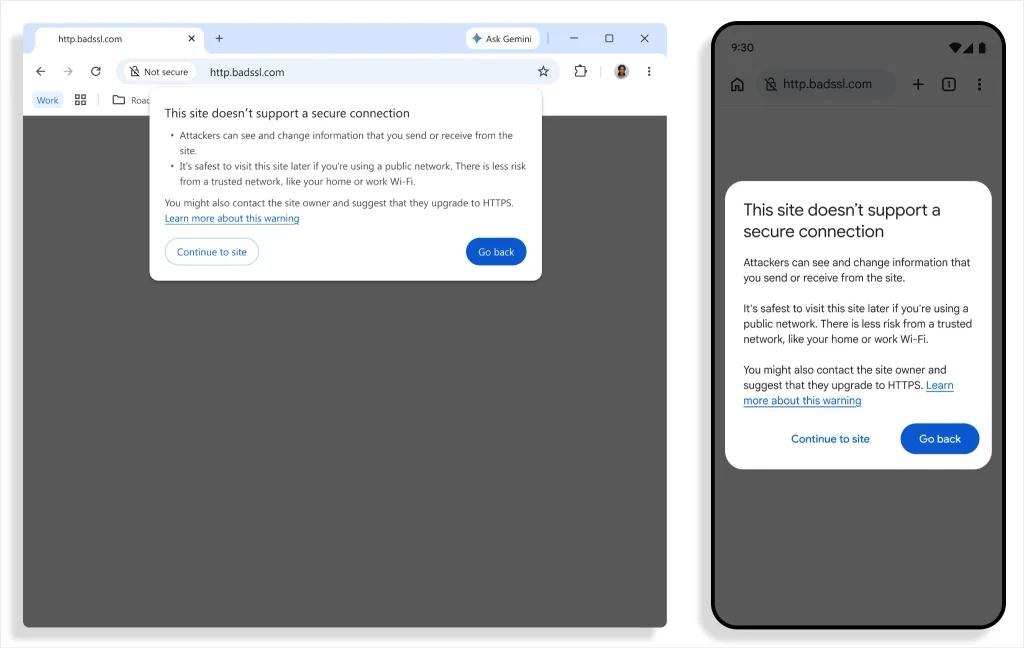
By requiring approval before the handshake happens, Chrome closes the exposure window entirely. If you click an outdated link or get bounced through an unencrypted redirect, your browser won’t broadcast data across an untrusted network unless you explicitly give it permission.
Smart exceptions to eliminate warning fatigue
Google is aware that warning fatigue can ruin security features if implemented poorly. To keep the browsing experience seamless, the team has built practical guardrails into how and when these prompts appear:
- Two-week approval memory: Chrome asks for approval the first time you visit an HTTP site. Once you grant permission, Chrome remembers your choice and will not warn you again for that site unless you haven’t visited it for at least two weeks.
- Exemptions for local hardware: Warnings are not shown for destinations that cannot obtain publicly trusted certificates. This includes single-label hostnames (like
intranet/) and local IP addresses (like192.168.0.1) typically used to configure home Wi-Fi routers and network equipment. Because an attacker would already need to be on your private local network to tamper with that traffic, the risk profile is significantly lower.
According to Google, widespread HTTPS adoption across the web makes this default switch possible without overwhelming users. Early rollout data indicates that nearly 95% of Chrome users on desktop do not encounter a single HTTP warning in a given week, with less than 1% seeing three or more. Warning rates on mobile devices are even lower.
Google notes that asking users before making an HTTP request represents the culmination of more than a decade of work across the web ecosystem. Chrome is the first browser to make this protection the default for everyone, closing a long-standing loophole and ensuring that your connection is private from the moment you click.
SUBSCRIBE TO UPSTREAM
Get Chrome Unboxed delivered straight to your inbox
Upstream is our flagship, curated newsletter with the top stories, most click-worthy deals, giveaways, and trending articles from Chrome Unboxed sent directly to your inbox a few times a week. Join 31,000+ subscribers.

