

Support our independent tech coverage. Chrome Unboxed is written by real people, for real people—not search algorithms. Join Chrome Unboxed Plus for just $2 a month to get an ad-free experience, access to our private Discord, and more. Learn more about membership here.
START FREE TRIAL (MONTHLY)START FREE TRIAL (ANNUAL)
Chrome for Android has offered a “Reading mode” for several years, but the experience has historically been inconsistent, with the trigger button appearing and disappearing seemingly at random depending on how Google’s algorithms interpreted a page’s layout. With the latest update currently hitting the stable channel, Google is shifting toward a more intentional, user-driven design that makes the feature far easier to find and use.
More consistent, more accessible
The most significant change in this redesign is how you actually activate the simplified view. Previously, users had to wait for a specific icon to appear next to the Omnibox and it was a process that was often hit-or-miss: even on long-form articles. In the new version, Google has moved the trigger into the overflow (three-dot) menu. Underneath the “Listen to this page” option, users will now find a “Show Reading mode” button that appears to be available regardless of the page being visited.
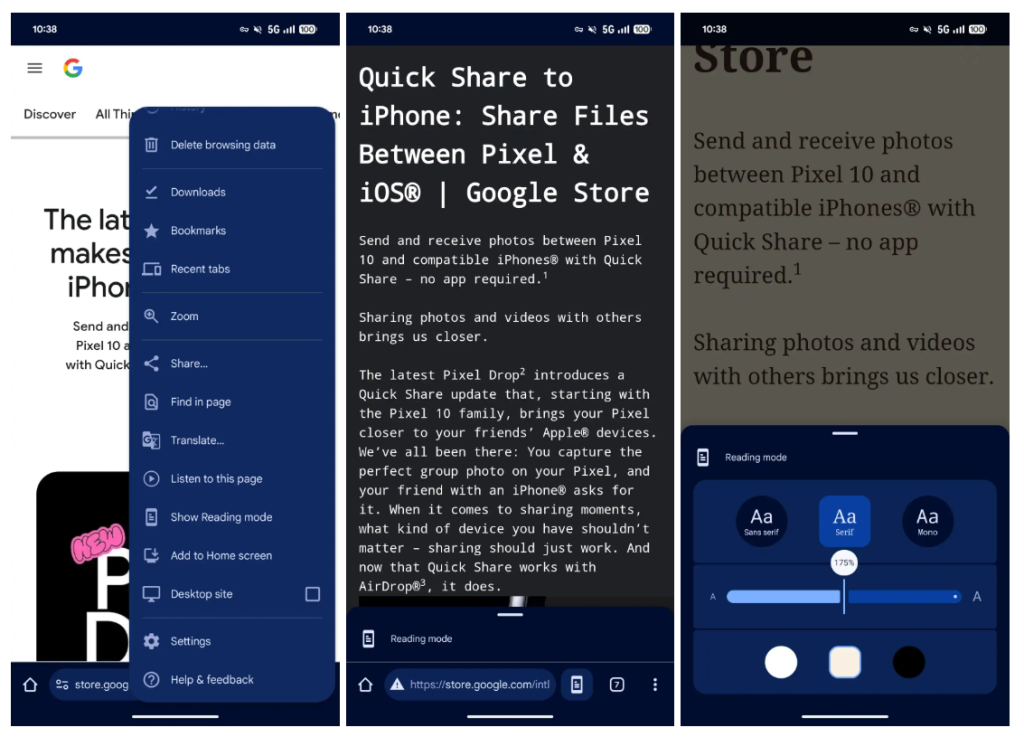
While this removes the dedicated address bar shortcut, the trade-off for consistency is well worth it. By making the feature a permanent fixture of the menu, Google is ensuring that users no longer have to guess whether a page supports a simplified view. Once active, a small button remains available to quickly exit the mode and return to the standard web layout.
Modern design and better customization
The visual overhaul of Reading mode is slick looking, leaning heavily into Google’s Material 3 Expressive design language. Unlike the old version that took over the entire screen, the redesigned view retains the Omnibox at the top, making it feel more like a part of the browser rather than a separate app. The controls are now housed in a bottom sheet that utilizes morphing shapes and modern containers to give it a polished, high-end feel.
Inside this bottom sheet, users have access to several deep customization options to tailor the reading experience to their needs. You can choose between Sans serif, Serif, or Mono fonts and scale the text size up to 250% for improved legibility. Additionally, the background color can be swapped between Light, Sepia, and Dark modes. Best of all, Chrome will now preserve these preferences across different pages, so you don’t have to re-configure your setup every time you click a new link.
Rolling out with Chrome 143
This redesign is currently appearing for users on Chrome 143 in the stable channel. While it is not yet a wide-scale rollout for every Android device, its presence in the stable build suggests that a broader release is imminent. If you aren’t seeing the new Reading mode yet, you can keep an eye on the overflow menu as the update continues to propagate or try enabling the chrome://flags/#reader-mode-improvements flag.
SUBSCRIBE TO UPSTREAM
Get Chrome Unboxed delivered straight to your inbox
Upstream is our flagship, curated newsletter with the top stories, most click-worthy deals, giveaways, and trending articles from Chrome Unboxed sent directly to your inbox a few times a week. Join 31,000+ subscribers.

