

• Skip to main content
  • Skip to primary sidebar
  • Deals
  • Features
  • Guides
  • Chromebooks
  • Videos
  • Podcast
  • More +
    • Reviews
    • Unboxing
    • Upcoming Devices
    • Chromebook Plus
    • Chrome
    • ChromeOS
    • Chrome OS Flex
  • Search
  • Sign Up
  • Log In
Chrome Unboxed – The Latest Chrome OS News

Chrome Unboxed - The Latest Chrome OS News

A Space for All Things Chrome, Google, and More!

  • Deals
  • Features
  • Guides
  • Chromebooks
  • Videos
  • Podcast
  • More +
    • Reviews
    • Unboxing
    • Upcoming Devices
    • Chromebook Plus
    • Chrome
    • ChromeOS
    • Chrome OS Flex
  • Search
  • Sign Up
  • Log In

Chrome for Android finally has a simple, built-in PDF viewer

April 27, 2025 By Robby Payne View Comments

Support our independent tech coverage. Chrome Unboxed is written by real people, for real people—not search algorithms. Join Chrome Unboxed Plus for just $2 a month to get an ad-free experience, access to our private Discord, and more. Learn more about membership here.
START FREE TRIAL (MONTHLY)START FREE TRIAL (ANNUAL)

For years, Chrome users on desktop computers have benefited from the browser’s integrated PDF viewer. Clicking a PDF link online or opening a downloaded file happens right within a Chrome tab, bypassing the need for external applications for viewing and marking up a PDF. It’s a seamless, convenient feature that I know I take for granted most days.

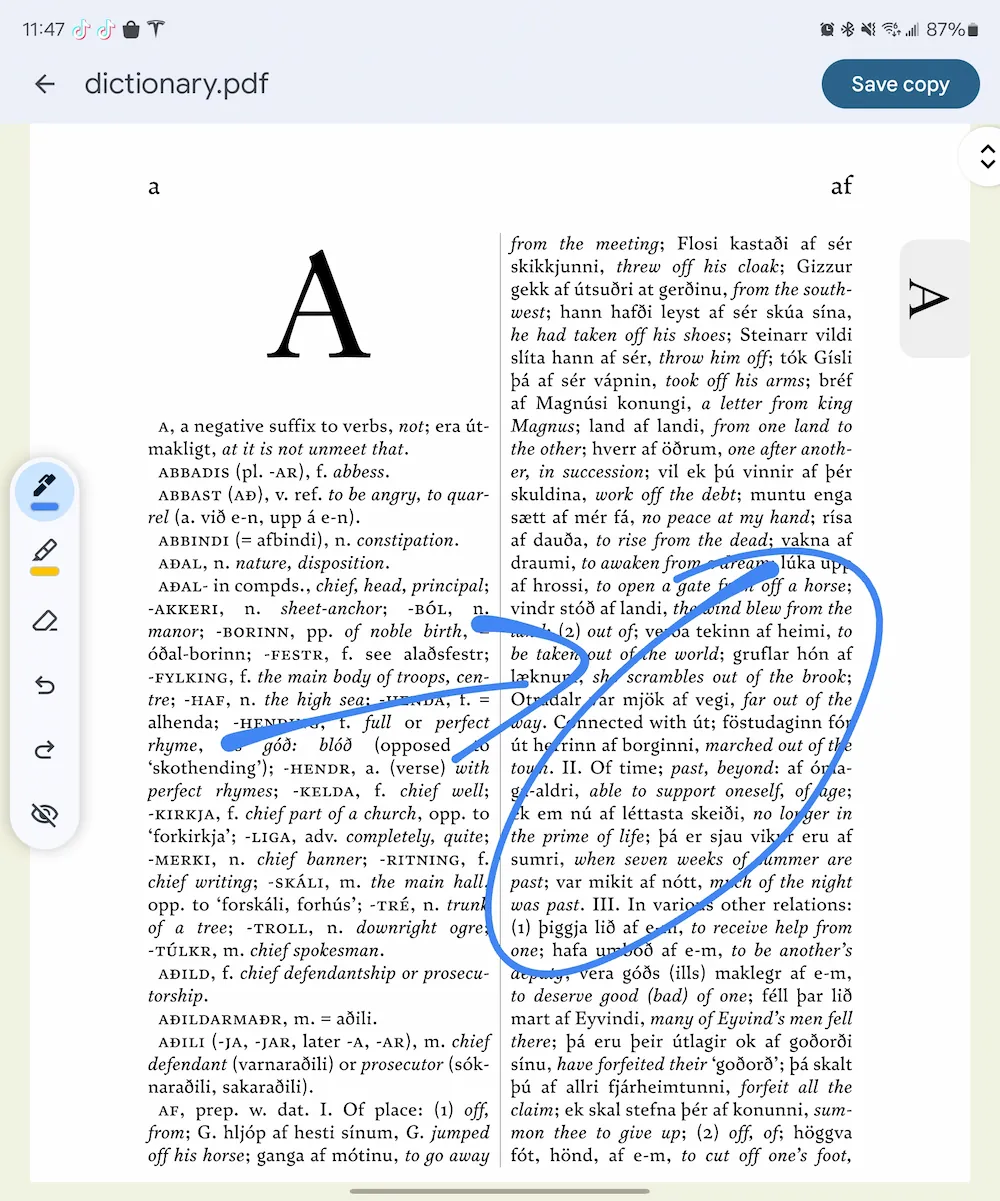
Unfortunately, this same level of integration hasn’t been available on Chrome for Android, requiring users to rely on third-party apps (usually Google Drive) to view PDF documents. That gap has now been closed. In the latest versions of Chrome for Android, native PDF viewing is rolling out, bringing the mobile browser experience more in line with its desktop counterpart. When you encounter a PDF online or download one using the browser, it will now open directly within a new Chrome tab, just like you’d expect.
Xremove ads

With the latest version of Chrome, I can now click on small or massive PDF documents and have them loaded up for viewing quickly right in Chrome. This integration goes beyond simple viewing, too. You can use the standard Chrome menu options to search for specific text within the PDF document. Additionally, an annotation tool is built-in, allowing you to mark up the document as needed. Helpfully, this annotation interface also includes the option to save a new copy of the PDF complete with your markups.

This is definitely one of those features that should have been around a long, long time ago, but one that I’m also very happy to have at my disposal when needed. Whether its marking up something to send it back or simply being able to quickly and seamlessly look over something like menu at a restaurant, having PDF viewing available right in the Chrome browser on Android is a huge help, and you should be seeing it already active in the latest Chrome 135 update.

Featured Videos

Xremove ads

VIA: Droid Life

SUBSCRIBE TO UPSTREAM

Get Chrome Unboxed delivered straight to your inbox

Upstream is our flagship, curated newsletter with the top stories, most click-worthy deals, giveaways, and trending articles from Chrome Unboxed sent directly to your inbox a few times a week. Join 31,000+ subscribers.

SUBSCRIBE HERE!

Filed Under: News

About Robby Payne

As the founder of Chrome Unboxed, Robby has been reviewing Chromebooks for over a decade. His passion for ChromeOS and the devices it runs on drives his relentless pursuit to find the best Chromebooks, best services, and best tips for those looking to adopt ChromeOS and those who've already made the switch.

Primary Sidebar

Googlebook

How will Googlebook updates work? Here’s why a decoupled schedule makes total sense

By Robby Payne
August 31, 2026

Why the upcoming Lenovo Googlebook Duet m is the tablet I’ve been waiting on for years

By Robby Payne
August 30, 2026

Googlebook is weeks from launch and Google still hasn’t named the operating system

By Robby Payne
August 28, 2026

Adobe Premiere on Googlebook: Leaked render reveals video editing is coming

By Joseph Humphrey
August 28, 2026

New ‘Aneto’ Googlebook development board points to a 14-inch Snapdragon X convertible

By Robby Payne
August 26, 2026

More Googlebook

Xremove ads

Deals

The best Chromebook deals today

By Robby Payne
August 27, 2026

The best Chromebook ever made is $350 off at Best Buy right now

By Robby Payne
August 21, 2026

The excellent, powerful Acer Chromebook Plus Spin 514 is $150 off right now

By Robby Payne
August 12, 2026

Acer’s new Chromebook 315 is wildly affordable and points to the real future of Chromebooks

By Robby Payne
August 11, 2026

You can score the massively upgraded ASUS CX54 Chromebook Plus for just $599 right now

By Joseph Humphrey
July 28, 2026

More Deals

Xremove ads

Reviews

Acer Chromebook Plus Spin 514 Review: the best convertible you can buy [VIDEO]

By Robby Payne
July 1, 2026

Lenovo Chromebook Plus 2-in-1 Review: pretty great in a vacuum

By Robby Payne
April 23, 2026

My review after 6 weeks with the Lenovo Chromebook Plus 14 [VIDEO]

By Robby Payne
August 11, 2025

One week with the best small Android tablet you can buy, and I’m sold

By Robby Payne
May 9, 2025

Best Chromebooks of 2024 [VIDEO]

By Robby Payne
November 28, 2024

More Reviews

Xremove ads

TWITTER · FACEBOOK · INSTAGRAM · YOUTUBE · EMAIL · ABOUT

Copyright © 2026 · Chrome Unboxed · Chrome is a registered trademark of Google Inc.
We are participants in various affiliate advertising programs designed to provide a means for us to earn fees by linking to affiliated sites.

PRIVACY POLICY