

• Skip to main content
  • Skip to primary sidebar
  • Deals
  • Features
  • Guides
  • Chromebooks
  • Videos
  • Podcast
  • More +
    • Reviews
    • Unboxing
    • Upcoming Devices
    • Chromebook Plus
    • Chrome
    • ChromeOS
    • Chrome OS Flex
  • Search
  • Sign Up
  • Log In
Chrome Unboxed – The Latest Chrome OS News

Chrome Unboxed - The Latest Chrome OS News

A Space for All Things Chrome, Google, and More!

  • Deals
  • Features
  • Guides
  • Chromebooks
  • Videos
  • Podcast
  • More +
    • Reviews
    • Unboxing
    • Upcoming Devices
    • Chromebook Plus
    • Chrome
    • ChromeOS
    • Chrome OS Flex
  • Search
  • Sign Up
  • Log In

Chrome for Android finally adds pinned tabs for better mobile multitasking

February 13, 2026 By Robby Payne View Comments

Support our independent tech coverage. Chrome Unboxed is written by real people, for real people—not search algorithms. Join Chrome Unboxed Plus for just $2 a month to get an ad-free experience, access to our private Discord, and more. Learn more about membership here.
START FREE TRIAL (MONTHLY)START FREE TRIAL (ANNUAL)

The rollout of Chrome 144 is proving to be a solid quality of life updated for sure. One of the new features finally arriving for most is pinned tabs for Chrome on Android. Just like the desktop counterpart, this little feature is extremely handy when trying to hold on to a few tabs that you want to be sure you don’t accidentally close at any time.

While the feature was technically announced late last year, it is now hitting devices in a much broader capacity. For power users who treat their mobile browser with the same intensity as their desktop, this addition brings a level of parity and organization that has been missing from the Android app for years.

Xremove ads

How pinned tabs work on mobile

The implementation is intuitive and fits perfectly within the existing tab grid view. By long-pressing on any tab card, you’ll now find a “Pin tab” option located just above the standard “Close tab” command. Once selected, that tab is immediately shuffled to the very top of your grid, where it becomes anchored.
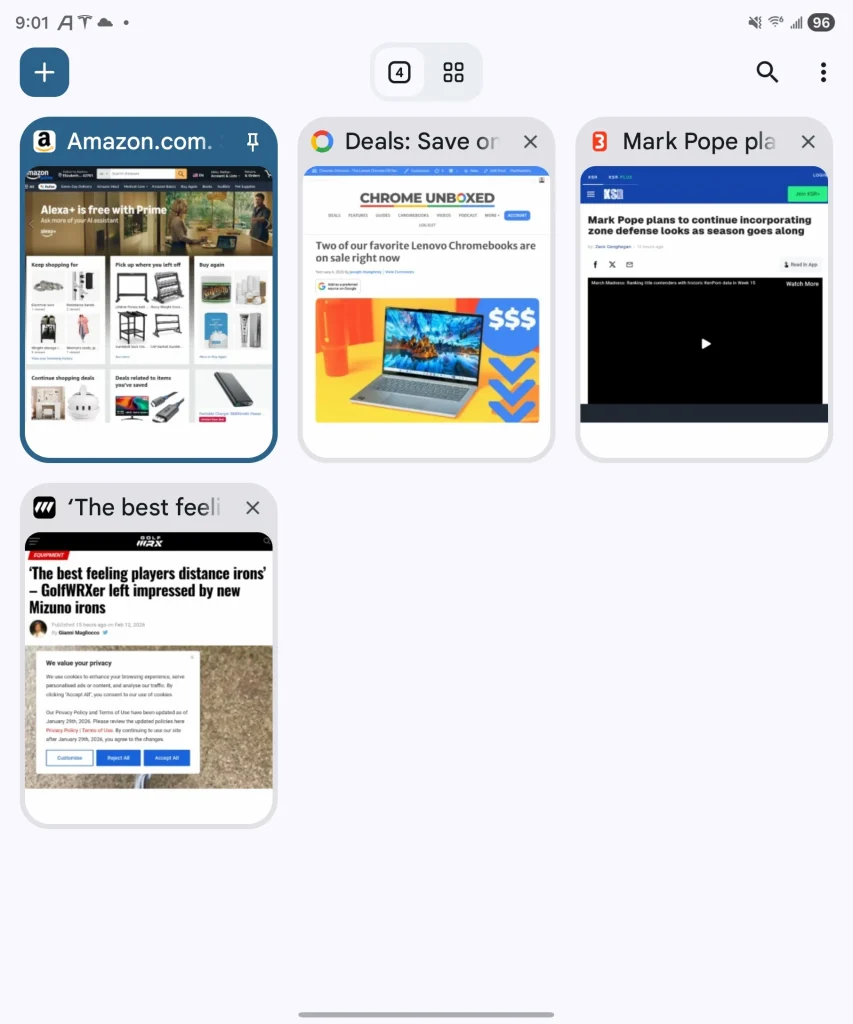
To protect these tabs from accidental dismissal, Google has made a few smart UI choices. The traditional “x” in the corner is replaced by a pin icon, and the swipe-to-close gesture is disabled for any tab that is pinned. This ensures that your most essential pages—whether it’s a work dashboard, a calendar, or a persistent research doc—stay exactly where you put them.

Featured Videos

Xremove ads

A new way to navigate your grid

One of the more impressive parts of this update is how it handles navigation. If you have a large number of tabs open and find yourself scrolling deep into your grid, you don’t have to scroll all the way back up to find your essentials. Chrome now features a docked carousel at the top of the tab switcher that displays the favicons and page names of your pinned tabs.
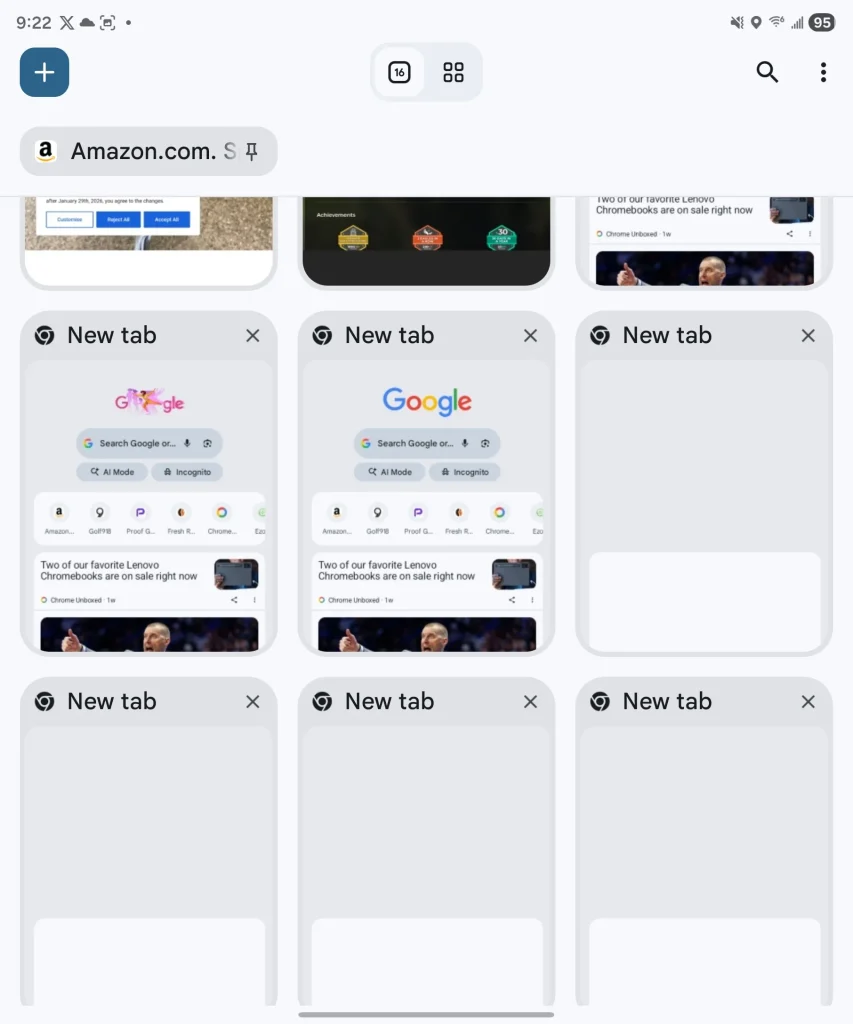
This carousel remains accessible and allows for quick, snappy switching between your most important sites. It’s a clean, thoughtful addition to the interface that makes managing a heavy tab load significantly less chaotic on a smaller screen. To revert a tab to its normal state, another long-press allows you to unpin, at which point the standard close controls return.

This feature is rolling out now as part of the Chrome 144 update. If you don’t see it yet, ensure your browser is updated to the latest version in the Play Store. It’s a small change in the grand scheme of Google’s AI-focused roadmap, but for anyone who lives in the browser, it’s an update that will be felt every single day.

Xremove ads

SUBSCRIBE TO UPSTREAM

Get Chrome Unboxed delivered straight to your inbox

Upstream is our flagship, curated newsletter with the top stories, most click-worthy deals, giveaways, and trending articles from Chrome Unboxed sent directly to your inbox a few times a week. Join 31,000+ subscribers.

SUBSCRIBE HERE!

Filed Under: Chrome, New & Upcoming Features, News

About Robby Payne

As the founder of Chrome Unboxed, Robby has been reviewing Chromebooks for over a decade. His passion for ChromeOS and the devices it runs on drives his relentless pursuit to find the best Chromebooks, best services, and best tips for those looking to adopt ChromeOS and those who've already made the switch.

Primary Sidebar

Xremove ads

Deals

The best Chromebook deals today

By Robby Payne
April 20, 2026

Deal Alert: the excellent Lenovo Chromebook Plus 2-in-1 returns to $429

By Robby Payne
April 20, 2026

Lenovo Legion Tab Gen 3 drops to $399, ahead of the much pricier Gen 5 release

By Joseph Humphrey
April 18, 2026

How to get 50% off YouTube Premium for a full year with Google One

By Robby Payne
April 16, 2026

The Pixel 10a just dropped to $449, but here’s why you should buy the Pixel 10 instead

By Joseph Humphrey
April 13, 2026

More Deals

Xremove ads

Reviews

Acer Chromebook Plus Spin 514 Review: Kompanio Ultra power in a convertible

By Robby Payne
December 24, 2025

My review after 6 weeks with the Lenovo Chromebook Plus 14 [VIDEO]

By Robby Payne
August 11, 2025

One week with the best small Android tablet you can buy, and I’m sold

By Robby Payne
May 9, 2025

Best Chromebooks of 2024 [VIDEO]

By Robby Payne
November 28, 2024

Samsung Galaxy Chromebook Plus Review: Samsung is back! [VIDEO]

By Robby Payne
October 28, 2024

More Reviews

Xremove ads

Guides

This Chromebook trackpad shortcut is definitely not new, but is blowing my mind

By Robby Payne
March 11, 2024

How to reduce broadcast delay on YouTube TV to stop live spoilers

By Robby Payne
December 8, 2023

Windows PC keyboard and Chromebook

How to use a Windows keyboard with a Chromebook

By Joseph Humphrey
December 8, 2023

How reset and revert your Chromebook to the previous version of Chrome OS

By Robby Payne
November 29, 2023

My Chromebook Plus features disappeared: here’s how I fixed it

By Robby Payne
November 24, 2023

More Guides

TWITTER · FACEBOOK · INSTAGRAM · YOUTUBE · EMAIL · ABOUT

Copyright © 2026 · Chrome Unboxed · Chrome is a registered trademark of Google Inc.
We are participants in various affiliate advertising programs designed to provide a means for us to earn fees by linking to affiliated sites.

PRIVACY POLICY