

Support our independent tech coverage. Chrome Unboxed is written by real people, for real people—not search algorithms. Join Chrome Unboxed Plus for just $2 a month to get an ad-free experience, access to our private Discord, and more. Learn more about membership here.
START FREE TRIAL (MONTHLY)START FREE TRIAL (ANNUAL)
There’s no doubt that more foldable phones, tablets and laptops are coming. With companies like Samsung, Motorola and Huawei blazing the trail, folding, personal electronic devices seem to be part of the future one way or another. After all, once these types of devices are a bit more sturdy, affordable, and available, who wouldn’t want to have a phone in their pocket that can turn into a small tablet or a small tablet that can also be a laptop? I know I’m very interested in where this segment is headed.
And so is Google, apparently. From a hardware standpoint, there is ample evidence that Google is planning their very own folding Pixel device and that is important for a few reasons. First, we all know Google isn’t exactly on the bleeding edge when it comes to phone design. They generally take the careful approach and adopt tech after it has been tried and tested in other handsets. The move for Google to begin readying a launch of their own folding phone tells me they’ve observed enough market growth in the category to see it as long-lasting and viable. Second, it matters because as the gatekeeper of Android, Google getting involved in a deeper way with folding form factors means Android will keep getting better at handling these unique takes on what phones and tablets could become.
But Google is more than hardware and more than just Android. Let us not forget the deep interests they have in the web with their cloud services, cloud-based software, the Chrome browser and Chrome OS. If anything, one could argue that the web is Google’s main focus, main revenue source, and largest conduit to actual users on a daily basis. If they are taking folding form factors seriously enough to not only make sure Android works well with them, but also jumping in the game from a hardware standpoint, it only makes sense for them to shore up the web portion of the equation, too. And that’s where the new DevicePosture API comes in.
There are multiple APIs that have existed already for web content to help developers deal with more-complex, folding devices and web-based content. However, it seems there was some overlap and confusion with some of these methods and the W3C has now consolidated the way developers can interact with these new, folding form factors on the web via browsers, and it is called DevicePosture API. Here’s a summary from the W3C:
New types of mobile devices are appearing that have some sort of folding capabilities around the screen. Hence, when the device folds, it physically can be different form factor. The main interest in knowing the posture is to enable new user experiences with responsive design.
Among the described “folding” devices, there are mainly two different physical form factors: devices with a single flexible screen (seamless), and devices with two screens (with seam). They can both fold around a hinge, and the current specification applies to both types. It should be clarified as well that both seamless and (devices) with seam can be of different dimension ranging from mobile and tablets to laptop sizes. It should also be noted that different devices will have different default orientations (portrait or landscape), and that the fold might happen in a vertical or horizontal way.
From enhancing the usability of a website by avoiding the area of a fold, to enabling innovative use cases for the web, knowing the posture can help developers tailor their content to different devices. Content can be consumed and browsed even when the device is not flat, in which case the developer might want to provide a different layout for it depending on the posture state in which the device is being used.
Via W3C Github
With this new API, developers can craft their sites or web apps to understand better what a device is actually doing and respond the right way. For instance, if a users spans the window to full screen, what does the content in the browser do? Does it go into columns, desktop-style view, or remain static? What about when partially folded? What about when dropped to one side of the folding hinge? Or laid on the table in a laptop orientation? The DevicePosture API gives control to developers to write behaviors based on these positions, inviting fixes to odd layouts and opening the door to unique experiences on the web with foldable electronics.
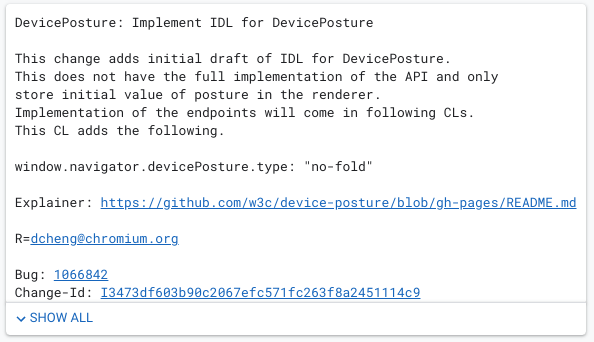
As you can see in the commit above, Google has already added this API to Chrome, so the world’s most popular browser will already be in the position to take advantage of these updated capabilities and I’m excited to see what comes of this over time. Foldable phones, tablets and laptops are part of our future one way or another, and as more and more people choose these form factors over the standard slab phones and laptops we now use, we’ll need the platforms to build great experience for them on the web. This is a huge move in that direction for sure.
SUBSCRIBE TO UPSTREAM
Get Chrome Unboxed delivered straight to your inbox
Upstream is our flagship, curated newsletter with the top stories, most click-worthy deals, giveaways, and trending articles from Chrome Unboxed sent directly to your inbox a few times a week. Join 31,000+ subscribers.

