
• Skip to main content
  • Skip to primary sidebar
  • Deals
  • Features
  • Guides
  • Chromebooks
  • Videos
  • Podcast
  • More +
    • Reviews
    • Unboxing
    • Upcoming Devices
    • Chromebook Plus
    • Chrome
    • ChromeOS
    • Chrome OS Flex
  • Search
  • Sign Up
  • Log In
Chrome Unboxed – The Latest Chrome OS News

Chrome Unboxed - The Latest Chrome OS News

A Space for All Things Chrome, Google, and More!

  • Deals
  • Features
  • Guides
  • Chromebooks
  • Videos
  • Podcast
  • More +
    • Reviews
    • Unboxing
    • Upcoming Devices
    • Chromebook Plus
    • Chrome
    • ChromeOS
    • Chrome OS Flex
  • Search
  • Sign Up
  • Log In

Chrome for Android prepares for the new Google Pixel Tablet with a new look and features

October 19, 2022 By Michael Perrigo View Comments

Support our independent tech coverage. Chrome Unboxed is written by real people, for real people—not search algorithms. Join Chrome Unboxed Plus for just $2 a month to get an ad-free experience, access to our private Discord, and more. Learn more about membership here.
START FREE TRIAL (MONTHLY)START FREE TRIAL (ANNUAL)

You’ve likely heard whispers of a new Google-branded tablet device that has nothing to do with the Pixel Slate or ChromeOS. At the 2022 Google Hardware event, the company revealed the Pixel Tablet which will double as the next Nest Hub but with one unique selling point – it’s detachable from the base speaker and charging dock.

Even before its announcement, Google has been hard at work revamping the Android tablet experience and app developers have been walking alongside them to provide better experiences for anyone interested in larger screen use. In light of that, a new Chrome for Android app update was shown off today via The Keyword and details a new look and feel as well as several new features for Chrome on tablets. These updates are specifically being developed in preparation for the Pixel Tablet, but all tablet users will, of course, benefit from them.
Xremove ads

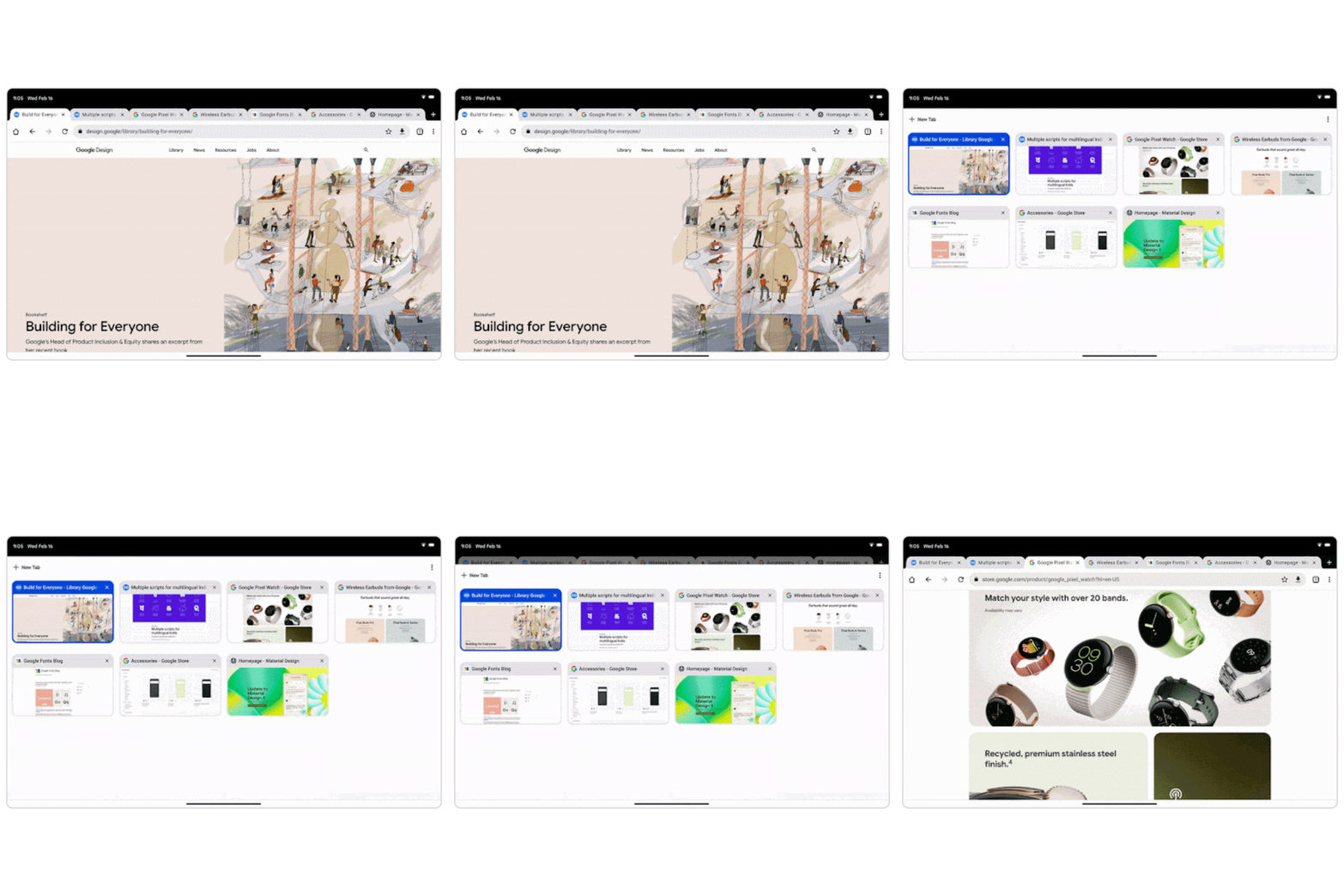
First off, this awesome, new tab grid overlay will show you all of your open browser tabs and it takes full advantage of the available space. On top of that, the same tab groups system you’ve used on your phone and on your Chromebook is now coming to your tablet. This means that you can keep everything organized and even color-coded if you’re as crazy as I am with it all.

A side-by-side split view within the same Chrome app will show you the active tab as well as your other tabs to make quickly switching between them easier. Also, to keep you from accidentally closing tabs, the close button will finally be hidden if you have too many tabs crowded together. These tabs get much smaller as you add more, and you’ve probably tried to tap the one to the far right before destroying it, right? Yeah, me too. It’s one of those annoying small quality-of-life things that I’m glad Google is addressing.
Featured Videos

Xremove ads

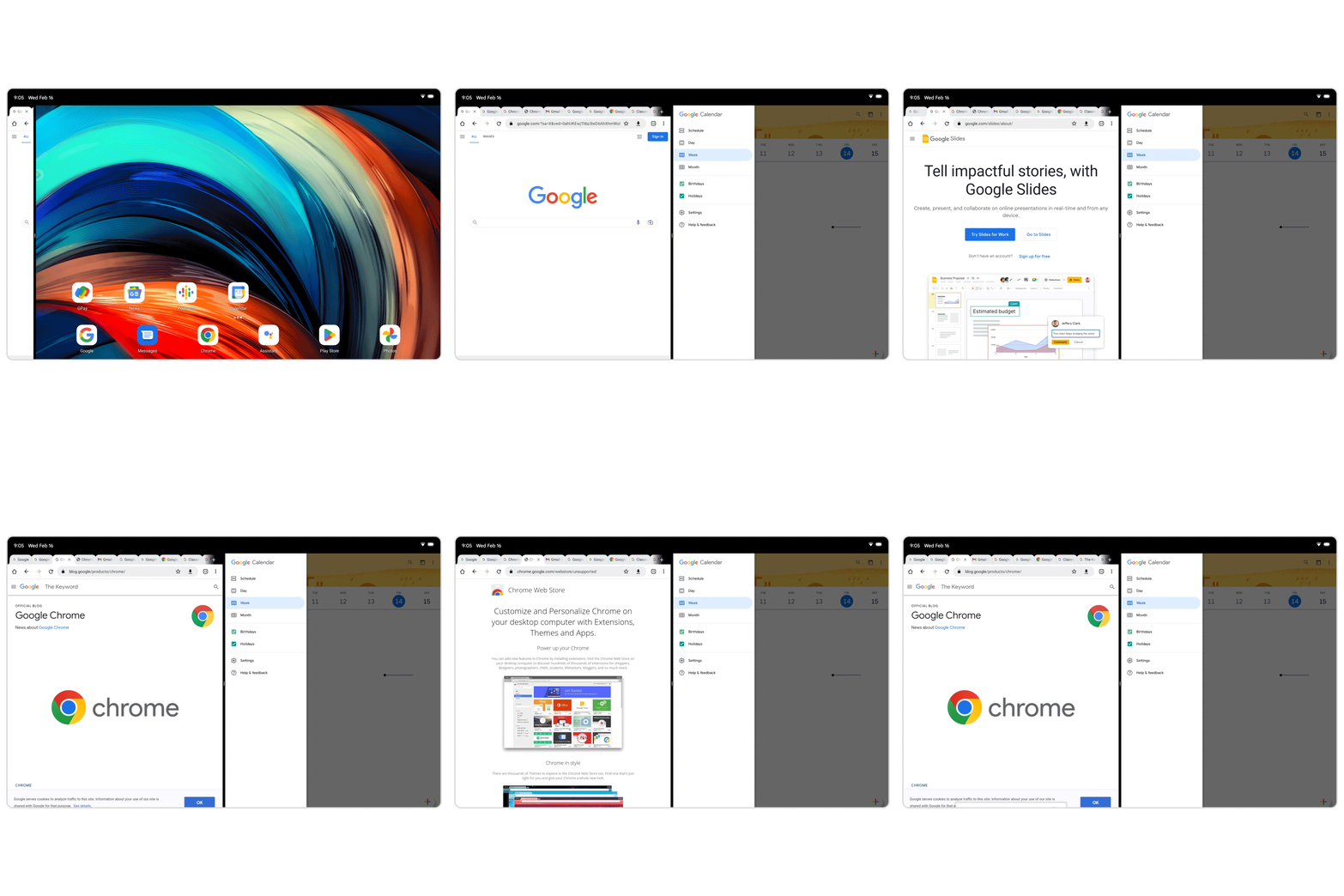
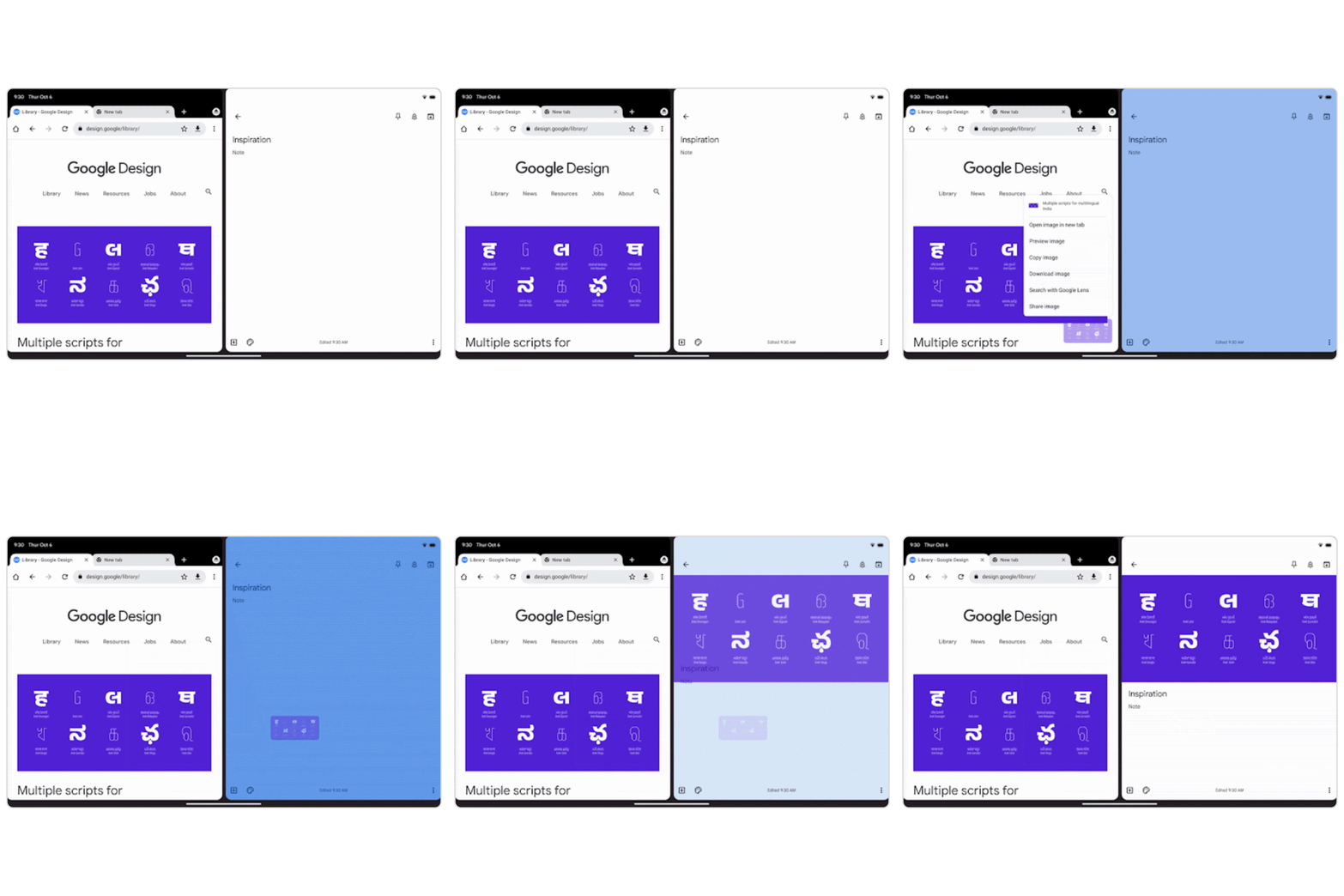
Lastly, by snapping Chrome to either the left or right side of the tablet display, you will now be able to drag and drop content into other apps without having to manually save and import it! In this way, Chrome for Android will now act more like the desktop version of the browser, and that’s quite honestly my favorite part of this announcement.
Speaking of desktop, it will also be much easier to request desktop mode on any site and to tell Chrome to default to that mode for that site from then on. In the past, this was only available on the actual desktop version, but now it’s coming to mobile.

SUBSCRIBE TO UPSTREAM

Get Chrome Unboxed delivered straight to your inbox

Upstream is our flagship, curated newsletter with the top stories, most click-worthy deals, giveaways, and trending articles from Chrome Unboxed sent directly to your inbox a few times a week. Join 31,000+ subscribers.

Xremove ads
SUBSCRIBE HERE!

Filed Under: Android, Chrome

About Michael Perrigo

Known as "Google Mike" to his customers, Michael worked at Best Buy as a Chromebook Expert who dedicated his time to understanding the user experience from a regular Chromebook owner's perspective. Having spent nearly 20 years meeting you face-to-face, he strives to help you understand your technology through carefully crafted guides and coverage, relentlessly seeking out the spark in what's new and exciting about ChromeOS.

Primary Sidebar

Xremove ads

Deals

The touchscreen Lenovo Chromebook Slim 3 is a steal at under $200

By Robby Payne
March 16, 2026

Google TV Streamer and Remote held in front of a wall-mounted TV

The premium Google TV Streamer 4K is back down to $80

By Joseph Humphrey
March 16, 2026

The best Chromebook deals today

By Robby Payne
March 16, 2026

Pixel Buds Pro 2 running

I still love the Pixel Buds Pro 2 and they are $60 off right now

By Joseph Humphrey
March 13, 2026

The Lenovo Chromebook Slim 3 is the one to get, starting at just $139 right now

By Robby Payne
March 6, 2026

More Deals

Xremove ads

Reviews

Acer Chromebook Plus Spin 514 Review: Kompanio Ultra power in a convertible

By Robby Payne
December 24, 2025

My review after 6 weeks with the Lenovo Chromebook Plus 14 [VIDEO]

By Robby Payne
August 11, 2025

One week with the best small Android tablet you can buy, and I’m sold

By Robby Payne
May 9, 2025

Best Chromebooks of 2024 [VIDEO]

By Robby Payne
November 28, 2024

Samsung Galaxy Chromebook Plus Review: Samsung is back! [VIDEO]

By Robby Payne
October 28, 2024

More Reviews

Xremove ads

Guides

This Chromebook trackpad shortcut is definitely not new, but is blowing my mind

By Robby Payne
March 11, 2024

How to reduce broadcast delay on YouTube TV to stop live spoilers

By Robby Payne
December 8, 2023

Windows PC keyboard and Chromebook

How to use a Windows keyboard with a Chromebook

By Joseph Humphrey
December 8, 2023

How reset and revert your Chromebook to the previous version of Chrome OS

By Robby Payne
November 29, 2023

My Chromebook Plus features disappeared: here’s how I fixed it

By Robby Payne
November 24, 2023

More Guides

TWITTER · FACEBOOK · INSTAGRAM · YOUTUBE · EMAIL · ABOUT

Copyright © 2026 · Chrome Unboxed · Chrome is a registered trademark of Google Inc.
We are participants in various affiliate advertising programs designed to provide a means for us to earn fees by linking to affiliated sites.

PRIVACY POLICY