

Support our independent tech coverage. Chrome Unboxed is written by real people, for real people—not search algorithms. Join Chrome Unboxed Plus for just $2 a month to get an ad-free experience, access to our private Discord, and more. Learn more about membership here.
START FREE TRIAL (MONTHLY)START FREE TRIAL (ANNUAL)
Right on schedule, the next milestone update to the Chrome browser has started rolling out to Windows, macOS, and Linux users. This update is relatively light in the features department but delivers a healthy batch of security updates and patches. Let’s take a look at what’s new in Chrome 105 for Desktop.
More PWA controls
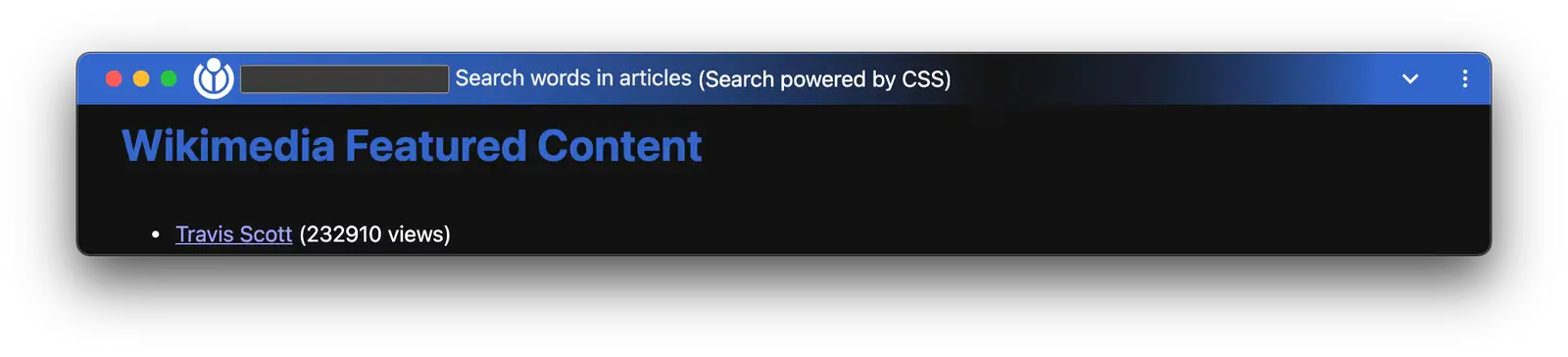
Progressive Web Apps have come a long way in Chrome and before long, it will be nearly impossible to distinguish between browser-based tools and native applications. Chrome 97 added the ability to add elements to the top bar of a web app. Chrome 105 builds on that feature with customizable controls. Now, web app developers can add tools like search bars and add or customize features in the top bar. This gives developers more control over how the web app looks and interacts with the user.
Window tiling options
We’ve covered this upcoming feature at length and while it’s technically not available in Chrome 105, you can enable it with a simple flag. The feature will give Chrome a window snapping ability that’s similar to what Windows already does. When enabled, you simply hover the maximize button in Chrome and you’ll be presented with a variety of size and snapping options for the window that’s in focus. Here’s a look at the feature in action on ChromeOS in the Canary Channel.
As I mentioned, this feature isn’t on by default but you can enable it by pointing your browser to chrome://flags/#partial-split and enabling the flag. Once you restart Chrome, you should be able to see the window snapping in action.
Dev tools
As I said, there isn’t much to talk about in this update from a user standpoint but there are some updates under the hood that give developers some new and updated tools to work with. You can read more about those on the Chromium Blog but I’ll list them here just in case you’re interested.
- Custom Highlight API – The custom highlight API provides a way for web developers to style the text of arbitrary ranges. This is useful in a variety of scenarios, including editing frameworks that wish to implement their own selection, find-on-page over virtualized documents, multiple selections to represent online collaboration or spellchecking frameworks.
- Container Queries – Container queries enable developers to query a parent selector for its size and styling information, making it possible for a child element to own its responsive styling logic, no matter where it lives on a web page.
- :has() Pseudo Class – The CSS
:has()pseudo-class enables developers to check if a parent element contains children with specific parameters. - Fetch Upload Streaming – start a request before you have the whole body available by using the Streams API.
- Multi-Screen Window Placement API – Enhancements to the label strings provided by multi-screen window placement API
Security updates and patches
That’s it for features and tools and now, onto the security updates. This version of Chrome contains a whopping 24 patches. While that may seem excessive, it’s not uncommon for a milestone update and it means that Google is continuing to focus on keeping Chrome safe and secure for all of its users. Here’s a list of the patches along with the associated bugs and the bounties collected by the devs that discovered each vulnerability.
- [$NA][1340253] Critical CVE-2022-3038: Use after free in Network Service. Reported by Sergei Glazunov of Google Project Zero on 2022-06-28
- [$10000][1343348] High CVE-2022-3039: Use after free in WebSQL. Reported by Nan Wang(@eternalsakura13) and Guang Gong of 360 Vulnerability Research Institute on 2022-07-11
- [$9000][1341539] High CVE-2022-3040: Use after free in Layout. Reported by Anonymous on 2022-07-03
- [$7500][1345947] High CVE-2022-3041: Use after free in WebSQL. Reported by Ziling Chen and Nan Wang(@eternalsakura13) of 360 Vulnerability Research Institute on 2022-07-20
- [$5000][1338553] High CVE-2022-3042: Use after free in PhoneHub. Reported by koocola(@alo_cook) and Guang Gong of 360 Vulnerability Research Institute on 2022-06-22
- [$3000][1336979] High CVE-2022-3043: Heap buffer overflow in Screen Capture. Reported by @ginggilBesel on 2022-06-16
- [$NA][1051198] High CVE-2022-3044: Inappropriate implementation in Site Isolation. Reported by Lucas Pinheiro, Microsoft Browser Vulnerability Research on 2020-02-12
- [$TBD][1339648] High CVE-2022-3045: Insufficient validation of untrusted input in V8. Reported by Ben Noordhuis info@bnoordhuis.nl on 2022-06-26
- [$TBD][1346245] High CVE-2022-3046: Use after free in Browser Tag. Reported by Rong Jian of VRI on 2022-07-21
- [$7000][1342586] Medium CVE-2022-3047: Insufficient policy enforcement in Extensions API. Reported by Maurice Dauer on 2022-07-07
- [$5000][1303308] Medium CVE-2022-3048: Inappropriate implementation in Chrome OS lockscreen. Reported by Andr.Ess on 2022-03-06
- [$3000][1316892] Medium CVE-2022-3049: Use after free in SplitScreen. Reported by @ginggilBesel on 2022-04-17
- [$3000][1337132] Medium CVE-2022-3050: Heap buffer overflow in WebUI. Reported by Zhihua Yao of KunLun Lab on 2022-06-17
- [$2000][1345245] Medium CVE-2022-3051: Heap buffer overflow in Exosphere. Reported by @ginggilBesel on 2022-07-18
- [$2000][1346154] Medium CVE-2022-3052: Heap buffer overflow in Window Manager. Reported by Khalil Zhani on 2022-07-21
- [$TBD][1267867] Medium CVE-2022-3053: Inappropriate implementation in Pointer Lock. Reported by Jesper van den Ende (Pelican Party Studios) on 2021-11-08
- [$TBD][1290236] Medium CVE-2022-3054: Insufficient policy enforcement in DevTools. Reported by Kuilin Li on 2022-01-24
- [$TBD][1351969] Medium CVE-2022-3055: Use after free in Passwords. Reported by Weipeng Jiang (@Krace) and Guang Gong of 360 Vulnerability Research Institute on 2022-08-11
- [$3000][1329460] Low CVE-2022-3056: Insufficient policy enforcement in Content Security Policy. Reported by Anonymous on 2022-05-26
- [$2000][1336904] Low CVE-2022-3057: Inappropriate implementation in iframe Sandbox. Reported by Gareth Heyes on 2022-06-16
- [$1000][1337676] Low CVE-2022-3058: Use after free in Sign-In Flow. Reported by raven at KunLun lab on 2022-06-20
Updating Chrome
Chrome 105 is currently rolling out for Windows, macOS, and Linux users. If you haven’t received the update, no worries. It should be along in the coming days. You can always check for updates by heading to the three-dot menu in the top right of the Chrome browser, clicking “Help,” and clicking About Chrome. There, you should see an update button. If Google keeps to its schedule, we should see the update to ChromeOS 105 tomorrow. Stay tuned for more on that when it arrives.
SUBSCRIBE TO UPSTREAM
Get Chrome Unboxed delivered straight to your inbox
Upstream is our flagship, curated newsletter with the top stories, most click-worthy deals, giveaways, and trending articles from Chrome Unboxed sent directly to your inbox a few times a week. Join 31,000+ subscribers.

