

Support our independent tech coverage. Chrome Unboxed is written by real people, for real people—not search algorithms. Join Chrome Unboxed Plus for just $2 a month to get an ad-free experience, access to our private Discord, and more. Learn more about membership here.
START FREE TRIAL (MONTHLY)START FREE TRIAL (ANNUAL)
If you clicked into this article, there’s a good chance that you were one of many eagerly awaiting the full release of the Brydge C-Type wireless trackpad for Chrome OS. It’s been over a year since the product was first unveiled to the world here at Chrome Unboxed and 6 months since its partner in crime – the fantastic C-Type wireless keyboard for Chrome OS – became widely available for sale. As it stands, the only real options currently available for Chrome OS users to have a wireless trackpad on their desk are the Apple Magic Trackpad 2 and the aging Logitech T650.
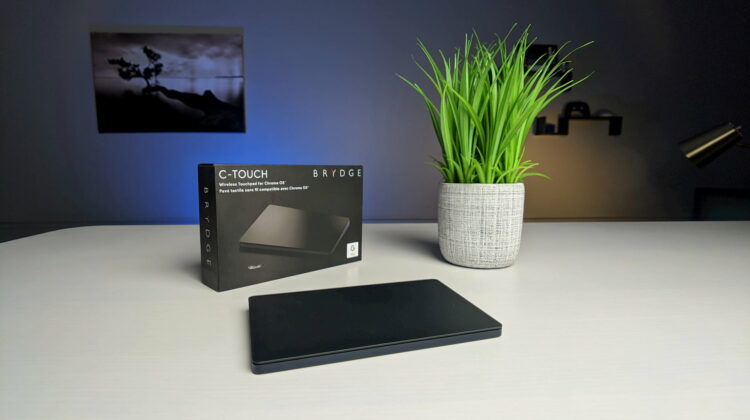
Both of these options are actually quite good, but the Apple Magic Trackpad is a tad bit expensive and the Logitech T650 is hard to find new these days. Both devices require Google to continue to decide to pull the drivers forward into future version of Chrome OS, so it isn’t a 100% bet that they will always operate as you’d expect. That was the difference with the Brydge C-Touch trackpad. Brydge was building a trackpad that didn’t rely on firmware and drivers, but instead used all the internal bits offered by Chrome OS to accept inputs.
While this method would have truly set it apart as a trackpad that would never really lose functionality down the road (after all, if the trackpad is simply passing inputs over and fully allowing the OS to dictate what to do with those movements, there are no special drivers needed and no worries of forward compatibility), getting that to all happen over Google’s admittedly shoddy Bluetooth on Chromebooks looks to have been too much for Brydge to accomplish. Please note that we don’t have official word that this was the problem, but with Apple’s latest trackpad functioning on my Chromebook without issue, I can’t see anything else being the underlying problem.
Either way, it looks like what we suspected would happen has come to pass, and the Brydge C-Touch trackpad won’t ever actually make it to market. The product has been removed from their website and emails have been sent to those who registered for updates. It does look very much like the hardware was re-purposed as the new trackpad for iPad OS and will be sold as such. It’s a shame, really, but sometimes these things just don’t work out. The G-Type keyboard/trackpad combo for the Pixel Slate still works perfectly well for us, so I’m not really sure where things went sideways.
As a company that builds top-notch products at the highest level for Apple products, I was so excited that Brydge took a real interest in Chrome OS and Chromebooks. The fact that this device died before making it to store shelves feels like a bit of a gut punch. Whatever the underlying problem ended up being, I sure hope this doesn’t end up being a trend with accessory makers working with Google. We clearly love Chrome OS and part of a diverse and well-rounded ecosystem is the accessory library. To date, Chrome OS’ library is fairly small. There are efforts in place that will hopefully expand this, but for now, this loss feels like a big one. Without hesitation, I suppose, I now offer the Apple Magic Trackpad as the best overall wireless trackpad for Chrome OS.
Shop Apple Magic Trackpad 2 on Chrome Shop
SUBSCRIBE TO UPSTREAM
Get Chrome Unboxed delivered straight to your inbox
Upstream is our flagship, curated newsletter with the top stories, most click-worthy deals, giveaways, and trending articles from Chrome Unboxed sent directly to your inbox a few times a week. Join 31,000+ subscribers.

