

Support our independent tech coverage. Chrome Unboxed is written by real people, for real people—not search algorithms. Join Chrome Unboxed Plus for just $2 a month to get an ad-free experience, access to our private Discord, and more. Learn more about membership here.
START FREE TRIAL (MONTHLY)START FREE TRIAL (ANNUAL)
It was no secret to us that ASUS would eventually be dropping a 10th Gen Comet Lake Chromebox. As a matter of fact, it was just Monday that we shared that ASUS’s new mini Chrome OS PC was added to the “unofficial” developer list of board names. That said, ASUS has dropped the news sooner than I honestly expected and the all-new ASUS Chromebox 4 will be available next month.
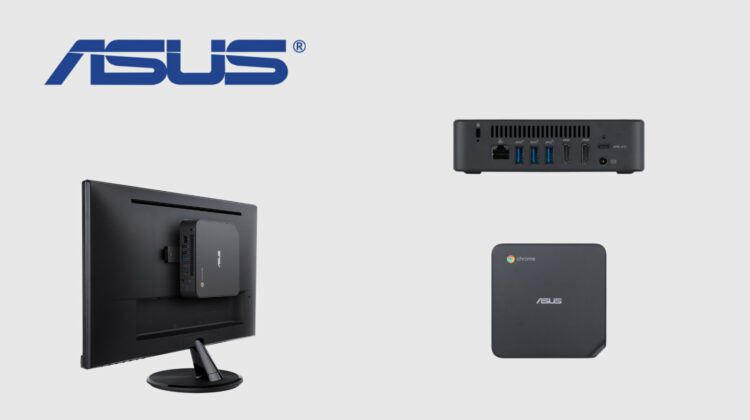
As expected, ASUS is following the lead of other OEMs by offering CPU options that range from the Celeron 5205U all the way up to the Core i7-10510U. It is worth noting that there are actually four Core i7 CPUs in the Comet Lake lineup. This is the lowest end version with other manufacturers like CTL using the Core i7-10610 but the performance difference between the two will likely be marginal if any. ASUS didn’t do much in the way of refreshing its Chromebox’s design but I suppose it doesn’t really need to be aesthetically advance as many users will simply mount it to the back of their monitors. That’s what’s so great about Chromeboxes. They do what you need them to and take up very little space.
Thanks to an additional HDMI port and a USB-C 3.2 port, the ASUS Chromebox can support up to three simultaneous displays at 4K resolution. Like all Comet Lake Chromeboxes, the ASUS supports Bluetooth 5 and Wi-Fi 6 connectivity. It appears that ASUS will initially offer only 4GB or 8GB memory options which is a misstep in my opinion. With companies leveraging Linux applications and software like Parallels, 16GB of RAM should be an option. Thankfully, DIY RAM upgrades are usually easy on Chromeboxes. The storage options start at 32GB and ASUS has opted to use eMMC for this and the 64GB option so don’t plan on upgrading your hard drive unless you go with the 128GB or 256GB SSD option. Here’s a closer look at the available options for the all-new ASUS Chromebox 4:
ASUS Chromebox 4
- Intel® Celeron® 5205U Processor 1.9 GHz (2M Cache, up to 1.9 GHz)
- Intel® Core™ i3-10110U Processor 2.1 GHz (4M Cache, up to 4.1 GHz)
- Intel® Core™ i5-10210U Processor 1.6 GHz (6M Cache, up to 4.2 GHz)
- Intel® Core™ i7-10510U Processor 1.8 GHz (8M Cache, up to 4.9 GHz)
- 4GB DDR4 SO-DIMM/8GB DDR4 SO-DIMM
- Wi-Fi 6 (802.11ax) + Bluetooth 5.0
- 2 x USB 3.1 Gen2 (front)
- 1 x Audio Jack (Combo Mic/Headphone Jack)
- 1 x Micro SD card
- 2 x HDMI
- 3 x USB 3.1 Gen2
- 1 x LAN (RJ45) port
- DC in
- Kensington lock
I hate to talk about new devices as “run of the mill,” but Chromeboxes are pretty much all the same. The ASUS Chromebox 4 offers the same i/o and CPU selection as everyone else. What determines the one you purchase will likely boil down to price. I’m sure that larger Chrome Enterprise customers will be able to get these at a discount but the base model is going to start at $289 when it goes on sale in December. That will likely be a Celeron 4GB/32GB model. For thirty dollars less, you can get the exact same internals and performance and double the storage from CTL. Until these Chromeboxes from larger OEMs go on sale, CTL is our recommendation if you need to purchase one or one hundred new Chromeboxes. You can learn more about the ASUS Chromebox 4 by heading over to the new product page. The Chromebox is set to be available next month.
SUBSCRIBE TO UPSTREAM
Get Chrome Unboxed delivered straight to your inbox
Upstream is our flagship, curated newsletter with the top stories, most click-worthy deals, giveaways, and trending articles from Chrome Unboxed sent directly to your inbox a few times a week. Join 31,000+ subscribers.

