


Support our independent tech coverage. Chrome Unboxed is written by real people, for real people—not search algorithms. Join Chrome Unboxed Plus for just $2 a month to get an ad-free experience, access to our private Discord, and more. Learn more about membership here.
START FREE TRIAL (MONTHLY)START FREE TRIAL (ANNUAL)
Have you ever heard of Midjourney or Dall-E? Both of these bots have recently taken the world by storm by taking text input and automatically generating entire images, scenes, and more based on it. It’s completely wild to think that AI can create entirely original pieces of artwork based on just a few words or sentences, but what it really does is use computer vision, machine learning, and more to learn and compile a piece of art based on the billions of images it’s been fed over time.
Taking that concept, I turned to searching the web for something that could turn sentences or just a few words into intelligible paragraphs, entire papers, and more. What I happened upon is pretty cool. Jasper (formerly called Jarvis), claims to be “the future of writing”, and does just that!
Disclaimer: The above link will net me extra credits to create more prompts for each person who tries out the demo, but there is no monetary gain for me.
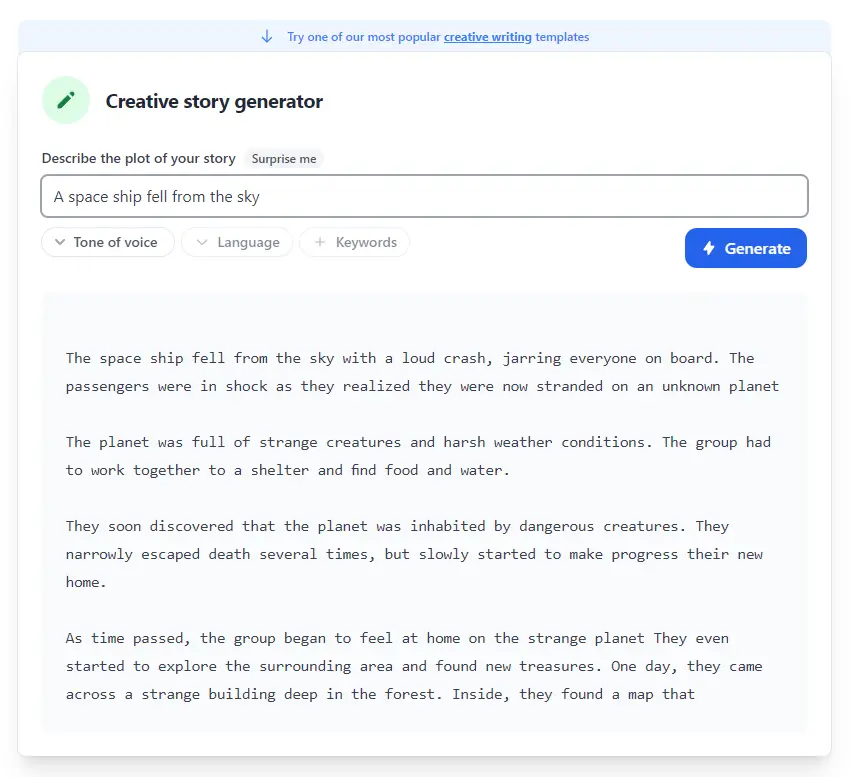
Visiting Jasper on the web will give you 1,000 free credits to test out its demo and generate your own creative writing, articles, blog posts, marketing and SEO copy, and more. You can use it to inspire your own work, expand on sentences, improve your content, generate content to work with (social media polls, questions, comments, etc) website content, and so on. As you can see below, I’ve typed in “A spaceship fell from the sky”, and was given a few paragraphs about that prompt. This was generated on the fly and is entirely original!
Unless you pay for the service, you can’t get much more than that, but you do get several prompts per month, and your credits reset every 30 days for free. The paid service costs about $40 USD per month, so I wouldn’t recommend paying for it unless you truly have a need or desire to use it beyond the initial prompts you can spend.
The fact that any of this is possible truly shows how far we’ve come with technology, and gets me excited for what’s yet to come. Many people are worried that such tools will replace creativity and original content from humans, but after using both Midjourney and Jasper, I firmly believe this will not be the case. Instead, I believe that it creates a greater sense of tailored inspiration that one can draw from in order to propel further and faster toward a goal.
Here’s another fun prompt below – “Compare Starbucks and Dunkin Donuts”. The generator is rather accurate in its assessment of both brands but was less accurate for other things I asked it to write. I believe that your mileage may vary, but it’s still super fun to toy with, especially since it’s free up front.

There is also a large template library that you can start using when you sign up or demo the tool online. Some ideas for how to make use of the software is to let it automatically write product descriptions, Google Ads headlines, ridiculous marketing ideas, text summarizers, review responses, business and product names, and so on. Honestly, it’s just a blast to see it write creative stories, rephrase text to make it easier for children to understand, personal bios, and entire blog posts.
As much as I’d like to say that this entire article was completely written by a bot, it wasn’t. Jasper and similar tools like Ryter all struggle with piecing together new information that doesn’t exist yet, and being perfectly cohesive with its information output. For example, I couldn’t use it to write up a new Stadia feature as said feature has specific details unbeknownst to the bot, so again, it’s mostly meant for inspiration and assistance, not replacement of original content.
SUBSCRIBE TO UPSTREAM
Get Chrome Unboxed delivered straight to your inbox
Upstream is our flagship, curated newsletter with the top stories, most click-worthy deals, giveaways, and trending articles from Chrome Unboxed sent directly to your inbox a few times a week. Join 31,000+ subscribers.

