


Support our independent tech coverage. Chrome Unboxed is written by real people, for real people—not search algorithms. Join Chrome Unboxed Plus for just $2 a month to get an ad-free experience, access to our private Discord, and more. Learn more about membership here.
START FREE TRIAL (MONTHLY)START FREE TRIAL (ANNUAL)
 Pranksters Unite!
The holiday made just for the jokster in you is now upon us and our favorite Google Educator John Sowash is back with some fun and friendly Chromebook pranks to liven up your classroom, get on over on your coworkers or maybe just annoy your wife a tad bit.
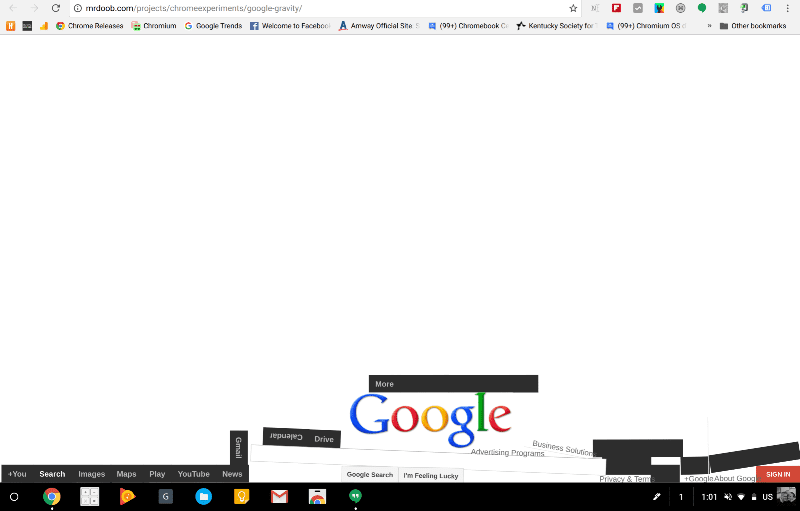
Google Gravity
This one is great to get a fellow teacher with or, if you happen to be buddies with your IT admin, you can prank the masses. Google Gravity is a Google homepage spoof that collapses into a pile as soon as the mouse is moves. If you can access an individual’s Chromebook, head to Settings>Advanced settings>On startup and select “open a specific page or set of pages.”
From there click “set pages” and add this url. https://goo.gl/zlCsbG Close the settings and the browser and wait. For other devices with the Chrome browser simply follow Chrome settings>Appearance>Default homepage link and add the link above.
Prank Wallpaper
This one requires you to have someone on the inside in your IT department. Unless you are and admin, in which case this prank will be a breeze. Inside the Chrome Management Console you can push wallpapers to Chrome devices. If you’ve not done this before check out how here. I’ll wait. Ok, ready? Here’s a couple ideas to catch your students off guard.
Broken Screen-Find a high-res wallpaper of a shattered display and push it to a device or every device depending on how mischievous you’re feeling.
iPad/Windows– I love this one. Find an image that looks like a Windows desktop or iPad screen and throw that bad boy up there. That would put me in panic mode for sure.
Prying Eyes-Get a good picture of a staff member peering suspiciously from a familiar locale and have it front and center to startle an unsuspecting user.
Nope (UPDATE: no longer available)
Definitely a classic and unusually handy in the workplace, the Nope extension will send you a “fake” phone call with a simple click of the extension to get you out of talking to your coworker about their cat’s upcoming birthday party.
Not only will you get a quick excuse to answer the phone, Nope will walk you through a series of instructions to really drive home the conversation.
Hilarious
Grab Nope from the Webstore, here.
April 1st Prank Toolkit
Rounding off the list is a new-to-me extension that adds a list of funny pranks to pull on your students, friends or coworkers.
With it, you can flip website images upside down, redirect Google to Bing (bleh), hide the cursor and more. You can even make the Chromebook censor text with color strikethroughs making everything look like a typical government document.
The Toolkit can be used anytime or you can set it to only enable on April 1st.
Power Tip: Right click (two-finger click) the ex
John Sowash is an experienced educator and school administrator who works effectively with learners of all ages. John inspires educators to use technology to foster creative opportunities and to connect with others. Learn more at John’s site, the ElectricEducator. While you’re there sign up for news and updates from the world of Education Technology.
You can also find his book, The Chromebook Classroom, at the link below. Everything you need to know about the use, deployment and management of Chrome devices in today’s classroom.
The Chromebook Classroom on Amazon
Bonus Prank
This one requires a little flag action but I’ve always found it to be a riot. Most of you know you can rotate a Chromebook’s display by clicking Ctrl+Shift+Refresh but did you know you can flip the display’s image horizontally?
Just paste this flag into your URL bar and select enable on the flag.
chrome://flags/#ash-enable-mirrored-screen
Everything on the screen will now rotate 180 degrees on axis. Talk about confounding! Make sure you copy down the flag somewhere to make it easier to get things back to normal. Navigating on a backward display can be tough.
I know, I know. April fools falls on a Sunday this year. Even better! Students and coworkers will show up Monday thinking they’ve dodged a bullet. Let ’em have it. Hope you have some fun with these. Do you have a favorite Chromebook prank? Drop a comment below and share a laugh with us.

