

Support our independent tech coverage. Chrome Unboxed is written by real people, for real people—not search algorithms. Join Chrome Unboxed Plus for just $2 a month to get an ad-free experience, access to our private Discord, and more. Learn more about membership here.
START FREE TRIAL (MONTHLY)START FREE TRIAL (ANNUAL)
Our first Pixel Feature Drop of the year is here, and it’s bringing a whole host of AI-driven enhancements and practical updates to your Pixel devices. Google says these new features are designed to streamline your daily interactions, increase your safety, and enhance your overall Pixel experience.
Gemini Live gets a big upgrade
A significant focus of this update is the expansion and refinement of Gemini Live. Leveraging the power of Gemini 2.0 Flash, users can now engage in seamless multilingual conversations across more than 45 languages, without the need to manually adjust language settings.
Additionally, the multimodal capabilities introduced earlier this year for Pixel 9 users are now extending to Pixel 6 and newer devices, including the Pixel Fold. This allows for the integration of images, files, and YouTube videos into Gemini Live conversations, providing richer context and facilitating more nuanced interactions. In the coming weeks, users will also gain the ability to interact with Gemini Live through live video and screen sharing with Gemini Advanced.
Streamlined Organization and Creative Tools
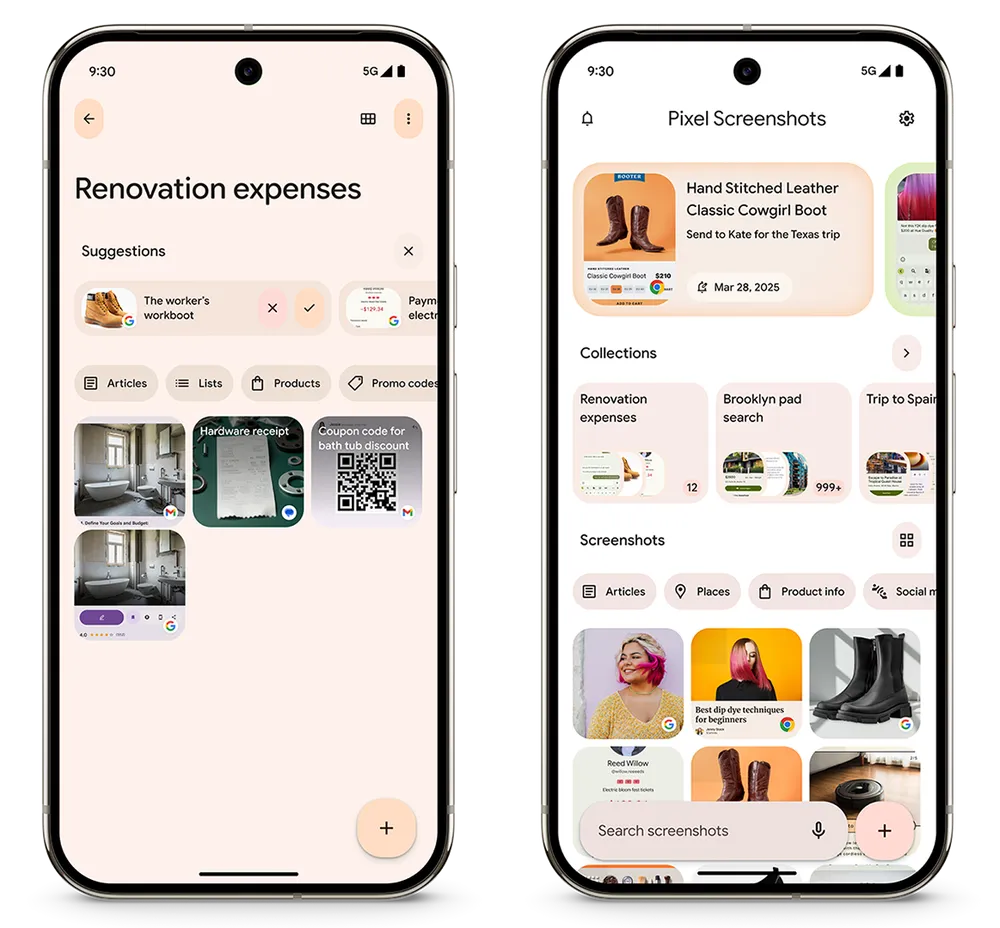
Organization also receives a boost with intelligent updates to Pixel Screenshots. The new suggestions feature automatically categorizes screenshots into collections, reducing the mental overhead of manual organization. Furthermore, the Pixel Screenshots app now supports work profiles, enabling users to efficiently manage professional documents such as receipts and expense reports.
Pixel Studio introduces a powerful new image generation feature, allowing users to create unique images of people and scenes simply by providing text descriptions. This feature brings a new level of creative expression to Pixel users.
Region-specific AI enhancements
For users in Japan and Germany, the Pixel experience is further enhanced with region-specific AI features. These include expanded functionality for Pixel Screenshots, Pixel Studio, AI-powered weather reports and pollen tracking in the Weather app, and AI-driven summaries in the Recorder app for Japanese speakers.
Enhanced safety and security features
Safety and security remain paramount in this update. Scam Detection, powered by Gemini Nano, now extends to Google Messages, complementing its existing functionality for phone calls. This on-device AI analyzes conversational patterns to identify and flag potential scams in real-time, providing users with timely warnings and the ability to block and report suspicious activity.

Satellite SOS is expanding its reach, now available in Hawaii, Alaska, Europe, and Canada. This feature ensures that users can connect with emergency services even in areas without cellular or Wi-Fi coverage. Additionally, Verizon and T-Mobile users gain enhanced satellite connectivity for text messaging and emergency communication. The Find My Device app also now includes live location sharing, allowing users to easily share their whereabouts with friends and family.
Health and wellness updates for Pixel Watch
Health and wellness features are also prominent in this update. Loss of Pulse Detection on Pixel Watch 3, recently cleared by the FDA, will be available in the U.S. later this month, offering potentially life-saving emergency assistance.
Pixel Watch 3 also introduces on-device menstrual tracking and improved step tracking accuracy. Auto-bedtime Mode, initially launched with Pixel Watch 3, is now extending to Pixel Watch 2, automatically disabling notifications and conserving battery life during sleep.
Productivity and creator-focused improvements
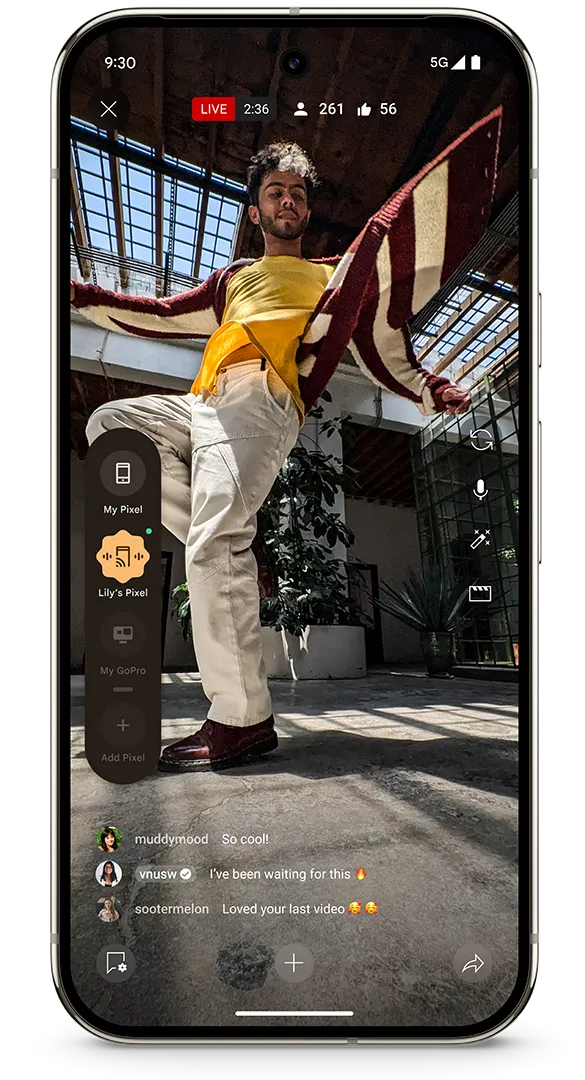
For Pixel Fold users, Dual Screen Preview now supports video recording, and Pixel 9 Pro Fold users gain access to the Add Me feature. Creators will appreciate the new Connected Cameras feature, which allows for multi-device streaming to social media platforms. No longer is there a need for a switcher if you have multiple Pixels or other cameras (like a GoPro) around; Google has baked it right into the OS.
Productivity enhancements include the ability to transfer recordings from older devices to the Recorder app on new Pixel phones, along with automatic transcription. Gboard introduces a new Voice Toolbar for easy voice-to-type input. Users can personalize their Pixel’s modes to adapt to their routines and control audio content with new actions on Pixel Watch.
This March Pixel Feature Drop, alongside new Android features, is rolling out now and will continue over the coming weeks, and it is an absolute monster of an update for Pixel fans across the board. There are so many helpful updates this time around, it’s hard to know where to start. Keep an eye out for your update, arriving at any point now.
SUBSCRIBE TO UPSTREAM
Get Chrome Unboxed delivered straight to your inbox
Upstream is our flagship, curated newsletter with the top stories, most click-worthy deals, giveaways, and trending articles from Chrome Unboxed sent directly to your inbox a few times a week. Join 31,000+ subscribers.

