
• Skip to main content
  • Skip to primary sidebar
  • Deals
  • Features
  • Guides
  • Chromebooks
  • Videos
  • Podcast
  • More +
    • Reviews
    • Unboxing
    • Upcoming Devices
    • Chromebook Plus
    • Chrome
    • ChromeOS
    • Chrome OS Flex
  • Search
  • Sign Up
  • Log In
Chrome Unboxed – The Latest Chrome OS News

Chrome Unboxed - The Latest Chrome OS News

A Space for All Things Chrome, Google, and More!

  • Deals
  • Features
  • Guides
  • Chromebooks
  • Videos
  • Podcast
  • More +
    • Reviews
    • Unboxing
    • Upcoming Devices
    • Chromebook Plus
    • Chrome
    • ChromeOS
    • Chrome OS Flex
  • Search
  • Sign Up
  • Log In

YouTube announces new “Subtitle Editor” role to collaborate on video captions

April 12, 2022 By Johanna Romero View Comments

Support our independent tech coverage. Chrome Unboxed is written by real people, for real people—not search algorithms. Join Chrome Unboxed Plus for just $2 a month to get an ad-free experience, access to our private Discord, and more. Learn more about membership here.
START FREE TRIAL (MONTHLY)START FREE TRIAL (ANNUAL)

In September of 2020, YouTube discontinued the “Community Captions” feature that allowed viewers to add high-quality captions for their favorite content creators’ videos. At the time, YouTube cited under-utilization and abuse as the main reasons for ending this program. This, of course, didn’t go well with the community, especially for those that are deaf or hard of hearing or those that speak a different language.

Fast forward to 2022, and YouTube is providing an alternative by announcing a new role called “Subtitle Editor,” which allows channel owners to assign someone else limited access to their channel to help add captions. This role can be managed within channel permissions by inviting trusted users. Below is YouTube’s explanation of how to use this feature:

Xremove ads

When adding access to your channel through Channel Permissions, you’ll now see a role for “Subtitle Editor” where you can invite users to access the subtitle editing features within YouTube Studio. Full steps to invite here. Once the subtitle editor has accepted their invite, they’ll be given access to Studio where they will see a list of videos eligible for captioning. Subtitle Editors will be able to type out subtitles manually, edit automatically generated captions (when applicable), or upload subtitle and caption files.
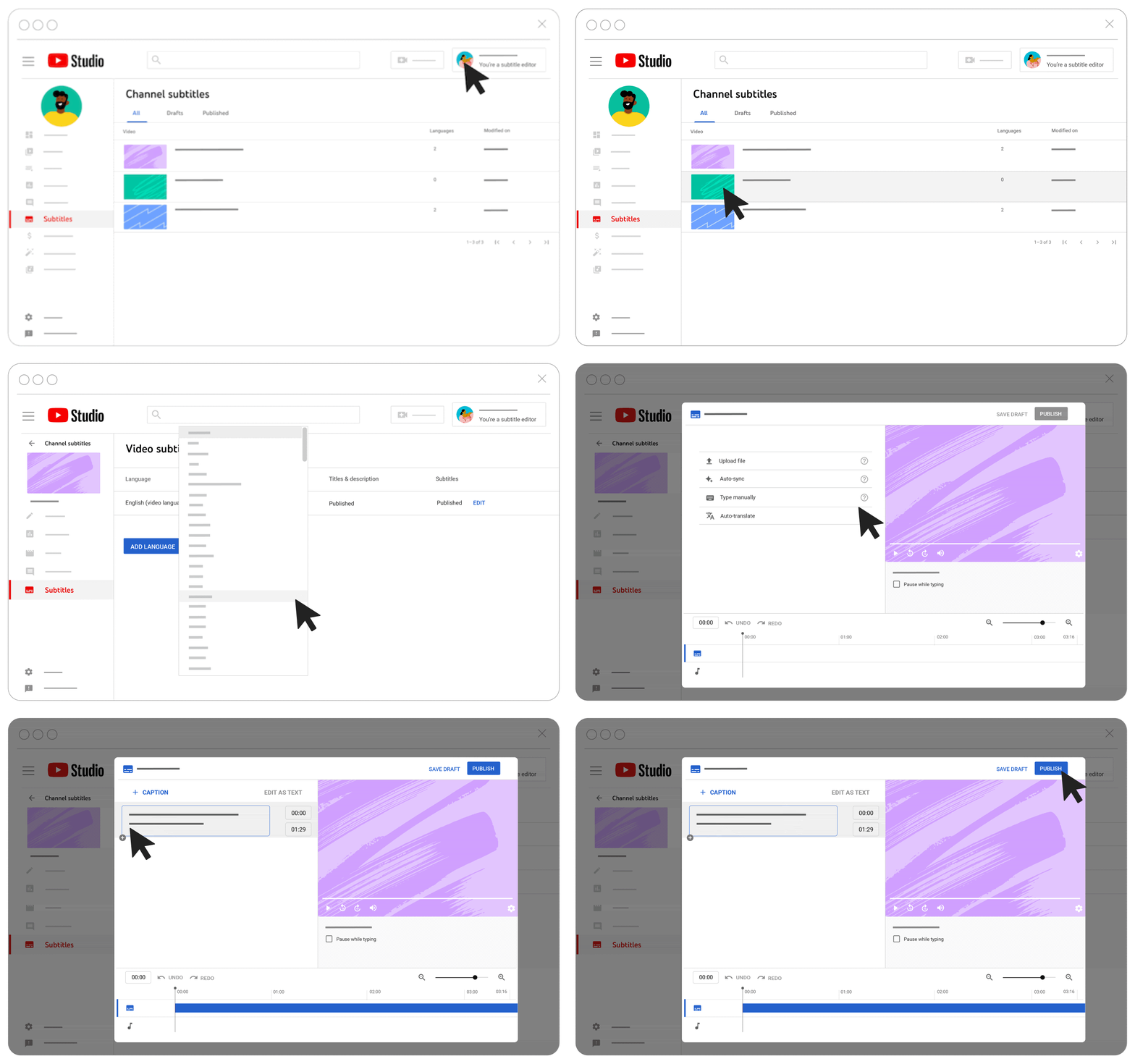
Though this role only grants them access to the “Subtitles” tab in Studio and only access to add captions to videos set as Public or Unlisted with a default language set, YouTube advises only inviting people you know and trust since, as the channel owner, you will be taking full responsibility for what your subtitle editors do. Still, you will also have access to edit or delete any newly added or existing captions.

This new feature is a welcome addition to YouTube, although in my opinion, not a full replacement for the old “Community Captions.” It remains to be seen how the YouTube community will make use of it and whether it will stick around for the long run. However, I can see this being an extremely helpful accessibility tool and one that should be taken advantage of.

Featured Videos

Xremove ads

SUBSCRIBE TO UPSTREAM

Get Chrome Unboxed delivered straight to your inbox

Upstream is our flagship, curated newsletter with the top stories, most click-worthy deals, giveaways, and trending articles from Chrome Unboxed sent directly to your inbox a few times a week. Join 31,000+ subscribers.

SUBSCRIBE HERE!

Filed Under: New & Upcoming Features, YouTube Tagged With: subtitle editor, youtube, youtube roles, youtube studio

Primary Sidebar

Xremove ads

Deals

Lenovo’s powerful 8.8-inch Legion Tab Gen 5 Android gaming tablet is now $150 off

By Joseph Humphrey
June 10, 2026

The Google TV Streamer hits $80 again, bringing Gemini and smart home control to your living room

By Joseph Humphrey
June 5, 2026

The best Chromebook deals today

By Robby Payne
May 25, 2026

Save $300 as Acer’s Chromebook Plus Spin 714 returns to its all-time low price

By Robby Payne
May 21, 2026

Save $40 on the Google Pixel Watch 4 before the Spring Sale ends

By Joseph Humphrey
April 24, 2026

More Deals

Xremove ads

Reviews

Lenovo Chromebook Plus 2-in-1 Review: pretty great in a vacuum

By Robby Payne
April 23, 2026

Acer Chromebook Plus Spin 514 Review: Kompanio Ultra power in a convertible

By Robby Payne
December 24, 2025

My review after 6 weeks with the Lenovo Chromebook Plus 14 [VIDEO]

By Robby Payne
August 11, 2025

One week with the best small Android tablet you can buy, and I’m sold

By Robby Payne
May 9, 2025

Best Chromebooks of 2024 [VIDEO]

By Robby Payne
November 28, 2024

More Reviews

Xremove ads

Guides

This Chromebook trackpad shortcut is definitely not new, but is blowing my mind

By Robby Payne
March 11, 2024

How to reduce broadcast delay on YouTube TV to stop live spoilers

By Robby Payne
December 8, 2023

Windows PC keyboard and Chromebook

How to use a Windows keyboard with a Chromebook

By Joseph Humphrey
December 8, 2023

How reset and revert your Chromebook to the previous version of Chrome OS

By Robby Payne
November 29, 2023

My Chromebook Plus features disappeared: here’s how I fixed it

By Robby Payne
November 24, 2023

More Guides

TWITTER · FACEBOOK · INSTAGRAM · YOUTUBE · EMAIL · ABOUT

Copyright © 2026 · Chrome Unboxed · Chrome is a registered trademark of Google Inc.
We are participants in various affiliate advertising programs designed to provide a means for us to earn fees by linking to affiliated sites.

PRIVACY POLICY