


Support our independent tech coverage. Chrome Unboxed is written by real people, for real people—not search algorithms. Join Chrome Unboxed Plus for just $2 a month to get an ad-free experience, access to our private Discord, and more. Learn more about membership here.
START FREE TRIAL (MONTHLY)START FREE TRIAL (ANNUAL)
Google communicated a few updates that have been recently pushed to the YouTube Studio mobile app. If you are not familiar, YouTube Studio is where content creators manage their YouTube channels, upload videos, respond to comments, and more. The web-based version can be reached at studio.youtube.com and has traditionally offered more features than its mobile companion app on Android and iOS. However, Google is looking to bridge that gap by adding all the below features to the mobile app:
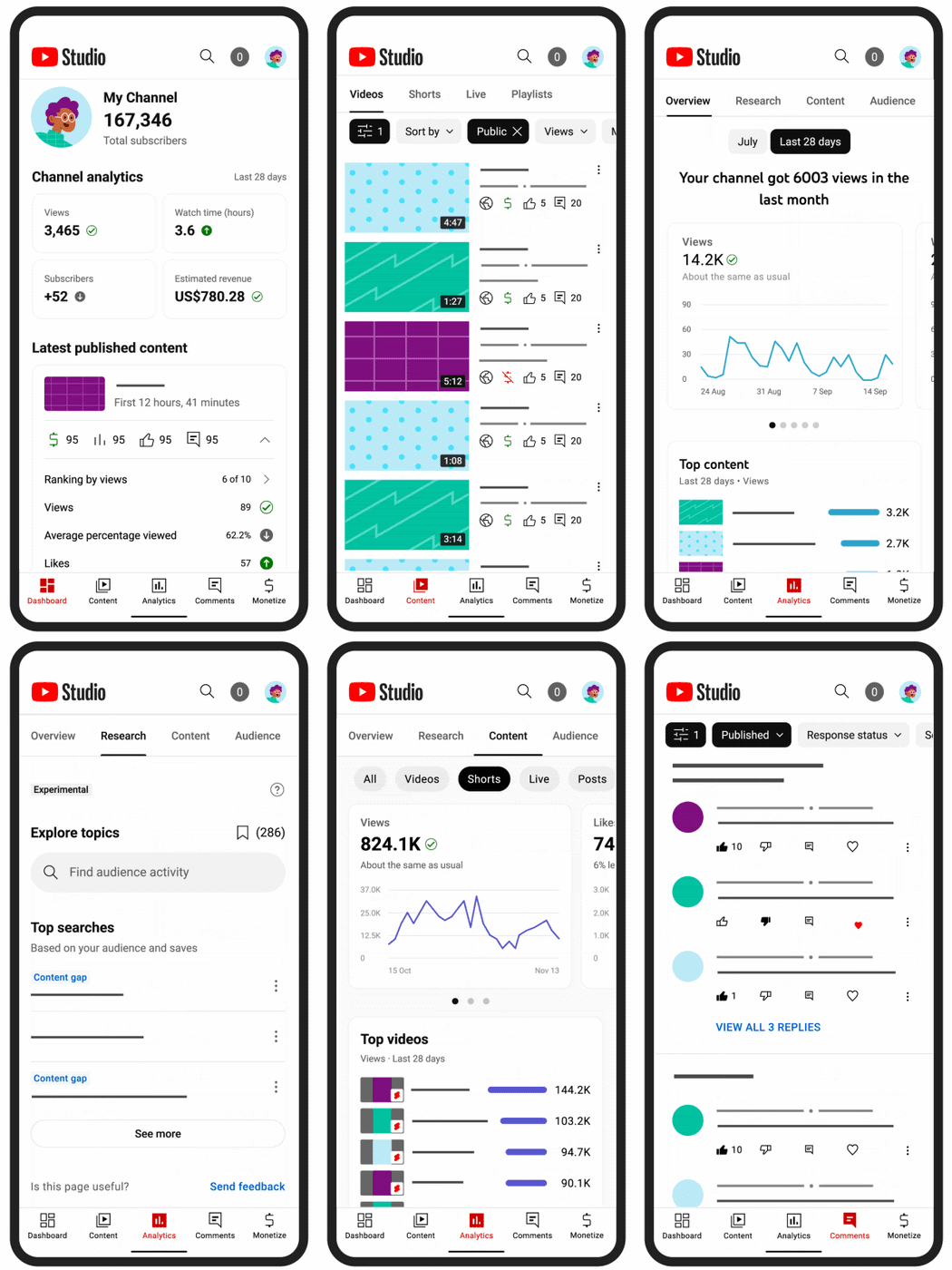
Find out what your audience thinks and how your channel is performing
The look of the Studio mobile dashboard has been updated to make it easier for you to see at a glance how your channel is doing. It is now more interactive, and you can expand sections to get more information where you need it.
Research in Analytics on the Studio mobile app was only available to a small group of creators before. In the coming months, it will be available to all creators around the world. Research in Analytics for mobile will also have some extra features that aren’t available on desktop. You’ll see things like the most popular searches on YouTube, content gaps, and how often people watch videos on topics that are important to your audience. At first, the insights will only show what viewers in the United States do.
Now under the “Analytics” tab, you can see how well each type of content you make did. You’ll be able to check how well your short videos are doing in comparison to your long-form videos and use that information to plan ahead.
Making money with the Studio app
You can now use the app to sign up for the YouTube Partner Program (YPP). Additionally, you can keep track of your progress toward YPP eligibility thresholds in the “Monetize” tab. Once you meet the requirements, you can apply for the program right in the app. Also, Google says that next year it’ll add the ability to manage your channel memberships and other Fan Funding features.
Upload Checks are also now available on mobile devices. Checks look at your video for possible copyright and monetization problems, and if you’re in YPP, you can sign up to be notified if any problems are found. This way, you can fix any problems you find before putting a new video online.
Engage your viewers
Over the next few weeks, Google will be adding two new features that will let you interact with even more of your viewers’ comments:
- Smart Replies: Gives you suggestions on what to say in response to a comment. This makes it easier to interact with viewers.
- Comment translations: To make it easier to talk to people from all over the world who leave comments on your videos. This feature will use Google Translate, of course.
All of the above changes will be coming soon to the Studio Studio app, so if you are a content creator with a YouTube channel, you should definitely download the app and start familiarizing yourself with it. The app has come a long way from its barebones beginning, and it’s actually become preferable to many creators when it comes to managing their channel’s engagement.
SUBSCRIBE TO UPSTREAM
Get Chrome Unboxed delivered straight to your inbox
Upstream is our flagship, curated newsletter with the top stories, most click-worthy deals, giveaways, and trending articles from Chrome Unboxed sent directly to your inbox a few times a week. Join 31,000+ subscribers.
