


Support our independent tech coverage. Chrome Unboxed is written by real people, for real people—not search algorithms. Join Chrome Unboxed Plus for just $2 a month to get an ad-free experience, access to our private Discord, and more. Learn more about membership here.
START FREE TRIAL (MONTHLY)START FREE TRIAL (ANNUAL)
It’s not exactly a secret that I’ve been less than pleased with the forced move to YouTube Music from Google Play Music. It’s not just one thing, but a series of aggravations that have bristled me against the move and I’ve not shied away from making my feelings pretty clear about it. I don’t hate YouTube Music, but I also don’t understand a new service from the same company taking steps backward on certain core features. It just doesn’t make sense to me.
All that said, over the past few months, YouTube Music has been getting new features and fixes that have been making the transition easier and easier by the day. They successfully migrated my entire library over in June, they’ve quietly fixed the Bluetooth issue that made using the service in my car such a headache, and the general navigation around the app has really improved over time. I’m slowly getting more comfortable with what Google has put together, here, and a couple new features just make the move a bit sweeter.
Lyrics tab across platforms
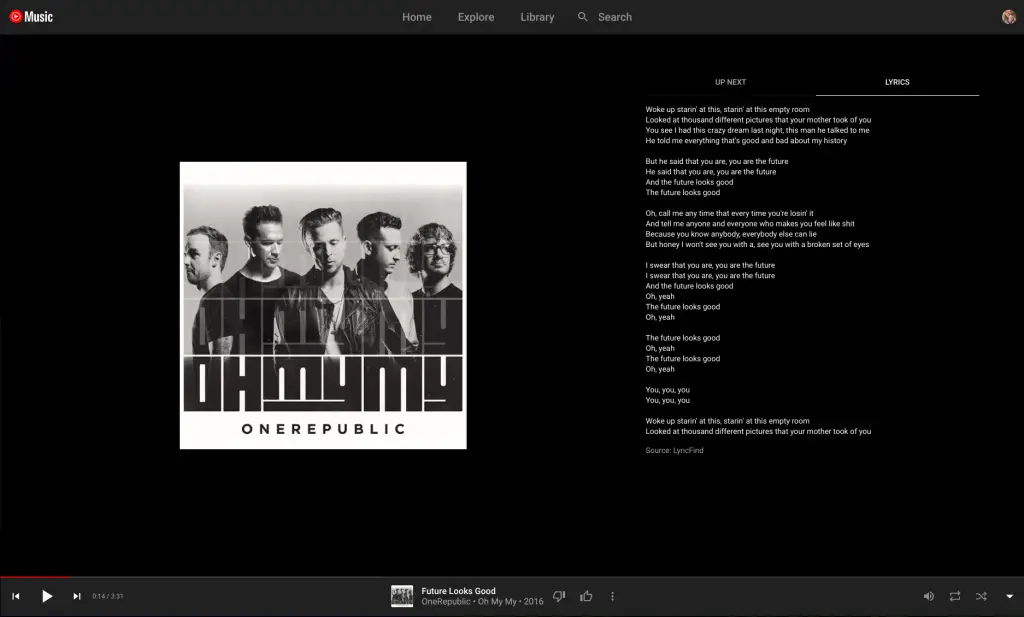
Though the web versions of most things get updated a bit slower, YouTube Music is trying to keep pace with the app and the web player and has added the lyrics feature to the web for most users at this point. It began rolling out a couple weeks ago, and I really love this perk. I like lyrics and knowing what is being said when I can’t quite make out what a track is talking about. Being able to simply click into the ‘Now Playing’ screen and select the lyrics tab makes this process simple and enjoyable to use on the web player.
Daily Playlists
Like Spotify already offers, YouTube Music is prepping a new addition to the ‘Mixed for you’ section that adds seven (one more than the six that Spotify offers) daily mixes that are auto-curated for you. Instead of the singular ‘Your Mix’ that is currently on offer, these mixes are a bit more specific to a particular genre or artist. If you are like me and listen to a wide variety of music, this approach sounds far better than a massive jumble of all the varying musical styles I embrace.
It has only shown up for a certain people and mainly just on the web player, but this is likely an early test before a wider roll-out happens. When it does, this will be yet another reason to embrace YouTube Music as a daily go-to for audio consumption as Google Play Music finds itself nearing the end of its life.
After trying out Spotify for a bit and Apple Music as well, I’ve found that every music service comes with caveats and oddities. For me, as a Google user and YouTube Premium subscriber, it makes most sense for me to stick with whatever Google is offering. While I was really put off by YouTube Music a few months back, I’m starting to really enjoy the service on a daily basis now. If we can get a proper cast button in the web player and if Google will separate the YouTube Music history from my YouTube video history, I think most of my aggravations will finally be ironed out.
SUBSCRIBE TO UPSTREAM
Get Chrome Unboxed delivered straight to your inbox
Upstream is our flagship, curated newsletter with the top stories, most click-worthy deals, giveaways, and trending articles from Chrome Unboxed sent directly to your inbox a few times a week. Join 31,000+ subscribers.

