


Support our independent tech coverage. Chrome Unboxed is written by real people, for real people—not search algorithms. Join Chrome Unboxed Plus for just $2 a month to get an ad-free experience, access to our private Discord, and more. Learn more about membership here.
START FREE TRIAL (MONTHLY)START FREE TRIAL (ANNUAL)
Until recently, if a YouTube creator wanted to correct an error or update information on an already published video, the options were pretty limited. The cleanest way to fix an error on a video is to edit and re-upload the video, but that would result in losing all the engagement metrics and comments that the video had accumulated to date. To avoid this, Creators resorted to workarounds such as adding a note in the video description, responding to comments, or adding a new pinned comment calling out the correction.
However, based on feedback, YouTube is launching a new feature to remedy this situation. The new feature is called “Corrections.” It will allow Creators to call attention to corrections and clarifications in the descriptions of their already published videos without resorting to any of the aforementioned workarounds. When a video correction is made, you will see an info card teaser appear on the video. This card signals that there are one or more corrections. However, it appears only once at the timestamp of the first correction, regardless of how many corrections the video has. Once you click on that card, the video’s description will expand, showing all the text corrections that have been made and when they occur on the video.
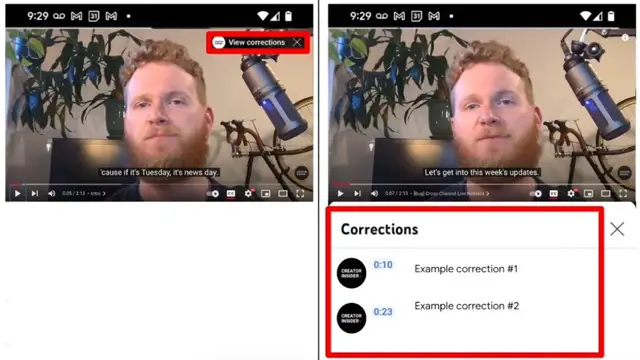
Creators can use this feature by typing in the word “Correction:” or “Corrections:” in the video description, followed by the timestamp and explanation. This is similar to how creators can manually add video chapters right now. However, if you use both features in the same video, the order should always be video chapters first and then corrections afterward. Also, the corrections feature won’t be available if the channel has any active strikes or the content is considered inappropriate.
So far, the feedback from the Creator community on this has been overwhelmingly positive, preferring this solution to having nothing at all. This is a good start, but I see the potential for improvement. For example, as the warning only comes up once, it may be easy for the viewer to miss it and, therefore, all the corrections submitted afterward. On the other hand, I guess it was done this way to not overwhelm the viewers with too many popups, like when text annotations on videos were severely abused and prompted for the feature to be removed altogether. Hopefully, this implementation works and is liked by the viewers as well.
Featured Photo by Muhammad Asyfaul on Unsplash
SUBSCRIBE TO UPSTREAM
Get Chrome Unboxed delivered straight to your inbox
Upstream is our flagship, curated newsletter with the top stories, most click-worthy deals, giveaways, and trending articles from Chrome Unboxed sent directly to your inbox a few times a week. Join 31,000+ subscribers.
