


Support our independent tech coverage. Chrome Unboxed is written by real people, for real people—not search algorithms. Join Chrome Unboxed Plus for just $2 a month to get an ad-free experience, access to our private Discord, and more. Learn more about membership here.
START FREE TRIAL (MONTHLY)START FREE TRIAL (ANNUAL)
I have to give them credit; Google is steadily working to bring new updates and features to its Messages app. No longer just a texting application, the RCS client from Google is growing in its abilities day by day, and the latest addition may be the ability to edit sent messages in RCS (Rich Communication Services) chats to help Google’s primary messaging service compete with services like iMessage and WhatsApp.
Thanks to a find by @Jhowkira2000 on X, it looks like editing an RCS message will be a breeze. As it works in other messaging apps, a simple long-press on a sent message will reveal a new edit pencil alongside familiar options like copy, delete, and star. Tapping the edit button will open the message in a text field, where users can make their changes with the option to cancel the edit if you change your mind.

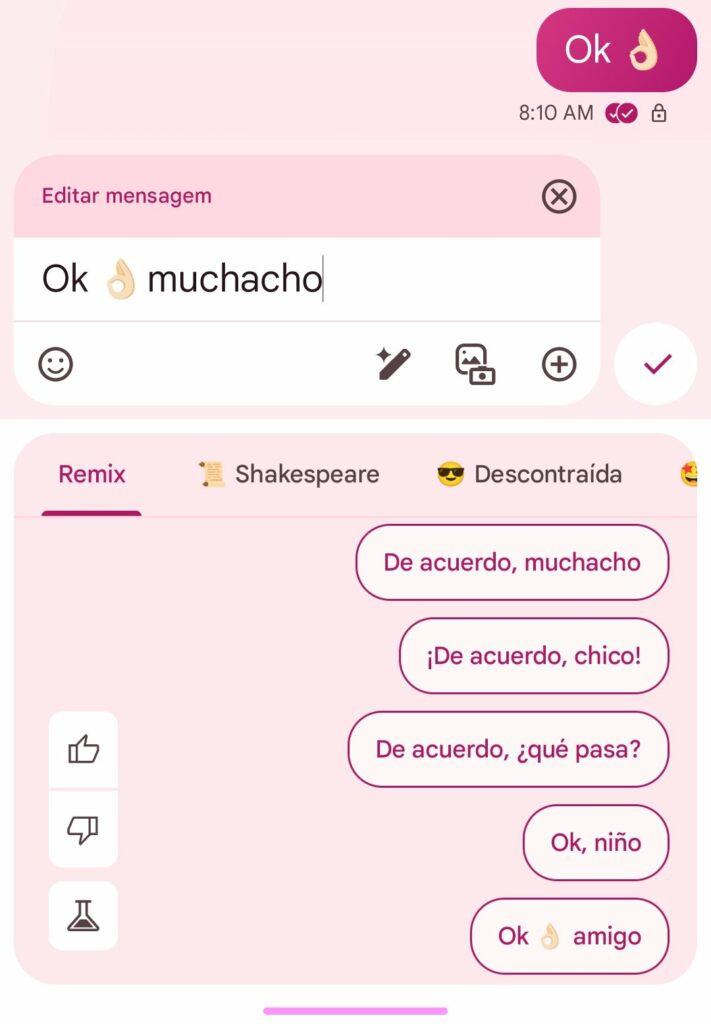
According to this same tweet, users will have a 15-minute window after sending a message to make any necessary edits. Again, that time frame aligns with the editing capabilities offered by services like WhatsApp and iMessage. Additionally, the original message can be viewed by accessing the overflow menu and selecting “View details.”
While this feature is not yet widely available, some beta users have reportedly gained access to it within the past week. However, this appears to be a limited test, as the functionality has not appeared on all devices and Google has not officially announced a timeline for the broader rollout of RCS message editing. Though, with this current implementation hitting the app for some users, I doubt it will be a long wait for the rest of us.

