

Support our independent tech coverage. Chrome Unboxed is written by real people, for real people—not search algorithms. Join Chrome Unboxed Plus for just $2 a month to get an ad-free experience, access to our private Discord, and more. Learn more about membership here.
START FREE TRIAL (MONTHLY)START FREE TRIAL (ANNUAL)
For months, we have been tracking rumors and leaks about a massive platform shift—a move away from the ChromeOS we know today toward a new, Android-based platform codenamed “Aluminium OS.” And while Google hasn’t officially unveiled all the details about this new operating system, the leaks have painted a fascinating picture.
A recent job listing for a “Senior Product Manager, Android, Laptop and Tablets” explicitly mentioned “Aluminium OS” and described it as being “built with Artificial Intelligence (AI) at the core.”
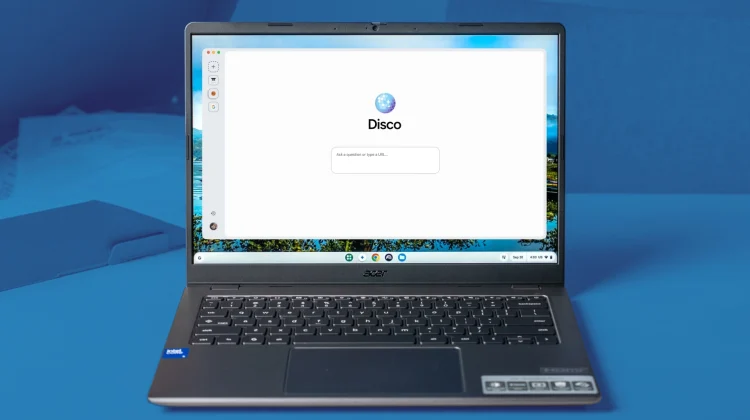
“AI at the core.” It’s a catchy buzzword, but what does it actually mean for a laptop? Does it just mean a smarter chatbot in the sidebar? I don’t think so. After seeing Google’s new Disco browser experiment, I think we might finally have a glimpse of what that future actually looks like.
The browser is the computer
To understand why Disco matters for Aluminium OS, we have to remember the fundamental philosophy of the Chromebook: The browser is at the core. Even if Aluminium OS is based on Android, it will (hopefully) still be a cloud-first OS.
That means the browser will remain the window through which we do 90% of our work. If Google says the OS is built with AI at the core, they are really saying the browser is built with AI at the core. Current AI implementations sit next to your work. Disco is different. It sits in front of your work.
From managing tabs to managing intent
In the current ChromeOS experience, you are the project manager. You open 15 tabs about “kitchen renovation,” you manually organize them into groups, and you copy-paste prices into a Sheet. The OS is passive; it just holds the windows for you.
Disco flips that script. It uses Gemini 3 to understand your intent. If it sees you researching kitchen renovations, it doesn’t just let you drown in tabs; it proactively builds a custom “Kitchen Renovation App” for you, complete with price trackers and mood boards generated from your open tabs.
This lines up perfectly with the “AI at the core” promise of Aluminium OS. Imagine a laptop that doesn’t just manage your windows, but understands why you have them open.
Right now, if a student is writing a paper on the Solar System, their desktop is a mess of Wikipedia tabs, Google Image searches, and a blank Google Doc. In the Disco/Aluminium future, the OS understands the intent. Instead of just showing tabs, the “GenTabs” feature builds a custom Solar System Research Dashboard.
It then automatically generates an interactive 3D model of the planets based on the articles you are reading, pulls key facts into a comparison table, and even creates a citation manager that tracks every source you open. The computer isn’t just displaying web pages; it is building a bespoke learning app for that specific assignment.
Or what about planning a vacation, which usually involves a chaotic mix of flight searches, hotel reviews, and random travel blogs. In a traditional OS, you are the one manually copying addresses into Maps and prices into a spreadsheet. But with this new AI-first approach, the browser sees you opening tabs about “Tokyo Hotels” and “Kyoto Shinkansen tickets” and intervenes.
Then it builds a dynamic itinerary planner—a custom web app that places every location you view onto a shared map, syncs potential dates with your Google Calendar, and creates a pricing table that updates live as you browse more sites. You don’t have to build the spreadsheet; the OS builds the app for you.
How the OS could expand on this
So, if Disco is what happens when the browser gets smarter, what happens when the entire OS gets smarter? I think the answer lies in a complete reimagining of features like Virtual Desks.
Right now, Virtual Desks are just empty buckets. You have to manually create a desk, name it, and drag windows into it one by one. But an AI-native OS could handle that organization for you. Imagine an operating system that notices you have opened a Google Doc about “Q4 Strategy,” a spreadsheet with budget numbers, and a Slack thread with your finance team.
Instead of you juggling these scattered windows, the OS would understand the relationship between them and then ask you to group them into a dynamic “Q4 Strategy Project Desk,” keeping your workspace clean without you lifting a finger.
And the real magic could happen when you return to that work later. In an Aluminium OS future, opening that “Q4 Strategy” desk wouldn’t just reload your static windows. The OS could proactively prepare the space for you. It might auto-launch Gemini to provide a bulleted summary of the Slack messages you missed overnight, or surface the specific files you need for that morning’s meeting right in the center of the screen. It shifts the computer from a passive tool that waits for commands to an active partner that anticipates your next move.
An exciting future
I’ll be honest: this shift is a little scary. But I have to remember that Chromebooks were early in predicting that everyone would do most of their work in a browser. It’s this contrarian nature of the OS that drew me to Chromebooks in the first place. Now, in the AI age, it looks like Google is ready to predict the next shift.
And if Disco is indeed a sneak peek at the user experience of Aluminium OS, then the future of the Chromebook isn’t just about running Android apps on a laptop. It’s about a computer that understands what you’re trying to do, and builds the tools you need to get it done.
SUBSCRIBE TO UPSTREAM
Get Chrome Unboxed delivered straight to your inbox
Upstream is our flagship, curated newsletter with the top stories, most click-worthy deals, giveaways, and trending articles from Chrome Unboxed sent directly to your inbox a few times a week. Join 31,000+ subscribers.

