
• Skip to main content
  • Skip to primary sidebar
  • Deals
  • Features
  • Guides
  • Chromebooks
  • Videos
  • Podcast
  • More +
    • Reviews
    • Unboxing
    • Upcoming Devices
    • Chromebook Plus
    • Chrome
    • ChromeOS
    • Chrome OS Flex
  • Search
  • Sign Up
  • Log In
Chrome Unboxed – The Latest Chrome OS News

Chrome Unboxed - The Latest Chrome OS News

A Space for All Things Chrome, Google, and More!

  • Deals
  • Features
  • Guides
  • Chromebooks
  • Videos
  • Podcast
  • More +
    • Reviews
    • Unboxing
    • Upcoming Devices
    • Chromebook Plus
    • Chrome
    • ChromeOS
    • Chrome OS Flex
  • Search
  • Sign Up
  • Log In

WhatsApp Beta rolls out voice call support on Wear OS 3

September 1, 2022 By Johanna Romero View Comments

picture of wear os watch on wrist

Support our independent tech coverage. Chrome Unboxed is written by real people, for real people—not search algorithms. Join Chrome Unboxed Plus for just $2 a month to get an ad-free experience, access to our private Discord, and more. Learn more about membership here.
START FREE TRIAL (MONTHLY)START FREE TRIAL (ANNUAL)

While there is currently no WhatsApp app for Wear OS, watch wearers have been able to accept WhatsApp voice calls indirectly with an “Answer call on phone” option, which would promptly let you continue the conversation on your handset. However, the newest update to the Beta version of WhatsApp on the Play Store now allows you to fully answer and continue the call from your wrist without having to hand it off to your phone.

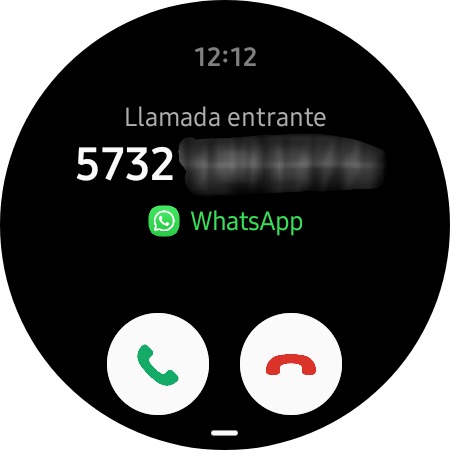
This new feature was spotted by u/jotta_morales_b on Reddit and then reported on by 9to5Google, who provided a screenshot showing a Wear OS watch screen with an incoming Whatsapp voice call, made obvious by the app’s logo and name shown directly below the phone number. This new capability came about after updating the Android app to version 2.22.19.12; however, some have also reported the same results on version 2.22.19.11. The only differentiating factor seems to be which version of the Samsung Galaxy Watch the user owns — Galaxy Watch 4 or 5 — since those two are the most popular smartwatches that currently run Wear OS 3.
Xremove ads

However, as the screenshot above shows how the incoming call appears when the watch is paired with a Samsung phone, those who have a watch paired with a Pixel 6 phone are also benefiting from this update. According to 9to5, for Pixel 6 owners, the incoming call appears as a native call on the watch without any WhatsApp branding, which made this feature hard to spot. It should be noted that this feature doesn’t add the ability to initiate WhatsApp voice calls from your smartwatch, only to answer incoming ones.

Although this is, for now, a one-way solution, it’s encouraging to see new app developments taking place for Wear OS 3. Just recently, the Google Keep app gained a tile with a new update, so this isn’t a one-off incident. Subsequently, it makes me feel like Wear OS is being taken seriously, unlike the stagnant state it was in before. Perhaps the fact that Wear OS has matured and runs better than ever on newer hardware has something to do with it, or maybe — and go with me on this one — the announcement of the Pixel Watch has proven to app developers that this isn’t an experiment anymore and Wear OS now means business.

Featured Videos

Xremove ads

SUBSCRIBE TO UPSTREAM

Get Chrome Unboxed delivered straight to your inbox

Upstream is our flagship, curated newsletter with the top stories, most click-worthy deals, giveaways, and trending articles from Chrome Unboxed sent directly to your inbox a few times a week. Join 31,000+ subscribers.

SUBSCRIBE HERE!

Filed Under: Wear Tagged With: smartwatch, wear os, wear os 3, whatsapp, whatsapp beta

Primary Sidebar

Xremove ads

Deals

Massive Deal Alert: The Acer Chromebook Plus Spin 714 just hit an all-time low $499

By Robby Payne
April 1, 2026

The best Chromebook deals today

By Robby Payne
March 30, 2026

The Acer Chromebook Plus Spin 714 hits a new all-time low at $270 off

By Robby Payne
March 25, 2026

You can score $40 off Google’s battery-powered Nest Doorbell right now

By Joseph Humphrey
March 20, 2026

The touchscreen Lenovo Chromebook Slim 3 is a steal at under $200

By Robby Payne
March 16, 2026

More Deals

Xremove ads

Reviews

Acer Chromebook Plus Spin 514 Review: Kompanio Ultra power in a convertible

By Robby Payne
December 24, 2025

My review after 6 weeks with the Lenovo Chromebook Plus 14 [VIDEO]

By Robby Payne
August 11, 2025

One week with the best small Android tablet you can buy, and I’m sold

By Robby Payne
May 9, 2025

Best Chromebooks of 2024 [VIDEO]

By Robby Payne
November 28, 2024

Samsung Galaxy Chromebook Plus Review: Samsung is back! [VIDEO]

By Robby Payne
October 28, 2024

More Reviews

Xremove ads

Guides

This Chromebook trackpad shortcut is definitely not new, but is blowing my mind

By Robby Payne
March 11, 2024

How to reduce broadcast delay on YouTube TV to stop live spoilers

By Robby Payne
December 8, 2023

Windows PC keyboard and Chromebook

How to use a Windows keyboard with a Chromebook

By Joseph Humphrey
December 8, 2023

How reset and revert your Chromebook to the previous version of Chrome OS

By Robby Payne
November 29, 2023

My Chromebook Plus features disappeared: here’s how I fixed it

By Robby Payne
November 24, 2023

More Guides

TWITTER · FACEBOOK · INSTAGRAM · YOUTUBE · EMAIL · ABOUT

Copyright © 2026 · Chrome Unboxed · Chrome is a registered trademark of Google Inc.
We are participants in various affiliate advertising programs designed to provide a means for us to earn fees by linking to affiliated sites.

PRIVACY POLICY