

Support our independent tech coverage. Chrome Unboxed is written by real people, for real people—not search algorithms. Join Chrome Unboxed Plus for just $2 a month to get an ad-free experience, access to our private Discord, and more. Learn more about membership here.
START FREE TRIAL (MONTHLY)START FREE TRIAL (ANNUAL)
Finally, WhatsApp has moved into the realm of Android applications I may start using on a regular basis on my Chromebook. Where the messaging Goliath used to require a phone number to get started on any platform (WhatsApp is obviously focused on mobile devices), recent updates have finally made the Android app able to utilize the QR code link method we’ve had in the web app for years.
On your Chromebook, you can simply install WhatsApp from the Play Store, scan the link code, and be up and running immediately. Previously, without some substantial gymnastics, you couldn’t get this app to work on a Chromebook. And, frankly, that’s been fine since the web app is so good at 90% of the things you need to do in WhatsApp. There are a few additions this Android app allows, however, that may make it worth a look for some users out there.
Upgrades over the web version
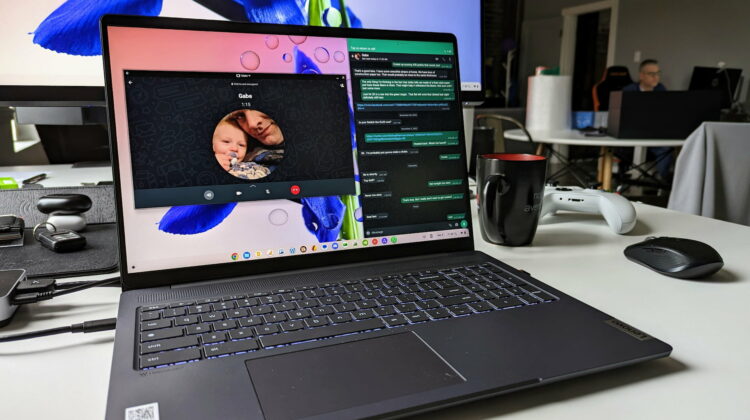
The biggest upgrades you’ll get when using the Android app versus the web version of WhatsApp is in the standard and video calling departments. While WhatsApp isn’t my favorite service for either of these things, sometimes it is the quickest option. If I’m in a chat with someone and need to quickly explain myself, a call or video chat is a simple, easy way to do this, and with the WhatsApp Android app, it’s a button press away.
For the time being, those things are not possible with the web app and having them available right away from my desktop is a pretty big perk. With the way WhatsApp functions these days, I don’t see any reason it won’t support video calls on the web in the future, but it definitely does not at this point. Want those things? You’ll want to go with the Android app moving forward.
Additionally, the WhatsApp app supports phone-like notifications, meaning you can completely close the app and still get push notifications on your Chromebook. Whether it’s a message, a call, or a video chat, it will appear in your notifications whether the app is open or closed, and that is pretty awesome. Sometimes I forget to re-open the web app when at the desk and I miss messages if my phone isn’t right next to me. With this Android version, that won’t happen any longer.
Finally, quick message shortcuts are available if you right-click the WhatsApp icon in your shelf or in the app launcher. This is another productivity upgrade you’ll get versus the relatively-Spartan context menu in the web app. I know this particular addition will be heavily used by many.
Downgrades versus the web app
I’m going to use this app for a bit and see how I like it, but there are definitely downgrades here as well. First up, the layout kinda stinks. This is still the phone version of the app, so the dual-pane layout from the web app is gone, and I don’t like that one bit. Having space on the desktop is nice and dual-pane views are great for nearly every messaging app out there. Losing it will take some getting used to.
I was going to list more, but I’ve yet to come across any other weaknesses so far. While the web app is pretty great and I think down the road it could match all of these abilities we’re seeing with the Android version, the fact is it simply doesn’t do all of what WhatsApp is capable of at the moment. I do think that will change, but until it does, this Android app is looking like my new WhatsApp solution on Chromebooks moving forward. We’ll see how long it lasts.
SUBSCRIBE TO UPSTREAM
Get Chrome Unboxed delivered straight to your inbox
Upstream is our flagship, curated newsletter with the top stories, most click-worthy deals, giveaways, and trending articles from Chrome Unboxed sent directly to your inbox a few times a week. Join 31,000+ subscribers.

