

Support our independent tech coverage. Chrome Unboxed is written by real people, for real people—not search algorithms. Join Chrome Unboxed Plus for just $2 a month to get an ad-free experience, access to our private Discord, and more. Learn more about membership here.
START FREE TRIAL (MONTHLY)START FREE TRIAL (ANNUAL)
Acer recently added a new member to its Chromebook Plus family: the Acer Chromebook Plus 516. If that name sounds familiar, it’s because it shares a designation with one of our favorite large-format Chromebooks from the past couple of years – the Acer Chromebook 516 GE (Gaming Edition). We’ve spent a lot of time with both of the 516 GE models, and I’ve loved the blend of performance, QHD 120Hz screen, and solid build you get with these Chromebooks. This new, non-GE model enters the scene with a significantly lower price tag, immediately raising the question: can it deliver a comparable experience for less money? We got our hands on one to find out.
The new Acer Chromebook Plus 516 recently surfaced at Best Buy for $479, a considerable drop from the 516 GE’s $649 MSRP. For that price, you’re getting a configuration featuring the Intel Core i3-1315U, 8GB of RAM, and 128GB of storage – a solid spec sheet that aligns well with the Chromebook Plus standard. Given the nearly $200 price difference right out of the gate (before any sales), this more affordable 516 certainly looks compelling on paper.
First Impressions and Build Quality
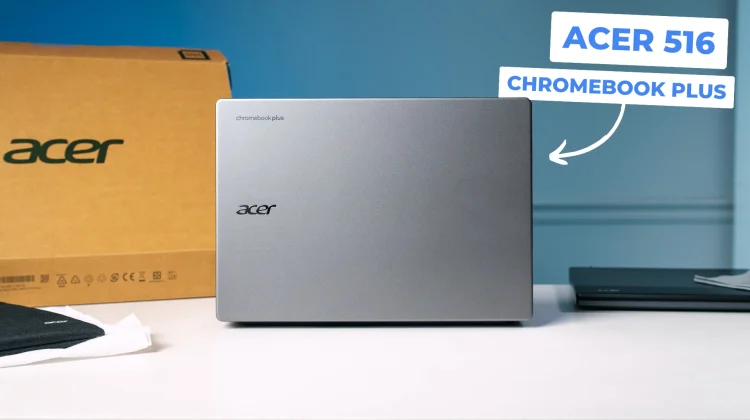
Pulling the Chromebook Plus 516 from its packaging reveals a device that looks, perhaps unsurprisingly, more like a traditional Acer Chromebook than its GE-branded counterparts. While the 516 GE has a distinct aesthetic, this new model features the familiar Acer swoop along the hinge and curved back common to many of their previous designs. The chassis is entirely plastic, which is expected at this price point. It feels reasonably firm, especially the lid when closed, but doesn’t quite match the rigidity of the slightly more premium-feeling 516 GE. Despite the plastic construction, it shares the same weight as the GE model at 3.75 lbs – substantial, but not overly burdensome for a 16-inch device.
Acer includes a nice bonus with the Best Buy configuration: a simple, branded carrying sleeve. It’s a basic zippered case with a front pocket, but it’s perfectly sized for the Chromebook and offers a bit of protection for carrying it solo.
Port selection is decent, too, offering flexibility for peripherals and external displays. You get two USB Type-C ports, one USB Type-A, a full-sized HDMI 1.4 port, a headphone/microphone combo jack, and a Kensington lock slot. The inclusion of HDMI 1.4 means it should handle the native 1080p resolution easily, though we’ll need to test its capabilities with higher-resolution external monitors (specifically QHD at 120Hz) during our full review, as HDMI 1.4 can be limited there.
Display, Keyboard, and Trackpad
Opening the lid reveals the large, non-touch 16-inch, 16:10 aspect ratio display. Unlike the QHD (2560×1600) panel on the 516 GE, this model sports a Full HD+ (1920×1200) resolution at 300 nits of brightness, and initial impressions are positive. The screen appears plenty bright, and the anti-glare coating is quite effective.
While text doesn’t look quite as razor-sharp as on a QHD panel (which is expected), it avoids looking overly fuzzy or pixelated, even at this larger screen size. 16 inches is arguably pushing the limits for FHD resolution on a laptop, but I don’t think most users will mind too much. You won’t get the same expansive screen real estate for multitasking as you might at scale on a QHD display, but for general use, it looks promising.
The keyboard deck feels solid with minimal flex. It features the updated Chromebook keyboard layout first seen on the Samsung Galaxy Chromebook Plus last fall. This means you get dedicated keys for features like dictation, screen capture, and mic mute, alongside the relocated Launcher key (now where Caps Lock traditionally sits) and the new Quick Insert key (where the Launcher key used to be).
While this layout seems to be the new standard moving forward, users accustomed to the old layout can easily remap the keys in ChromeOS settings if they choose to stick with the older layout. The typing experience itself is quite good – the keys are quiet, clicky, offer nice tactile feedback, and have ample travel. There is no keyboard backlighting, however.
To the right of the main keyboard sits a numeric keypad, but it’s a very compact, non-standard layout. The Enter, Plus, and Minus keys are relocated compared to a traditional numpad. While useful for quick number entry or PIN logins, it’s not ideal for heavy spreadsheet users. Below the keyboard sits a generously sized OceanGlass trackpad, which feels smooth and responsive with a satisfying click mechanism – consistently a strong point on Acer Chromebooks.
Speakers and Webcam
Positioned prominently above the keyboard are the upward-firing speakers. Unfortunately, the audio quality is not good. The sound produced is thin and tinny, lacking any significant low-end or fullness. It sounds heavily weighted towards the mid-range, likely tuned for voice clarity in video calls, but it’s quite underwhelming for music or movies, especially compared to the more-balanced speakers on the 516 GE.
On a more positive note, the 1080p webcam seems to be a step up from the camera found in the 516 GE, which often looked a bit soft. Under our studio lighting, the camera on this new 516 delivered good dynamic range and clarity, handling varying light levels well. It produced a clear image without excessive fuzziness, which is crucial for the video calls this device is clearly geared towards. The physical privacy slider is also conveniently located on the front bezel, rather than on the top edge.
Early Thoughts
The Acer Chromebook Plus 516 presents an interesting mix. The Core i3, 8GB RAM configuration should provide snappy performance, especially driving an FHD+ display. The screen brightness and anti-glare are nice to have, the keyboard feels great to type on, the trackpad is solid, and the webcam performance is surprisingly good. The included sleeve is also a nice touch.
However, the all-plastic build, disappointing speaker quality, compact numpad, and lack of keyboard backlighting or a touchscreen are clear trade-offs made to reach that $479 price point. The biggest question mark is the value proposition compared to both its 516 GE sibling and the recently-upgraded Chromebook Plus 515. While the lower price is attractive, the 516 GE offers significant upgrades (QHD 120Hz screen, better build, better speakers) for its higher cost. This new 516 feels less differentiated from the existing 15.6-inch Plus models, primarily offering a slightly larger, taller display.
Its success will likely depend on how frequently it sees discounts. If this Chromebook Plus 516 regularly drops into the $350-$375 range, it could become a very compelling option for those seeking a large-screen Chromebook Plus experience without breaking the bank. But at its full $479 MSRP, the compromises might push potential buyers towards either a discounted 516 GE or the less expensive 515. We’ll need more time with it for the full review to see how it performs day-to-day and holds up under load, but it’s certainly an intriguing, if slightly confusing, addition to Acer’s Chromebook lineup.
SUBSCRIBE TO UPSTREAM
Get Chrome Unboxed delivered straight to your inbox
Upstream is our flagship, curated newsletter with the top stories, most click-worthy deals, giveaways, and trending articles from Chrome Unboxed sent directly to your inbox a few times a week. Join 31,000+ subscribers.

