


Support our independent tech coverage. Chrome Unboxed is written by real people, for real people—not search algorithms. Join Chrome Unboxed Plus for just $2 a month to get an ad-free experience, access to our private Discord, and more. Learn more about membership here.
START FREE TRIAL (MONTHLY)START FREE TRIAL (ANNUAL)
Samsung made a bit of a splash by folding its budget-friendly Chrome OS offering into the Galaxy Chromebook family. Not long after the announcement, Samsung released the first model in the Galaxy Chromebook Go lineup in the form of an Intel Jasper Lake-powered clamshell with 4GB of RAM and 32GB of storage. The $299 Chromebook features a 1366 x 768 HD non-touch display and little else to really talk about. I’m sure that this Chromebook will be a hot seller for Samsung based solely on its look and the Galaxy branding and you can bet that it will go on sale frequently during the holiday shopping season.
Along with the base model Galaxy Chromebook Go, Samsung also teased an LTE-enabled version that would be coming soon. Earlier this week, we got our first glimpse of the upgrade model in a promo video from Samsung itself. While the built-in data wasn’t news, the video features what clearly appears to be a user interacting directly with the display of the Go. That was news to us as Samsung made no mention of a touchscreen model in the press release or the product listing for the Chromebook. Anyway, that was yesterday’s news.
Today, we got a tip from our new friend over at LaptopUnderBudget.com that the LTE version of the Samsung Galaxy Chromebook Go had just passed through the FCC. This isn’t exactly breaking news as we knew a model with cellular capability was on the way. However, after some back and forth with Mike Johnson from LUB, we both stumbled upon a completely unexpected detail about this new Galaxy Chromebook Go. This model was listed as having a non-touch display which seemed odd as Samsung’s new promo video indicated otherwise. My first assumption was simply that Samsung was making a touch and non-touch version of the LTE-enabled 14″ Galaxy Chromebook Go which is a perfectly reasonable explanation.
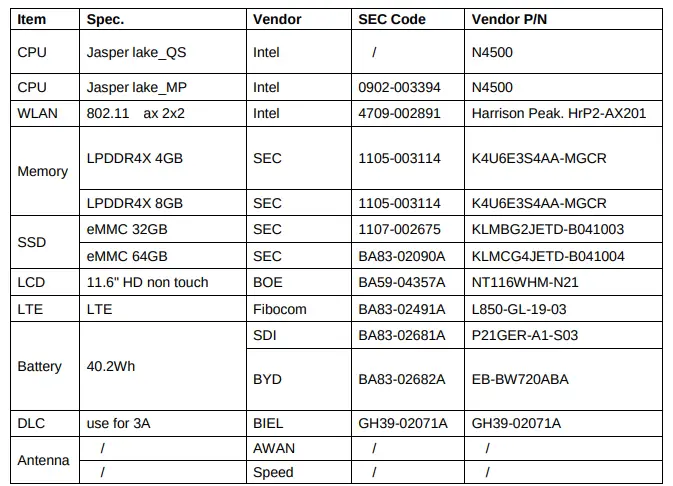
After taking a second glance at the key specifications PDF, I quickly realized that this new Chromebook was actually an entirely different model. The non-touch display listed on the spec sheet wasn’t 14″ but an 11.6″ panel from BOE. This was a massive discovery because it means that Samsung will continue producing two different size variations of its budget line of Chromebooks. This particular build will come with 4GB or 8GB of RAM and 32GB or 64GB of storage. My guess is that the 14″ LTE model, when released, will be the one with the touch screen and the expected 128GB of storage.
In hindsight, this play makes sense for Samsung as the Chromebook 4 and 4+ were popular devices in the budget-friendly Chrome OS segment. Adding the Galaxy branding and keeping the price down will surely strengthen the popularity of Samsung’s “cheap” Chromebooks and the addition of an LTE option will open the door for more use-cases and a larger consumer base. We’ll reach out to Samsung to see if we can get some clarification on this new lineup and hopefully, get some review units in ASAP. Special thanks to Mike at LUB for finding this great information.
SUBSCRIBE TO UPSTREAM
Get Chrome Unboxed delivered straight to your inbox
Upstream is our flagship, curated newsletter with the top stories, most click-worthy deals, giveaways, and trending articles from Chrome Unboxed sent directly to your inbox a few times a week. Join 31,000+ subscribers.

