


Support our independent tech coverage. Chrome Unboxed is written by real people, for real people—not search algorithms. Join Chrome Unboxed Plus for just $2 a month to get an ad-free experience, access to our private Discord, and more. Learn more about membership here.
START FREE TRIAL (MONTHLY)START FREE TRIAL (ANNUAL)
The day I’ve been anxiously awaiting is finally here! Right now, there is a version of Chrome OS you can have up and running that contains all the code necessary to experience Virtual Desks. No flags necessary. No hacks necessary. No half-baked experiences. All the multitasking and productivity-boosting benefits of Virtual Desks is here for you to try with nothing more than a switch to the Dev Channel.
For those of you who haven’t been around for a bit, I’ve been tracking every little change to Chrome OS Virtual Desks ever since we heard the first rumblings of the feature coming to Chromebooks. You can check out all of that with the link above or just by searching our site if you like, but the real news is the fact that all the changes, all the features, all the new animations, and all the capabilities of Virtual Desks are finally here in one update without any parts left out. Will it be perfect? No, we’re still in the Developer Channel after all. But having used it for the last few hours, I can tell you this will change the way I use my Chromebook forever.
Let’s look at all the features
First up, we have the addition of Virtual Desks itself without flags and without any additional settings. Up to this point, you’ve needed to enable a flag to get the feature to even show up. It looks like this will be true even in the Stable Channel update to Chrome OS 76 that should be showing up any day now. It seems like these updated features won’t be along for the ride until the Stable Channel hits version 77. Just hit the overview button on your keyboard or perform a 3-finger swipe up or down (depending on your trackpad orientation) and you’ll see the ability to add a new desktop nested right there at the top.
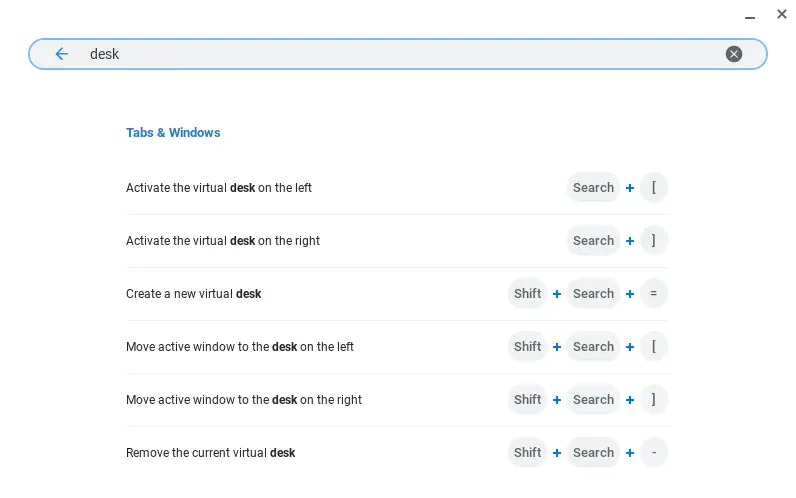
Next, you have all the keyboard shortcuts already baked in and ready to use. These shortcuts can all be seen by hitting CTRL + ALT + / and then searching for “desk.” You can see the shortcuts in the screen-grab below, but these quick strokes allow the addition/removal of Virtual Desks, navigation between open desks, and a quick way to move windows to adjacent desks.
Then, you have the trackpad addition which is my personal favorite. With a simple 4-finger swipe left or right, you can swiftly move between your open desks and pull an entirely new desktop full of windows into view just as fast as you could glance over. I’ve said it before and I’ll say it again: this gesture is not just intuitive, it is essential for Virtual Desktops to be the productivity booster that it is. Right now I have a second desktop set up (without the need of a second monitor) just to the right of the desktop I’m typing in. In it I have messaging apps that I use frequently, so with a simple gesture I can hop over and answer messages without opening, closing or minimizing anything. Another swipe and I’m right back in action where I left off. I absolutely love it!
Finally, you have all the nifty animations that have been thoughtfully added along the way. A bump on either side of the screen notifies you that you’ve reached the last open desk available. A subtle bump from the bottom of the screen gives users a visual cue that they’ve removed a Virtual Desk via keyboard shortcut. Window minimizations have been added as you drag an open window from one desktop to another, making it clear exactly what is going on. And the most fun animation is the one that accompanies the keyboard shortcut that moves windows from one desk to another (SHIFT + SEARCH + [ or ]) The selected window zips out of frame with a pleasing acceleration that just look cool.
I noted in a previous post that the development cycle for Virtual Desks stands as a shining example of how new software features should be developed. With a meticulous attention to detail, this entire effort has been added all at once and works exactly the way you would expect. While bits and pieces have been hidden behind flags across different channels for months, the delivery of the entire package out of the box in Chrome OS 77 Dev Channel is not just fantastic to see, it is fantastic to use.
For those of you not really excited about jumping to the Developer Channel to give this a try, rest assured that this will be part of your Chrome OS experience in about 6 weeks when we expect to see Chrome OS 77 hit the Stable Channel.

