

• Skip to main content
  • Skip to primary sidebar
  • Deals
  • Features
  • Guides
  • Chromebooks
  • Videos
  • Podcast
  • More +
    • Reviews
    • Unboxing
    • Upcoming Devices
    • Chromebook Plus
    • Chrome
    • ChromeOS
    • Chrome OS Flex
  • Search
  • Sign Up
  • Log In
Chrome Unboxed – The Latest Chrome OS News

Chrome Unboxed - The Latest Chrome OS News

A Space for All Things Chrome, Google, and More!

  • Deals
  • Features
  • Guides
  • Chromebooks
  • Videos
  • Podcast
  • More +
    • Reviews
    • Unboxing
    • Upcoming Devices
    • Chromebook Plus
    • Chrome
    • ChromeOS
    • Chrome OS Flex
  • Search
  • Sign Up
  • Log In

This demo of making a video with Google Vids looks pretty insane

April 25, 2024 By Robby Payne View Comments

Support our independent tech coverage. Chrome Unboxed is written by real people, for real people—not search algorithms. Join Chrome Unboxed Plus for just $2 a month to get an ad-free experience, access to our private Discord, and more. Learn more about membership here.
START FREE TRIAL (MONTHLY)START FREE TRIAL (ANNUAL)

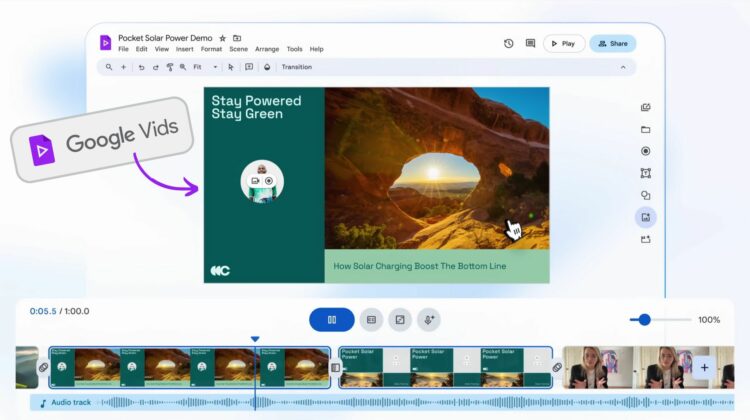
If you haven’t heard of Google Vids just yet, trust me: you will. Introduced just a couple weeks ago and not set for wide roll-out until June, Google Vids is a new, big swing from Google to give users a tool to build videos from the ground up with a lot of help from AI. The resulting creations are more like presentations than feature films, but the idea here seems more geared towards creating a video version of a slide show than creating YouTube content.

Say you need to build a pitch for an internal or external meeting that quickly gets the point across and doesn’t require you to poke through a presentation slide-by-slide to accomplish the goal. This is what Google Vids hopes to accomplish in a simple, collaborative, AI-driven way. And from the looks of this demo they’ve provided on YouTube, I’m inclined to think there’s something here.

Xremove ads

Imagine needing to communicate something with rich video, text, and voice and not needing to contact or hire a video editor to get that done. From templates to fonts to stock videos and realistic sounding text-to-voice models, Google Vids does a great job at laying the tools you’d need at your feet to put together a compelling video in no time at all.

Add in the same collaborative tools we expect from other Google products, and you have a seamless way to get others in on the creative process right along with you. I know the video above was all a demo, but I can see videos getting created with very little effort with very little training once Vids launches in June.

Featured Videos

Xremove ads

While this isn’t the cloud-based video production service I’d love to eventually see from Google (they have the chops to make something awesome in that space), I think this could be a massive win for Workspace users specifically. And as it likely will roll out to general Google users in the future, I could see simple videos being made in Vids on a regular basis to showcase features, highlight items, or simply get your thoughts across to friends, family, or on Youtube.

I’m eager to test it out in June when it arrives and you can be we’ll be putting it through the paces to see what the limits of this sort of tool are. Is this the end of the presentation slide deck? I don’t think so, but I bet we’ll see a lot more video presentations versus slides in the coming months thanks to Google Vids.

SUBSCRIBE TO UPSTREAM

Get Chrome Unboxed delivered straight to your inbox

Upstream is our flagship, curated newsletter with the top stories, most click-worthy deals, giveaways, and trending articles from Chrome Unboxed sent directly to your inbox a few times a week. Join 31,000+ subscribers.

Xremove ads
SUBSCRIBE HERE!

Filed Under: New & Upcoming Features, Workspace Tagged With: videos

About Robby Payne

As the founder of Chrome Unboxed, Robby has been reviewing Chromebooks for over a decade. His passion for ChromeOS and the devices it runs on drives his relentless pursuit to find the best Chromebooks, best services, and best tips for those looking to adopt ChromeOS and those who've already made the switch.

Primary Sidebar

Xremove ads

Deals

Lenovo’s powerful 8.8-inch Legion Tab Gen 5 Android gaming tablet is now $150 off

By Joseph Humphrey
June 10, 2026

The Google TV Streamer hits $80 again, bringing Gemini and smart home control to your living room

By Joseph Humphrey
June 5, 2026

The best Chromebook deals today

By Robby Payne
May 25, 2026

Save $300 as Acer’s Chromebook Plus Spin 714 returns to its all-time low price

By Robby Payne
May 21, 2026

Save $40 on the Google Pixel Watch 4 before the Spring Sale ends

By Joseph Humphrey
April 24, 2026

More Deals

Xremove ads

Reviews

Lenovo Chromebook Plus 2-in-1 Review: pretty great in a vacuum

By Robby Payne
April 23, 2026

Acer Chromebook Plus Spin 514 Review: Kompanio Ultra power in a convertible

By Robby Payne
December 24, 2025

My review after 6 weeks with the Lenovo Chromebook Plus 14 [VIDEO]

By Robby Payne
August 11, 2025

One week with the best small Android tablet you can buy, and I’m sold

By Robby Payne
May 9, 2025

Best Chromebooks of 2024 [VIDEO]

By Robby Payne
November 28, 2024

More Reviews

Xremove ads

Guides

This Chromebook trackpad shortcut is definitely not new, but is blowing my mind

By Robby Payne
March 11, 2024

How to reduce broadcast delay on YouTube TV to stop live spoilers

By Robby Payne
December 8, 2023

Windows PC keyboard and Chromebook

How to use a Windows keyboard with a Chromebook

By Joseph Humphrey
December 8, 2023

How reset and revert your Chromebook to the previous version of Chrome OS

By Robby Payne
November 29, 2023

My Chromebook Plus features disappeared: here’s how I fixed it

By Robby Payne
November 24, 2023

More Guides

TWITTER · FACEBOOK · INSTAGRAM · YOUTUBE · EMAIL · ABOUT

Copyright © 2026 · Chrome Unboxed · Chrome is a registered trademark of Google Inc.
We are participants in various affiliate advertising programs designed to provide a means for us to earn fees by linking to affiliated sites.

PRIVACY POLICY