

Support our independent tech coverage. Chrome Unboxed is written by real people, for real people—not search algorithms. Join Chrome Unboxed Plus for just $2 a month to get an ad-free experience, access to our private Discord, and more. Learn more about membership here.
START FREE TRIAL (MONTHLY)START FREE TRIAL (ANNUAL)
Over the weekend, I wanted to try something out that I knew would push my phone to its limits. As many of you all know, I made the switch to the Samsung Galaxy Z Fold 5 about 3 weeks ago and my love for this device continues to grow stronger by the day. I continually find myself interested in seeing just what all is possible with the extra screen real estate in my pocket at all times, and this latest project was a testament to what can be done with folding phones on the go.
Yes, I’m editing some video these days
First up, those who know us here at Chrome Unboxed fully realize that I’m no video editor. But with our very new, very upstart project called Proof Golf (go get subscribed and follow if you like golf and golf simulators), things are a bit different. We’re still feeling out all the content types that we want to make, but either way it all shakes out, I want to be able to help get some of the simpler posts out there, working on things as I have time.
Sitting at the desk and editing video for hours on end isn’t exactly my cup of tea, but having an option to do so on the go is pretty interesting and is a workflow I think I can actually maintain. Proof Golf is a side hustle for now, so I have to treat it as such. And that means finding moments here and there to work on it.
The Z Fold 5 as a portable editing machine
And that’s where the Z Fold 5 really shines. Being a larger screen in my pocket, as long as I have a bit of time, I can open up the inner screen, jump into a video edit, and knock out a bit of work when I have the freedom to do so. There’s simply no way a laptop or desktop solution gets me there. With the Z Fold 5, however, I’m just seconds away from being back in the edit.
Rest assured, I tried this all on a Chromebook first. But LumaFusion still won’t import my footage properly (I’ve tried on many Chromebooks on many versions of LumaFusion) and web-based editors all choked under the weight of importing a couple 10-minute, 1080p 60FPS 10-bit videos that totaled about 15GB of space. If I want to edit on the go, I need a solution that actually works when I squeeze out the time to actually do it.
Re-enter Kinemaster
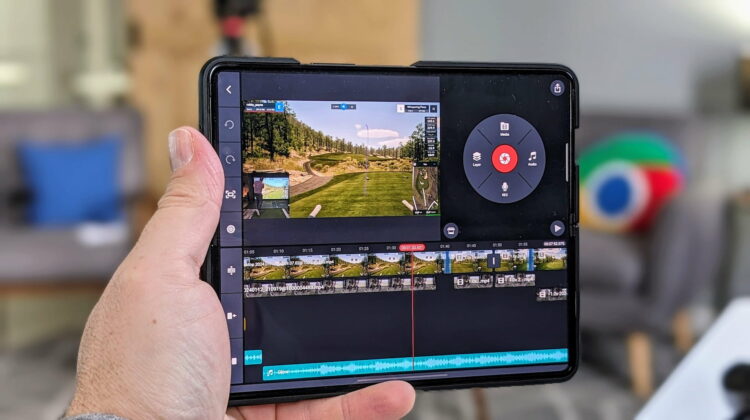
Remember Kinemaster? It was one of the first video editors that had some Chromebook-specific settings, but they’ve never really changed the UI to make it feel at home on the desktop. But you know what? It feels just fine on the nearly-8-inch Galaxy Z Fold 5’s inner screen.
Again, I found file imports to be an issue on the Chromebook with Kinemaster, but things worked absolutely perfectly on the Z Fold 5. After importing my files without breaking a sweat, I was amazed at how well I was able to smoothly move through my clips, make my cuts, re-align things and add effects. At no time did I feel any hiccups or hesitations and it really made editing feel a lot less stressful.
After finishing the edits over the weekend with 30 minutes here and 30 minutes there, I was equally excited to see the entire thing render and export in just a few minutes. The resulting video looks great and though I still have a lot to learn from a basic editing standpoint, I’m happy with the overall product and looking forward to refining things moving forward. You can check out the finished product below:
Samsung is really impressing me of late
I suppose this all comes back to how generally impressed with Samsung I am these days. Their software is smooth and fast, their features are genuinely useful, and their hardware – as it has been for years – is absolutely top-notch. There’s a reason they are the #1 Android phone maker and a reason they have become synonymous with Android here in the US, and I’ve never felt it so clearly as I did this weekend while editing my video.
While I’m sticking to my Galaxy Z Fold 5 (at least until the Z Fold 6 comes out), I think there may be many of you out there that have either never given Samsung a fair shake or tried them years ago and ran away because of gimmicks and bloatware. While I’m not going to say it’s all perfect these days, it is a far cry from where it used to be, and with each passing day, I’m becoming more of a Samsung fan. Their next big Unpacked event is tomorrow, and you can sign up to reserve your new Galaxy S24 phone and net yourself some extra savings in the process. I’m looking forward to seeing what they have up their sleeves for sure!
SUBSCRIBE TO UPSTREAM
Get Chrome Unboxed delivered straight to your inbox
Upstream is our flagship, curated newsletter with the top stories, most click-worthy deals, giveaways, and trending articles from Chrome Unboxed sent directly to your inbox a few times a week. Join 31,000+ subscribers.

