


Support our independent tech coverage. Chrome Unboxed is written by real people, for real people—not search algorithms. Join Chrome Unboxed Plus for just $2 a month to get an ad-free experience, access to our private Discord, and more. Learn more about membership here.
START FREE TRIAL (MONTHLY)START FREE TRIAL (ANNUAL)
Have you ever wanted to see a list of every company that’s in possession of your personal data like your email address, name, date of birth, and even your precise location? The internet is exploding in its growth, and it seems like everyone has their own way of collecting data on you these days. I was watching Mrwhosetheboss on Youtube (his videos are addicting!) and he mentioned an app called Say Mine that I ended up checking out. To my surprise, it was one of those gems that was actually worth an ad spot on the platform, so I wanted to share it with you all today. As a reminder, this is not at all a sponsored article, and I’m simply talking about this out of my own interest.
Say Mine is similar to my favorite data control web app Unroll.me which allows you to see a list of every company that has your email address and unsubscribe in bulk from all of the crap. The only difference is that Say Mine allows you to see a list of about 90% of the companies that house your personal information on their servers and automates a data erasure request using what I presume is a set of data protection laws like ‘The Right to be Forgotten’ in the EU, or per state Data Erasure laws that online sites must comply with.
Welcome to the future of data ownership. Discover where your personal data is and manage your digital footprint. You decide where you want to keep your data and where you don’t. We lost ownership of our personal data. Too many companies have been collecting too much information about us. Mine gives back what belongs to you. We’ll continuously let you know where your data is so you can reduce your digital exposure while enjoying the internet, feeling safe and secure.
Say Mine App
Now, I’m not as savvy on exactly what’s going on under the hood per user since each person lives in a different location, but what I do know is that over the past week, several websites have replied to my automated requests with confirmation that my data has, in fact, been removed from their servers! Of course, it’s hit or miss depending on who you’re requesting to forget you because the law states (at least GDPR) that anyone holding data on you for purposes related to helping you exercise your right of freedom of expression and information, to comply with legal rulings or obligations, and so on can deny any requests sent from Say Mine.
What I find particularly exciting is the app’s dashboard which shows you a tally of the number of companies that actually hold your data, how many you’ve already reclaimed your info from, and even a total ‘Data Ownership Progress’ bar as seen below.

Referring to itself as ‘The future of data ownership’, Say Mine works by scanning just and only the titles of your emails to compile the list. Yes, this means that you’re signing in with your email address and giving Say Mine your data, but doing so will have to be a personal choice. The team states that they want to be the ‘poster child for data privacy measures’ and that you can delete your data and account on Say Mine any time you’d like if you’re not feeling it.
Why should I reclaim my data from other companies, but trust you?
Mine believes that trust isn’t simply given; it’s earned. We put trust and transparency at the core of everything that we do, with you – the user, at the center. As a data privacy company, we aspire to be the poster child for data privacy measures. We strive to provide you with the best possible solution while keeping your personal data, yours alone. We never read or collect the content of your emails. Naturally, this means that Mine is one of the digital services you use, so if for any reason you feel like you’re not getting value from our product, you can reclaim your data from Mine by going to your Mine profile and clicking “Delete your Mine account.”
About Say Mine
The ability to see how a company handles deletion requests before sending these reclaims out so you can make more informed decisions is coming soon. You can already see a bar or risk meter for each company showing their likelihood of being hacked in the preview window before sending a request, which is one of my favorite features, though admittedly, I’m not sure how this is calculated.
In addition to its powerful automation tool, which is obviously the main event here, Say Mine also has a blog showing you how to delete your data manually across other websites and services. It’s definitely worth checking out!
My only real concern about the site is that its terms of service mention “Fees and Payment”, so while the service is currently free, I imagine they have plans to make the switch to being subscription-based in the future. My advice is to at least clean up your digital footprint over the course of an afternoon or a few days ahead of that time just in case this occurs. If you find ongoing value in the tool, you can obviously pay, but since it’s free right now, you may as well take advantage of it!
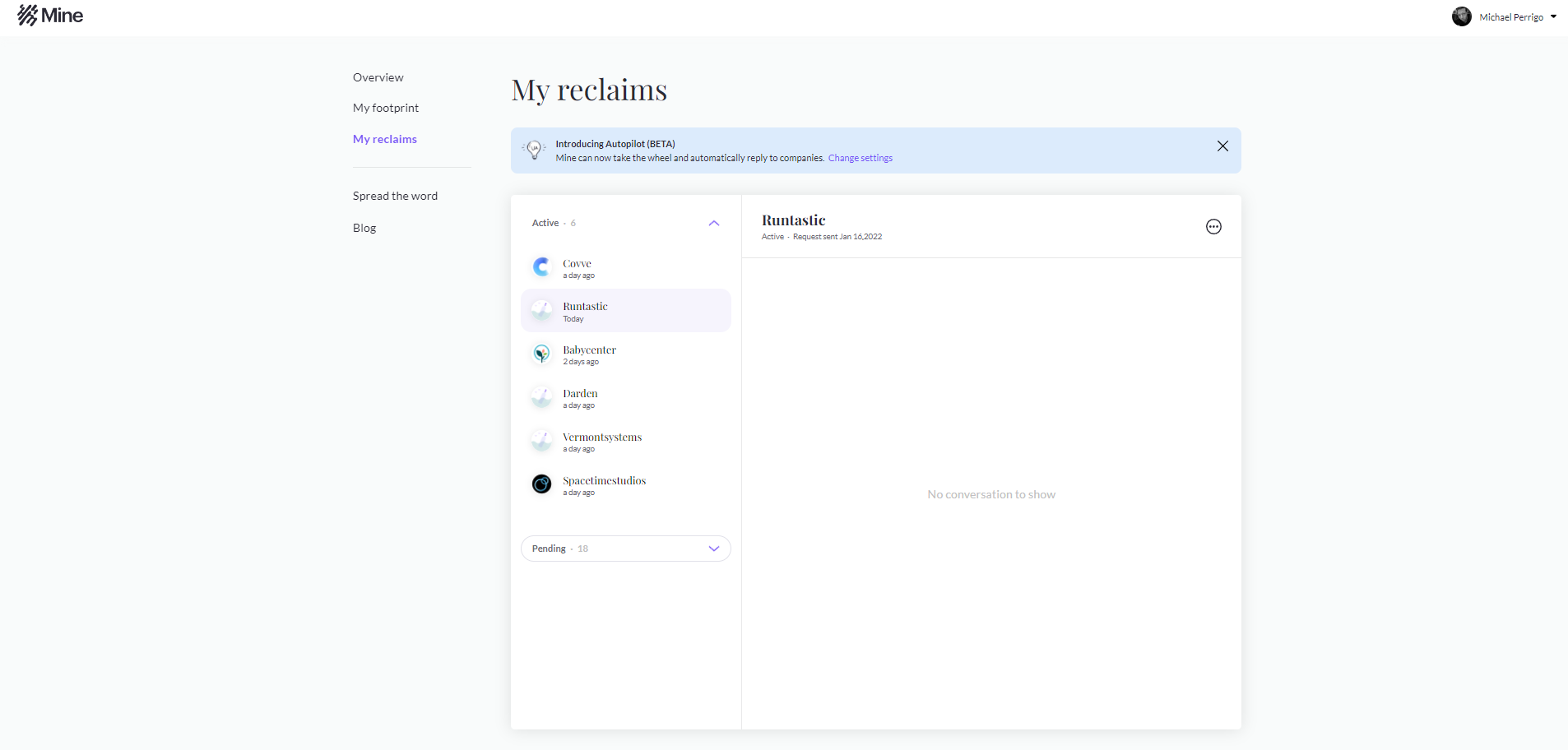
Another great feature I like is the ability to track and follow up with erasure requests right in the Say Mine ‘My reclaims’ section. It acts as a sort of inbox for your bi-directional email conversation with these companies without ever having to pop open Gmail or your email client of choice.
You may also find that upon visiting the ‘My footprint’ tab and scrolling through the list of companies that house your personal information, there are several that you’ve never even heard of. Before being too alarmed, and before requesting erasure from these oddly named companies, I highly recommend that you Google them or visit the provided website link for each to see if any company you are aware of interacting with uses them for legal work, payments processing, or any other white-label or third-party service. The last thing you’d want to do is to disconnect from a vital service like your car insurance payment service or even a loyalty card provider that you still use, right?
At the end of the day, Say Mine is a neat little tool that I discovered, and it can help you at least be more consciously aware of who you’re sharing your life with online. My advice is to do exactly what it recommends – use their tools, and then grow wiser about who you share with in the future, minimizing your online risk while continuing to enjoy the internet and all of its benefits.
Does this mean that I have to limit my use of the internet?
Not at all! We believe you should avoid data exposure, and should be able to exercise your privacy rights. That does not mean you should not use digital tools. The traditional approach of the privacy industry is creating solutions that build fences around your use of the internet. Those walls ultimately hurt your online experience. Alternatively, Mine makes it easy for you to minimize your online exposure and risks while you continue to enjoy the internet and its benefits without limitations.
Say Mine FAQ
SUBSCRIBE TO UPSTREAM
Get Chrome Unboxed delivered straight to your inbox
Upstream is our flagship, curated newsletter with the top stories, most click-worthy deals, giveaways, and trending articles from Chrome Unboxed sent directly to your inbox a few times a week. Join 31,000+ subscribers.

