
• Skip to main content
  • Skip to primary sidebar
  • Deals
  • Features
  • Guides
  • Chromebooks
  • Videos
  • Podcast
  • More +
    • Reviews
    • Unboxing
    • Upcoming Devices
    • Chromebook Plus
    • Chrome
    • ChromeOS
    • Chrome OS Flex
  • Search
  • Sign Up
  • Log In
Chrome Unboxed – The Latest Chrome OS News

Chrome Unboxed - The Latest Chrome OS News

A Space for All Things Chrome, Google, and More!

  • Deals
  • Features
  • Guides
  • Chromebooks
  • Videos
  • Podcast
  • More +
    • Reviews
    • Unboxing
    • Upcoming Devices
    • Chromebook Plus
    • Chrome
    • ChromeOS
    • Chrome OS Flex
  • Search
  • Sign Up
  • Log In

Save Big On The 14″ FHD Lenovo S330 Chromebook

April 15, 2019 By Gabriel Brangers View Comments

Support our independent tech coverage. Chrome Unboxed is written by real people, for real people—not search algorithms. Join Chrome Unboxed Plus for just $2 a month to get an ad-free experience, access to our private Discord, and more. Learn more about membership here.
START FREE TRIAL (MONTHLY)START FREE TRIAL (ANNUAL)

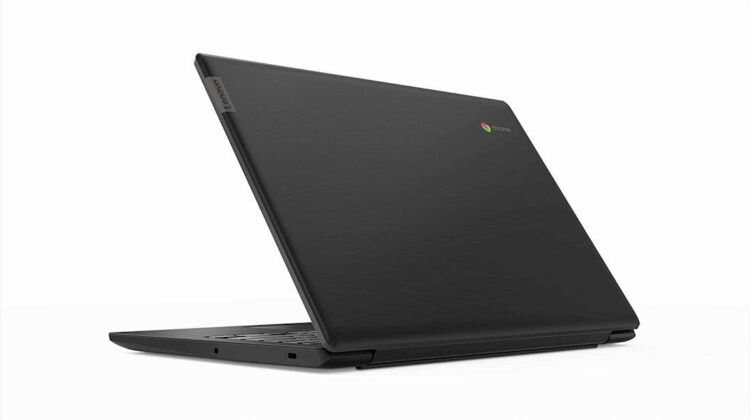
Another day and another great deal on a budget-friendly Chromebook. This time around, you can pick up the Lenovo S330 for a frugal $220 and it comes with a sweet 14″ Full HD display and 64GB of storage.

Built on the same MediaTek MT8173 processor made popular by the Acer Chromebook R13 and Lenovo’s 11.6″ convertible lineup, the S330 Chromebook is a great option for users wanting a device with a larger display without putting a dent in their bank accounts.

Xremove ads

Paired with 4GB of RAM and 64GB of storage, the Lenovo S330 is a capable device that’s perfect for casual use such as surfing the web, online banking, watching videos and using apps such as Google Docs.

Normally priced at $279, Amazon is selling the S330 for the impressive price of $219.99. As we noted with ASUS’ C523, you wouldn’t expect much in a Chromebook for $200 but deals like this are certainly an exception.

Featured Videos

Xremove ads

The only drawback of the Lenovo is that the processor is getting a little long in the tooth. Unlike the ASUS, the S330 has an End of Life date of June 2022. Still, that’s 3 years of guaranteed updates for a 1080P Chromebook that won’t break the bank.

The Chromebook S330 comes equipped with 1 each USB-C, USB-A and the increasingly rare full-size HDMI port as well and SD card slot, headphone jack and Kensington lock.

Lenovo Chromebook S330 On Amazon

Filed Under: Chromebooks, Deals

About Gabriel Brangers

Lover of all things coffee. Foodie for life. Passionate drummer, hobby guitar player, Web designer and proud Army Veteran. I have come to drink coffee and tell the world of all things Chrome. "Whatever you do, Carpe the heck out of that Diem" - Roman poet, Horace. Slightly paraphrased.

Primary Sidebar

Xremove ads

Deals

Lenovo’s powerful 8.8-inch Legion Tab Gen 5 Android gaming tablet is now $150 off

By Joseph Humphrey
June 10, 2026

The Google TV Streamer hits $80 again, bringing Gemini and smart home control to your living room

By Joseph Humphrey
June 5, 2026

The best Chromebook deals today

By Robby Payne
May 25, 2026

Save $300 as Acer’s Chromebook Plus Spin 714 returns to its all-time low price

By Robby Payne
May 21, 2026

Save $40 on the Google Pixel Watch 4 before the Spring Sale ends

By Joseph Humphrey
April 24, 2026

More Deals

Xremove ads

Reviews

Lenovo Chromebook Plus 2-in-1 Review: pretty great in a vacuum

By Robby Payne
April 23, 2026

Acer Chromebook Plus Spin 514 Review: Kompanio Ultra power in a convertible

By Robby Payne
December 24, 2025

My review after 6 weeks with the Lenovo Chromebook Plus 14 [VIDEO]

By Robby Payne
August 11, 2025

One week with the best small Android tablet you can buy, and I’m sold

By Robby Payne
May 9, 2025

Best Chromebooks of 2024 [VIDEO]

By Robby Payne
November 28, 2024

More Reviews

Xremove ads

Guides

This Chromebook trackpad shortcut is definitely not new, but is blowing my mind

By Robby Payne
March 11, 2024

How to reduce broadcast delay on YouTube TV to stop live spoilers

By Robby Payne
December 8, 2023

Windows PC keyboard and Chromebook

How to use a Windows keyboard with a Chromebook

By Joseph Humphrey
December 8, 2023

How reset and revert your Chromebook to the previous version of Chrome OS

By Robby Payne
November 29, 2023

My Chromebook Plus features disappeared: here’s how I fixed it

By Robby Payne
November 24, 2023

More Guides

TWITTER · FACEBOOK · INSTAGRAM · YOUTUBE · EMAIL · ABOUT

Copyright © 2026 · Chrome Unboxed · Chrome is a registered trademark of Google Inc.
We are participants in various affiliate advertising programs designed to provide a means for us to earn fees by linking to affiliated sites.

PRIVACY POLICY