


Support our independent tech coverage. Chrome Unboxed is written by real people, for real people—not search algorithms. Join Chrome Unboxed Plus for just $2 a month to get an ad-free experience, access to our private Discord, and more. Learn more about membership here.
START FREE TRIAL (MONTHLY)START FREE TRIAL (ANNUAL)
We’ve been digging into the development of ‘Sapphire’ for a while now, and the more we find, the more it feels like Lenovo is building something pretty special. Between the tablet form factor with the MediaTek Kompanio Ultra, the wirelessly-recharging stylus, 13-inch screen, fingerprint scanner in the power button, and the iconic Google-y four-color light bar, it’s already the flagship I’m easily most excited for.
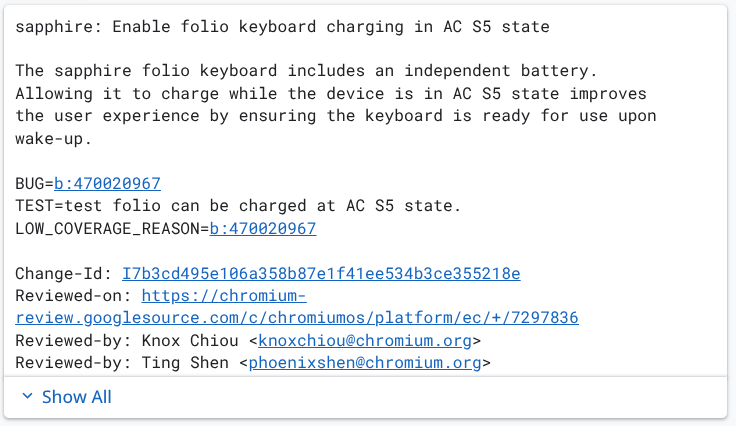
But a new commit has added a fascinating new wrinkle: the detachable keyboard for ‘Sapphire’ will have its own independent battery. In the world of Chromebook tablets, this is almost unheard of. Usually, folio keyboards are thin, passive accessories that draw a tiny bit of power from the tablet itself. Seeing an independent battery in the mix raises a few questions about how this one will be presented when it arrives.
Surface Book-style or hybrid?
One possibility is that we’re looking at a setup similar to the old Microsoft Surface Book. In that design, the keyboard attachment was actually a heavy, metal base that housed a massive secondary battery and even a dedicated GPU. If ‘Sapphire’ goes this route, it would transform from a tablet into a rock-solid laptop with class-leading battery life when docked. For what it’s worth, I don’t see this as the most likely solution.
However, there is on other intriguing comparison with Lenovo’s own ThinkBook Plus Gen 5 Hybrid. That wild device is actually two computers in one: an Android tablet screen and a Windows laptop base. While I don’t think we’re getting two processors here, the idea of a “Station” base that provides its own power and ports while the tablet acts as the brain is a very Lenovo move, so I don’t think we can 100% write this theory off.
Bluetooth folio with extra benefits
Then there’s the more conservative possibility. This could be a high-end folio keyboard—similar in form to the iPad Pro’s Magic Keyboard—but with a small internal battery specifically to power Bluetooth connectivity. This would allow you to prop the ‘Sapphire’ tablet up on a desk and keep using the keyboard even when it’s physically detached. It’s a small tweak, but for productivity on the go, or more complex desktop setups, it could be incredibly handy.
The commit specifically mentions enabling charging for this keyboard even when the device is in an “S5” (shutdown) state while on AC power. This ensures the keyboard is “ready for use upon wake-up.” That bit of text suggests the keyboard battery is a core part of the experience, not just an afterthought.
Whether it’s a full-blown battery base or a clever Bluetooth detachable, it’s clear that Lenovo is not holding back with this device. As the likely flagship for the ‘Aluminium’ project we expect to see later this year, ‘Sapphire’ needs to bring plenty of fire power to the fight. If Google expects to take the fight to Apple and Microsoft, they need high-quality hardware to do it. This one is shaping up that way for sure.
SUBSCRIBE TO UPSTREAM
Get Chrome Unboxed delivered straight to your inbox
Upstream is our flagship, curated newsletter with the top stories, most click-worthy deals, giveaways, and trending articles from Chrome Unboxed sent directly to your inbox a few times a week. Join 31,000+ subscribers.

