

Support our independent tech coverage. Chrome Unboxed is written by real people, for real people—not search algorithms. Join Chrome Unboxed Plus for just $2 a month to get an ad-free experience, access to our private Discord, and more. Learn more about membership here.
START FREE TRIAL (MONTHLY)START FREE TRIAL (ANNUAL)
Google Discover (at the bottom of your new tab page in Chrome, in the Google app, and on the left-most screen of the Android launcher) is a place I tend to find interesting and sometimes-random things that pique my interest. Over the weekend, that exact thing happened and out of nowhere I came across a new thing I didn’t know I wanted until it was made available, and I’m hoping to do the same thing for you right now.
In the vast library of Nintendo’s in-house games, Mario 64 sits atop the pile as probably my absolute favorite. A close second would have to be Zelda Breath of the Wild, nearly all the Mario Kart games, GoldenEye, and Splatoon 2. But they are all second place at best in my mind. As the first 3D treatment of the Mario franchise, Mario 64 still stands as one of the best overall video game experiences I’ve ever had. It is approachable, yet challenging. Simple, yet broad. And if you go for all the stars, you’re in for hours of fun.
While there have been emulators in the past that you could use to ressurect this gem of a game, those all required users to also go and download ROMs in order to play. While it is technically legal to have a ROM of a game you physically own (I own a physical cartridge of Mario 64 for what it’s worth), the whole thing is a bit of a gray area and something we’ve never felt comfortable peddling here at Chrome Unboxed despite the existence of some very fine emulators that work on Chromebooks.
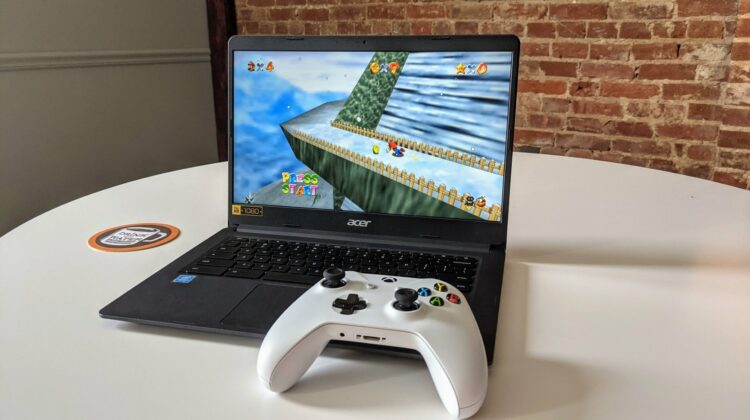
Mario 64 and all you need is Chrome
This effort is a bit different, however, bringing Mario 64 to the web to play in a browser with no download or installs necessary. It’s not to say that Nintendo won’t eventually shut this down, but having Mario 64 running in a browser keeps users from needing to go and search out/download ROMs to get up and running. Sure, the site hosting the files may find legal issue, but you as a user should be just fine taking in the game if you choose to do so. I’m no attorney and if you think for a second that you don’t want to cross that bridge, I’d say this isn’t for you or to play in an incognito window with a VPN on just to see it running. Or, if you do have a dusty old copy of this game lying around, play all you want, save your progress as you go, and have a great time.
And yes, I said save your progress. Using cookies I’d assume, the game actually allows for saving your progress just like you would have done on the Nintendo 64 console. It also supports controllers (we used the XBOX One controller) and runs like an absolute dream in your browser. We tested it on high-end Chromebooks and cheap devices alike and everything stayed smooth and buttery the whole time. This port even comes with all the sounds and music you love from the original. All in all, it is fantastic!
Whether you play it at length or not isn’t really the point, though. While I hope some users get to experience Mario 64 for the first time with what the folks over at froggi.es have made, I’m even more impressed by the overall abilities of the web at this point as a delivery mechanism for digital content. Sure, Mario 64 is only an 8GB game all told, but the fact that we can play a multi-hour game with controls, sound, and superb performance via a web browser (with no downloads or installs) is mind-blowing to me. We talk about it here a whole lot, but the open web is growing into a powerful force not only for the information we all glean from it, but for applications and experiences as well. It’s encouraging and staggering to see what is possible and I can’t wait to continue to see how people smarter than me continue to leverage the power of the open web to make cool stuff for us all to use and enjoy. For now, though, I’m going to collect a few stars.
SUBSCRIBE TO UPSTREAM
Get Chrome Unboxed delivered straight to your inbox
Upstream is our flagship, curated newsletter with the top stories, most click-worthy deals, giveaways, and trending articles from Chrome Unboxed sent directly to your inbox a few times a week. Join 31,000+ subscribers.


