

Support our independent tech coverage. Chrome Unboxed is written by real people, for real people—not search algorithms. Join Chrome Unboxed Plus for just $2 a month to get an ad-free experience, access to our private Discord, and more. Learn more about membership here.
START FREE TRIAL (MONTHLY)START FREE TRIAL (ANNUAL)
As we’re only a few months from the likely release window for the still-technically-rumored Pixel Fold, it just makes good sense that we’d start seeing things leak through the cracks in a bit more of a material way. There have already been highly-detailed renders leaked out online and those images and videos gave us a pretty good idea of what the Pixel Fold will look like at launch.
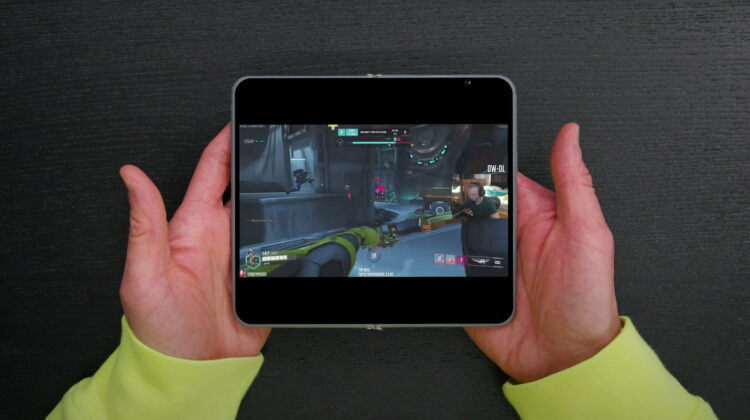
But there’s one thing digital renders can’t quite convey, and that’s the real-world size and dimensions of the Pixel Fold in someone’s hands. Set next to the Oppo Find N and a Galaxy Z Fold 4, Dave2D’s quick video of a Pixel Fold case mold gives us an intruiging look at how Google’s foldable is set to work and just how thin the device is in the hand.
What is a case model?
First off, a quick explanation of what he is holding in this video. Ahead of a new product release, phone makers will build plastic models of their devices to get in the hands of case makers so an assortment of accessories can be ready when the phone actually arrives. This is one of those models.
So when we look at the size of the screen, the thickness of the bezels, or the width of the device as a whole, we can feel confident that these measurements will be accurate to what the Pixel Fold will eventually look like. After all, if these models are supposed to go to case makers, things need to be accurate down to the millimeter so that cases aren’t misaligned or too big/small for users buying them on sites like Amazon where you simply have to trust that things are proportioned correctly. With that in mind, there are some cool things to be learned from Dave’s video.
The Pixel Fold screens
Though we’ve seen it in renders before, this model provides concrete measurements for the screens and the overall size of this device. We’re looking at a flat 5.79-inch 1080×2100 outer screen that will feel larger than the screen measurement. Most of our phones are 19.5:9 or 20:9, meaning they are thinner and taller than a standard 16:9 aspect ratio. The outer screen of the Pixel Fold will be closer to 16:9 (16.5:9 to be precise), so that 5.79-inch screen will feel a bit more spacious than a 5.79-inch 20:9 screen would. The closer to square your aspect ratio gets, the more square inches of screen real estate you get, so I’m excited about this.
Inside, the screen will measure 7.67-inches with a 2208×1840 resolution, making this screen far closer to square (6:5) than what we usually see on phones and tablets. For example, a 4:3 screen we used to see on older iPads would make this resolution 2453×1840, so that makes the Pixel Fold’s inner screen considerably closer to square than even the very-square-feeling iPads of old. Still, this resolution means the Pixel Fold will open to a landscape display by default, and that’s a good thing for sure.
The Pixel Fold will be incredibly thin
Another piece of info gleaned from this video is the thinness of the Pixel Fold’s panels. On either side, this folding phone will come in at just 5.7mm thick, and with the hinge closing the phone completely flat, that means the Pixel Fold will only be 11.4mm thick even when shut and folded up. For reference, the Pixel 7 Pro is 9mm on its own, so the entire Pixel Fold will only be a couple millimeters thicker than that device when closed. When open, it will feel wafer-thin for sure.
Pixel Fold will have a great hinge mechanism
With folding phones, there are a couple different hinge types: the ones that Samsung uses and most of the others out there in the market. Samsung’s hinges are fantastic, but they close in a V-shape and leave a gap between the screens where other folding phone makers use a wider, recessed mechanism to close the screens flat against one another while creating a less abrupt shape to the crease in the screen. Dave made a great graphic for this you can see below.
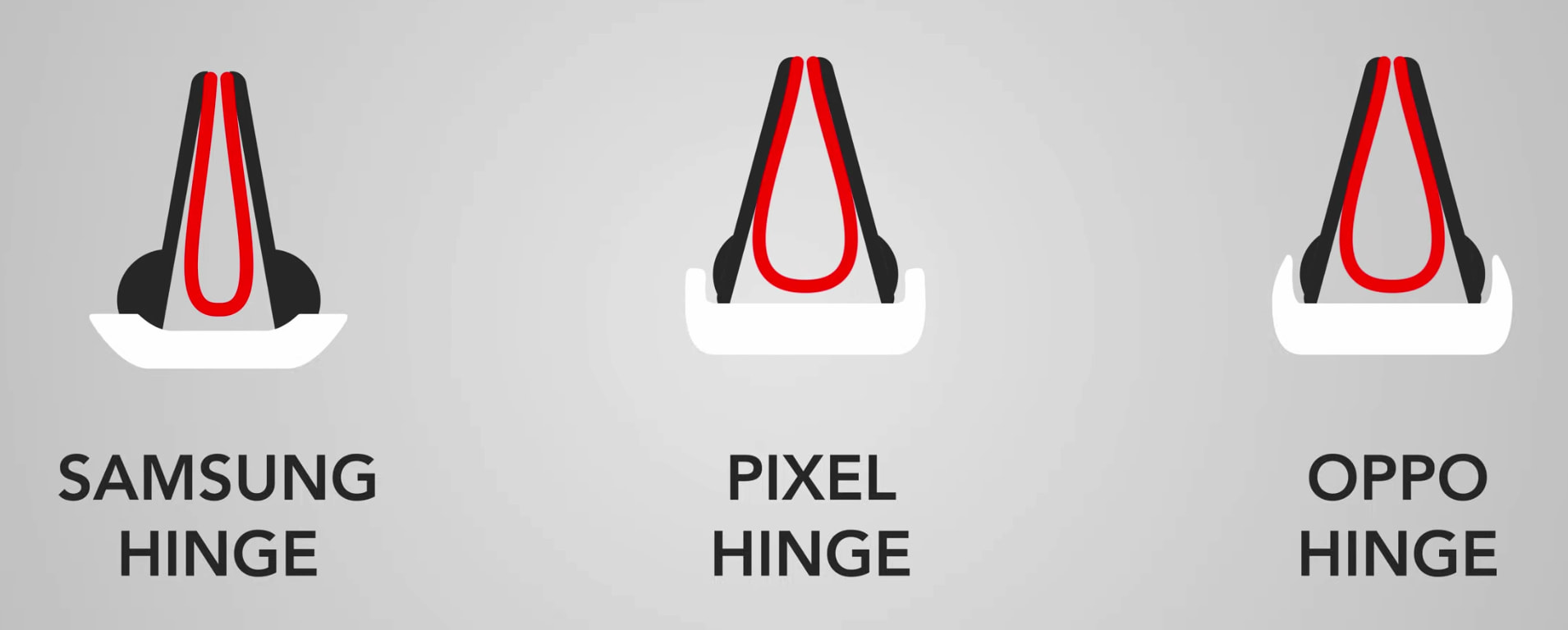
With this hinge system, there will likely be a less-noticeable crease in the screen when open and the Pixel Fold will close completely flush, making one-hand use a much better overall experience. From my time with the Samsung Galaxy Z Fold 3, the non-flat closure was a real bother. It seems the Pixel Fold will have both a better screen size/ratio and a better hinge to go with it. Win-win.
Stereo Speakers in any orientation
One final thing of note that Dave pointed out was the placement of the speakers. With one on each side of the hinge, the Pixel Fold should be able to pull off stereo separation in either orientation when the phone is opened into tablet mode. We’ll have to wait and see how well it performs down the road, but this is a thoughtful inclusion for a device that will largely be used to consume content.
We likely still have months to wait before the Pixel Fold lands, but that won’t stop the leakers and the overall hype train building steam for this device. If the rumored price of $1799 holds, it will be a tough sell regardless of how good it is, but I can assure you I’ll be in line to buy it. I’ve waited a long, long time for a foldable with Google’s software on board, and the Pixel Fold is shaping up to be exactly the hardware I’ve been holding out for. May can’t get here soon enough!
SUBSCRIBE TO UPSTREAM
Get Chrome Unboxed delivered straight to your inbox
Upstream is our flagship, curated newsletter with the top stories, most click-worthy deals, giveaways, and trending articles from Chrome Unboxed sent directly to your inbox a few times a week. Join 31,000+ subscribers.

