0:00
hey guys what's up gabriel here from
0:01
chrome unboxed and today we are talking
0:21
it's been a little over a year since
0:22
google officially rolled out
0:24
dark theme for android 10 back in
0:26
september of last year and
0:28
shortly thereafter we discovered work
0:30
being done on chrome os that would
0:32
hopefully bring us the same features to
0:35
just recently in a canary update the
0:38
theme option has finally arrived and
0:40
while it's not quite ready for the
0:43
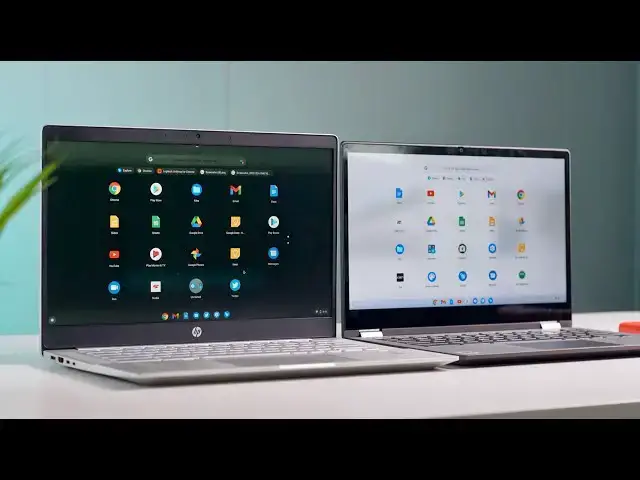
we have two devices here one with the
0:45
light theme and one with a dark theme
0:46
for you guys to take a look at because
0:49
you really like dark mode i like dark
0:51
mode all the things any app that i have
0:53
that works with dark mode i use it my
0:56
and i would love for my chrome os
0:58
devices to be in dark mode as well
1:00
so before too long hopefully by the end
1:03
you'll have that option so let's take a
1:06
look at the new chrome os
1:07
dark light theme alright guys so we have
1:11
device on the light theme you'll notice
1:13
the bar at the bottom has a little bit
1:15
of a translucent opaque look to it
1:18
and then the system tray here looks
1:21
the first commit that enabled this on
1:25
literally just gave you this button
1:27
right here that says dark theme offer on
1:30
off and the bar at the bottom your shelf
1:32
turned white and this toggle turned
1:35
and for the light theme that's really
1:36
about all the difference you're going to
1:38
google does have a new set of wallpapers
1:41
coming out called elements and they each
1:43
have a light version and a dark version
1:45
meant to complement this light theme
1:47
that they're having so instead of being
1:50
it's sort of opaque with a little bit of
1:52
translucence to it but if you look in
1:56
and the explore app and things of that
1:59
it really doesn't look any different
2:00
than chrome os right now everything
2:02
that's white should be white it doesn't
2:05
so the light theme is very subtle now
2:08
where you see a lot of differences is
2:11
when you come over here to the device
2:13
that has dark theme on it
2:15
dark theme obviously takes a lot of work
2:18
because you're dealing with very very
2:22
and you're still trying to render things
2:24
like web pages and system settings
2:26
in a way that's visible and viewable by
2:28
the user where you normally have things
2:31
like black text and black logos and
2:33
things of that nature
2:34
dark mode would inherently cover that up
2:37
and that's something we saw a few months
2:39
google was experimenting with forced
2:42
dark mode on websites
2:44
websites that weren't designed to handle
2:47
would actually just end up looking black
2:51
look like something that was in high
2:52
contrast mode the colors would be
2:54
inverted or blown out and it just looked
2:56
horrible so this is something google's
2:59
of time and developmental energy into
3:02
it still has a lot of work but here's
3:04
your first look at the overall
3:06
dark theme for chrome os so you'll see
3:10
very very dark this does have a slight
3:12
bit of opacity to it you can't really
3:14
tell with this background but these are
3:17
to show just a little bit of color from
3:19
your background so you'll see that
3:21
change depending on which wallpaper you
3:24
but with the dark theme on you'll see
3:26
your shelf is dark as well
3:28
and then your chrome os launcher is dark
3:30
so everything here looks pretty good
3:31
every everything looks
3:33
polished there's not a lot going on as
3:36
not rendering well they've done a good
3:39
where things start to break down just a
3:41
little bit or when you get into
3:43
the system settings this white bar
3:46
across the top i'm sure that's probably
3:50
but the settings menu looks pretty good
3:53
some of these darker blues and stuffs
3:54
are probably going to need to be
3:55
lightened up a little bit just to make
3:57
more visible things like buttons and
4:00
stuff that have very small borders
4:02
the chrome os team is going to have to
4:03
find a way to make those smaller
4:06
elements pop so that they're more
4:07
visible but overall this doesn't look
4:10
what is really impressive is what
4:12
they've done with the web ui
4:14
there was a couple more flags added last
4:16
week that actually allow
4:18
for forcing dark mode again on chrome
4:22
and if you have a website that has any
4:26
white elements those are going to be
4:27
forced to a dark element so this is
4:30
with the force dark mode on and honestly
4:32
it looks really good if you ever
4:34
ventured over to gaming unboxed before
4:36
we moved it over here this is
4:37
very much what gaming unbox look like
4:41
forcing dark mode on a website would
4:44
generally result in just
4:46
completely unusable most of your text
4:49
would be gone because
4:50
everything would be forced to dark and
4:52
you wouldn't see anything so
4:53
they're doing a really good job here
4:55
this is still going to require
4:56
some work on the website owner's ends to
5:00
their website set up to handle dark mode
5:04
we could code this to where if someone's
5:08
and the site detects that they're using
5:10
dark theme on chrome os
5:11
this changed to a white logo so it's
5:13
more visible but overall google's doing
5:15
a really great job on their
5:17
end of rendering these websites
5:20
that are normally staunch white in dark
5:24
you can see patreon is another great
5:28
really really good patreon probably
5:30
could just not touch their website and
5:32
it's going to look great
5:33
on dark mode so you have a few other
5:36
things the explore app which is the
5:38
application that opens when you first
5:40
launch your chromebook
5:41
google obviously designed this app so
5:44
it's already looking pretty good
5:45
for dark mode some of these colors are
5:48
going to have to change
5:50
but overall the dark theme is coming
5:52
along really nicely uh there's probably
5:54
still a lot of work to do on the back
5:55
end as far as the web
5:56
stuff and i don't know if google's ever
5:58
going to go to a forced web ui
6:01
but because some of the applications
6:03
that run on chrome os
6:04
are technically web apps some of the
6:07
system applications are actually web
6:09
they're forcing that web ui so that they
6:11
can get the dark mode on these system
6:15
i don't know that they would ever force
6:18
websites that's something that should be
6:20
left up to to the developers as to
6:22
whether or not they want their
6:24
websites to render in dark mode other
6:27
than that guys you can just see
6:29
everything is nice and clean and
6:33
one thing i learned while we were
6:34
setting up this shot i had both of these
6:37
devices logged into the same account
6:39
and every time i changed the dark light
6:42
mode on one device it would
6:44
instantly switch on the other device so
6:45
whatever they're doing right now
6:47
is syncing at an account level so i
6:49
actually had to log in
6:51
to two different accounts to get this to
6:53
work because it was changing every time
6:54
i tried to switch it so
6:56
there you go guys like i said this
6:58
probably still has some some pretty
7:00
decent amount of work before they're
7:01
ready for prime time on this but i would
7:04
dark mode to be beginning of the year
7:07
maybe end of the first quarter
7:08
and you'll see it in the stable channel
7:10
we'll keep track of it
7:12
should be rolling up to the developer
7:14
channel pretty soon for chrome os
7:16
so uh drop a comment below guys let us
7:18
know which one you like and why
7:20
if you like this video give us a thumbs
7:21
up and don't forget to hit that
7:24
and click that notification bell so
7:25
you'll get a notification whenever we
7:27
put out new videos because we've got a