Up next in 10

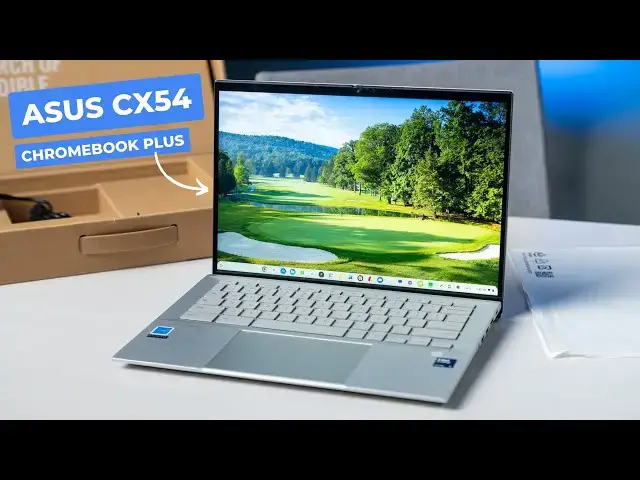
ASUS Expertbook CX54 Chromebook Plus: Unboxing
Sep 12, 2024


👉 Join Chrome Unboxed Plus for access to our private Discord, an ad-free website experience, ad-free podcast, AMAs, exclusive giveaways, and more! Start your FREE TRIAL here: https://chromeunboxed.com/join/
・・・・・・・
The ASUS ExpertBook CX54 Chromebook Plus is in the studio, and the version ASUS sent over has a few surprising upgrades up its sleeves!
📰 Read more: https://chromeunboxed.com/asus-expertbook-cx54-chromebook-plus-unboxing-video/
👉 Buy this UPGRADED ASUS ExpertBook CX54 Chromebook Plus: https://bit.ly/ASUScx54-16gb
👉 Buy the standard ASUS ExpertBook CX54 Chromebook Plus: bit.ly/ASUScx54
📧 Subscribe to our newsletter: http://bit.ly/2WjCDm7
・・・・・・・
☕ Fueled by Fresh Roasted Coffee! Buy the special edition Chrome Unboxed bag here: https://chromeunboxed.com/coffee
Subscribe to the channel: http://bit.ly/2xFuj6L
Follow us:
Show More Show Less View Video Transcript
0:00
The story of how this Chromebook, the Asus expert book, CX-54, Chromebook Plus, made it to our studio this week is a very interesting one
0:10
And this particular version that showed up is even more interesting. It's a whole story we'll kind of cover as we're unboxing it
0:18
So let's just dive in. But before we get in the box, a quick word about our growing and just frankly really awesome
0:30
Chrome Unbox Plus community. It's a spot where if you're into Chromebooks or Chrome OS or Google stuff
0:35
where you can go and connect with other really like-minded people in a really positive space and
0:41
chat and learn and interact with other people that are kind of the same mindset as you
0:46
And it's just been this really cool place since we relaunched it that I just enjoy spending a lot of time
0:52
And as a member over there at $2 a month, you get access to Joe and I who are in there constantly
0:59
access to a whole group of people who know a lot about ChromeOS and Chromebooks and who are big
1:04
fans of it, but also exclusive giveaways and AMAs with the ChromeOS team. We actually just had one of
1:10
those just a week ago or so, and it was awesome and a whole lot of fun. And again, it's just this
1:17
place where you can go and really enjoy conversation with level-headed people about Chromebooks
1:23
and it's a cool place to be. And so if you're interested in something like that, and it sounds
1:29
good to you, head over to cromunbox.com forward slash join and you can get all the details
1:34
including the fact that this gives you an ad-free access to our site and ad-free podcast
1:40
as well as all the other stuff I mentioned. It's an awesome thing. The people keep kind of pouring
1:45
in and it's just been a really fun place to be a part of. So if you remember, way back in January
1:50
when Asus first announced the expert book CX-54, which is what I'm going to call it from this point
1:56
forward. It was an interesting like announcement time because we thought it would show up at CES and
2:01
it didn't. And then we thought it would show up maybe early spring and then it didn't. And it was like
2:07
we had this pre-production device. Like we had hands on with this thing, I think in January or maybe
2:12
even December. And it was just this really odd timing thing because the one we had was definitely
2:18
very pre-production. It was kind of buggy and all that stuff. We didn't realize it was going to be like
2:22
six months before we'd actually see the thing. And then it finally showed up at good
2:26
Google's new Chromebook event, the Chromebook Plus event that was in May. It was there and it had a really attractive price because, again, we were guessing on all
2:34
of this stuff. It wasn't available. None of that stuff. It came in at 699, 8 gigs of RAM, 128 gigs of storage, 500 net quad HD display, awesome build quality
2:44
All that stuff was on display when we were there at the event. Super excited and we've been waiting to get our review unit like the actual one because I
2:52
can't even get the one that we had to boot up anymore. Like I said, it was pre-production, super duper buggy
2:56
So this thing arrives a couple days ago. And I just opened it up because ultimately we don't want to ever ruin one of these videos by opening this up and be like, oh, they sent us the wrong device
3:06
Or, oh, you know, because normally these things get handled before they get sent to us. And you don't want to open it up
3:12
And for some reason, we got a lemon and it didn't power on or something. And then we got to shut down the whole video and move on
3:18
So at least usually crack it over, make sure it's coming on, make sure it's the device we think it is
3:22
But the minute I crack this one open, I noticed something a little bit different about it. So I hadn't looked at the side of the box
3:27
and so it would have told me or I sorry the back of the box it would have told me had I done so This model is actually a different model It got the same core Ultra 5 115 U processor but it has 512 gigs of NBME storage and it has 16 gigs of RAM and it has I don think this actually says it on here but I figured it out after I opened it
3:50
I noticed the screen looked a little bit different. It's also touch enabled. So where this device, I feel like the standard Chromebook Plus model that's been on AIS's website for sale
4:01
hopefully in retailers at some point, while that device does not have a touchscreen has been one of those things that when people are like
4:08
I want something, I can't find the HP Dragonfly Pro anymore, I want something like that
4:13
It's been one of the ones that I've wanted to recommend, but without a touchscreen, it's, I don't know, it's a little bit different
4:20
From a build quality standpoint, I expect the exact same thing. basically from compared to an HP, but the HP had a lot of legs up
4:28
Granted, the consumer model of this is a full $300 cheaper. So this model, though, we're going to talk more about it
4:36
Obviously, it gets much closer to something like the Dragonfly Prob. So basic paperwork in here
4:45
What kind of charger do we get 45 watts? So I always love these little chargers
4:50
They fit in a bag much easier. And 45 watts is nice. So you're not just giving you like a 30 watt
4:55
Should charge relatively quickly. Nothing else really in the box here. It's not what you came for anyway
5:01
Let's get this guy out. And just like I remember that beautiful powdered, all aluminum chassis
5:12
incredibly rigid. I mean, that thing is just, there's no wiggle in that at all
5:17
Obviously, supports down here for fans, ports along the back for fans
5:20
all that kind of stuff. some feet on the bottom. We'll talk about those in a second
5:24
Speaker grills. And not much else. It's got a little bit of the vibe of the CX9 that came out a couple years ago
5:31
So it's a little bit angular, but it's very thin. I mean, here's my phone for just quick reference
5:37
It's very thin. I don't remember the exact. I think 1.39 or 1.69 centimeters is what comes to mind
5:43
I'm not sure if that's right or not. But I think that's roughly the case. It doesn't matter. It's super thin
5:48
Super light, too. So I think it comes in a little under 3.3.5. pounds, I believe. This one, I could be making this up. This feels a little bit heavier than the one
5:56
without a touch screen, but that makes sense because a touch screen should add a little bit of weight
6:00
in there. See if we still get the one finger lift. It'll get there. Feels like it's a little
6:06
tight out of the factory here. But all the same stuff in play, you get this super duper lifted
6:13
the ergo lift hinge, which basically it's not really, I don't think it's any more ergonical
6:18
but it does get the back of this off the table so that it can vent and fan itself a little bit better
6:24
Massive glass trackpad here with a great click mechanism. It's not flopping around
6:30
Feels really good. Man, ultra smooth, very large fingerprint scanner here. Up top, 8 megapixel camera, which roughly translates to 4K privacy sliders and check there
6:43
Before we log in and stuff, let's look around the sides. Because this is the other thing where this one actually beats the drive
6:48
Dragonfly Pro port selection. So you have headphone microphone. You've got two USB type A's
6:55
You've got a full size. I did remember looking this one up, HDMI 2.1. So you don't have to worry
7:00
about it not working with like 120 hertz and stuff like that These are Thunderbolt 4 ports I believe at least Thunderbolt 4 here and over here And microSD card with this one you probably won need that since it half a
7:14
terabyte of storage. But the standard model with 128 gigs of storage, be nice to be able to expand that if you want
7:19
to, Kensington lock, because this is a high-end device. And before I open this, before I log in, ASUS did get back to me right before we filmed this
7:30
And so this device, this particular version of this Chromebook, is actually meant for B2B Enterprise
7:37
So it's one that you would get from like a reseller. But they did give me a link to CDW
7:41
We will put that link in the description that if you want to buy this version of it, not the standard 699 version
7:50
It's actually right now it's CDW, so they might shift the prices
7:54
It's around $920,930. And again, that's upgrading you to half terabyte of storage, 16 gigs of RAM
8:00
and then giving you a touchscreen option here. But let me get logged into this thing
8:04
and then we'll crack it open and talk about some of this other stuff, like screen and all that good stuff
8:09
All right, so got logged in and all set up here. And just like I remember, this thing is just an absolute treat to use
8:17
The screen is definitely different than the other model that we had
8:22
So instead of having that plastic surround, like you normally get on a non-touch screen
8:26
this one is just completely flat. So you have your bezel and all that kind of stuff. It's the way you'd expect
8:31
There's no break there. And there are fully matte finish, you know
8:36
surrounded screens that have touch to them too. This one's like kind of sort of matte finish
8:41
It looks like there's a little bit of anti-layer treatment on here, but not a ton. It gets wildly bright
8:46
I mean, way too bright for our cameras. We're under 50% here in order to not blow the shot out
8:53
So it looks great. Quad HD, 16 by 10, 14 inches. And at 500 nits of brightness
8:59
So really impressive screen overall. And then above that screen actually is a camera that comes in at 8 megapixels
9:06
I've kind of forgotten about that. This is just one of those devices that it's been around so long
9:12
and then we haven't been able to use it for so long. Like I just kind of forgot some of the cool stuff that comes with it
9:17
And the screen or the camera looks really great. So I'm going to point it over here
9:23
I mean, it's darkness over there. There it goes. So it's adjusting up pretty impressively
9:28
and then let me show you a photo that I took real quick while we were getting set up
9:33
And I mean, you can see the detail level and the hair and all that kind of stuff. So, I mean, it's able to record video at 4K
9:40
And then it's an 8 megapixel front shooter. One of the better, if not the best camera I've seen on a Chromebook
9:46
This thing looks really, really good. It's doing really great in all the different lighting conditions and stuff
9:50
It's not freaking out under the big studio light. So very well done on the camera
9:55
And then you've got the speakers. While a lot of people are going to want to compare this or try to like, compare and contrast it with the HP Dragonfly
10:01
It's not on that level from a speaker standpoint. Most laptops, I don't think any laptops really are completely
10:07
You could argue maybe my MacBooks, stuff like that. Maybe you're in that realm. But this thing holds its own
10:13
Like listen to the spoken word here. You're hearing my voice like real time, like live
10:17
Here is it coming from the Chromebook. Acer Chromebook Plus 514 as a device
10:21
I didn't fully appreciate until I actually spent some real time. Pretty good. Since it debuted, it's 100% work
10:28
consideration. So let's get into it. Catching some of those low tones So that nice I mean obviously on a on any laptop spoken word sounding awesome is probably most important thing because you going to be in video calls and that kind of stuff
10:45
Being able to hear those spoken words and feel like you're in that conversation, super important
10:50
This thing's going to do that very well for you. So that takes care of the screen
10:54
Obviously, the camera does have a privacy shutter up here, which is always a nice touch
10:59
The keyboard feels amazing. Like, listen to the click on these things
11:03
every single the new acer chrome still clicked in there sorry about that
11:07
now listen really nice and quiet but such a massive amount of feedback on
11:15
the click here it's impossible for me to obviously show that to you but nice amount of travel
11:19
and since it's a nice sturdy keyframe obviously as well and this this keyboard feels great
11:25
it's going to be a real pleasure getting the type on this then massive glass track pad here
11:30
great click mechanism that clicks basically anywhere at the top it gets a little tough but anywhere you're going to go to click no problem there but
11:38
it's not flopping around it's glass it's smooth it's large great feeling track pad and then obviously
11:43
you get the fingerprint scanner here as well it just makes logging in so much nicer like let me used to
11:49
using a pin all the time i've got one set up that i can kind of do by memory but it's still nicer
11:55
to just be able to open the chrome book and touch this and be logged in it's a nice touch i love that
11:59
always being there. And then on the inside of this thing, this particular model, again, I've
12:05
said this before, Core Ultra 5, 115 U, 16 gigs of DDR5 RAM
12:11
and then 512 gigs of NV storage for 920 bucks. So you can quickly see, like as you
12:17
start putting the pieces together, who might be really interested in this
12:21
version of this Chromebook? And sure, I know it's meant to be sold B2B
12:25
and, you know, enterprise channels and all that kind of stuff. But I mean, this thing
12:29
is top notch in just about every way, shape, and form. I don't think I mention it, but there is backlighting on the keys as well
12:36
So it is there if you need it. It's these gray keys again. So under big light, you're better off turning it off
12:42
It's not my favorite thing in the world, but it's going to work in dim situations the way you need it to
12:47
And during the day, you probably just want to turn it off. But overall, the main version of this thing that's going to be available, hopefully at some other retailers soon, the $699 version
12:57
contains all the good stuff in this. So you're still getting the same processor
13:02
It's 8 gigs of RAM, but that's a good solid amount of RAM. 128 gigs of storage is enough for a lot of people
13:07
especially with an SD card slot. You're going to get the same ports. You're still going to get a 500 knit screen
13:12
with great viewing angles that looks awesome. It won't be touch. But you're still going to get an 8 megapixel camera
13:17
You're still going to get the same keyboard frame with back lighting. You're still going to get a fingerprint scanner
13:22
Still going to get that big glass track pad. So you're getting most of what you would get in this device
13:27
hopefully, you know, at other retailers down the road, and you're getting it for much less money
13:33
So $6.99, and hopefully, you know, in the next few months, we'll start seeing some sales on it and that kind of stuff
13:38
And maybe you get it for $600. But even at $700, this thing is ultra premium
13:43
It feels amazing. And I'm really, really looking forward to the review process on it
13:48
But guys, that's it for this one. If you enjoyed this video, give us a thumbs up. Head down there, hit that subscribe button
13:53
And be sure to bring the notification icon. if you'd like to be alerted when we make future videos just like this one
13:58
Until next time, we'll see you
#Computer Hardware
#Laptops & Notebooks
#Consumer Electronics
#Other