Up next in 10

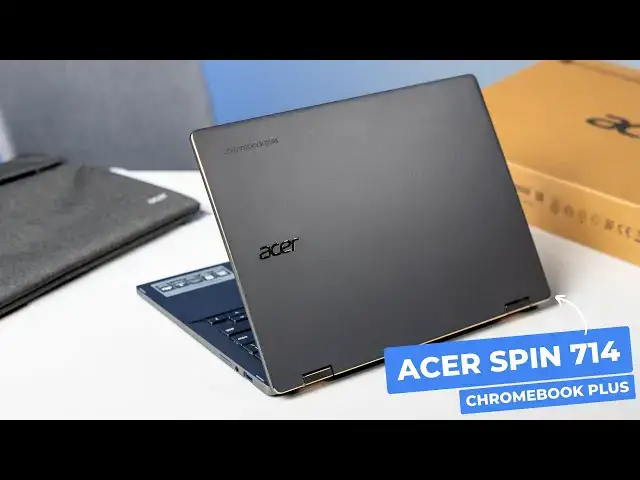
Acer Chromebook Plus Spin 714 Unboxing & Impressions
Sep 12, 2024


👉 Join Chrome Unboxed Plus for access to our private Discord, an ad-free website experience, ad-free podcast, AMAs, exclusive giveaways, and more! Start your 7-day FREE TRIAL here: https://chromeunboxed.com/join/
・・・・・・・
The Acer Chromebook Plus Spin 714 is the latest iteration in Acer's popular line of high-end convertible Chromebooks, and after spending a few minutes with it on this unboxing, it's an update that is better than I expected it to be. While it may seem like a minor iteration on the surface, a closer look reveals significant refinements (specifically in the chassis) that really enhance the overall user experience.
📰 Read more: https://chromeunboxed.com/unboxing-the-new-acer-chromebook-plus-spin-714-video/
👉 Buy the Acer Chromebook Plus Spin 714: https://howl.me/cmPjYoToVQI
📧 Subscribe to our newsletter: http://bit.ly/2WjCDm7
・・・・・・・
☕ Fueled by Fresh Roasted Coffee! Buy the special edition Chrome Unboxed bag here: https://chromeunboxed.com/coffee
Subscribe to the channel: http://bit.ly/2xFuj6L
Follow us: https://x.com/chromeunboxed
Show More Show Less View Video Transcript
0:00
So today in this box, we have the admittedly iterative update to the ACER Chromebook Spin 714
0:08
And that device has been really awesome in its last few iterations
0:12
But this is the official Chromebook Plus branded version that came out just this May
0:17
We finally have it in the office, so we're hopping in the box to check it out. So I do actually have right off camera here the last version
0:28
So this one's got the 13th. gen until core i 3 or i 5 i think i don't know so we'll be able to kind of see that for comparison
0:36
because we actually only had hands on with this thing i kind of thought we'd leave the event with one
0:41
of these um so i i looked at it for a second and moved on um so we actually didn't spend much time
0:47
at all with this device hence why we're actually doing an unboxing with this one um and as as they
0:53
have been lately uh acer is sending over a case with this one um i'm going to pull
0:59
pull this thing out of here and see what it looks like, but I would guess it's going to be a great case with pouch in the front. That's what Acer's been doing for a little while, but I appreciate
1:08
that. Like at one point Acer was like shipping mice with their Chromebooks, which is kind of cool too
1:13
I guess. But I think this is far more useful for more people. Let's just pop this dude open
1:21
give it a look. I like to use these while I have them. It helps me, as anybody who's been around
1:26
here for a little while knows. I've dropped a Chromebook or two. over the years. So this helps me ensure that I'm not going to break something. So yeah, just
1:34
a pouch in the front padded case here. It's a nice touch. I mean, if it's not going to drive
1:39
the price up at all, to be able to ship a case with your Chromebook is kind of a nice little
1:44
addition that Acer does. But here's what we all came for. Let's be honest, a new Chromebook
1:51
Plus branded. And if memory serves, I don't think it looks that much different than last year's
1:57
version. I don't think. Again, I could be wrong. I probably should have went back and
2:01
at least watched our hands-on video before doing this. But let's pop this bad boy open. And as
2:08
always, inside the Chromebook box, not much. A lot of recycled stuff, which is always a thumbs up
2:13
If you can recycle these boxes quickly and easily, that's awesome. Two-piece charger
2:18
USB Type C, obviously. And then the actual Chromebook and, you know, the general paperwork and stuff
2:26
that's always in there. Yep, as soon as I pull it up, even they have the same kind of gold accents here
2:31
So I think we're going to be in for a lot of the same. And we've talked about that on the website, at least
2:37
about the fact that the May event that we went to was a lot of iterations
2:43
So I talked about that a lot in the 516GE review. I put it in air quotes because we talked about some of the new stuff
2:51
the couple small iteration things. But ultimately, what Acer's done and what a lot of companies have done
2:56
Asus has done the same with the new Chromebooks that came out in the spring is just kind of
3:01
really iterate. So getting some of the more AI-centric Intel silicon in here
3:08
So these core ultra chips and not changing a whole lot else about these devices
3:13
And so we want to kind of check out and see what might be different in this one
3:17
So let me get them side by side. I'm not going to spend a ton of time talking about these side by side
3:22
But I just, I noticed looking over here that there's one, specific difference I noticed Again this is this is a little stuff but you see that nice rounded edge there It makes this whole device feel more approachable which I know it a small thing
3:37
But you can kind of see the sharp corner here on the backside of the last gen version of this thing
3:44
I apologize. We got this one off the shelf. It's a little dusty. And it looks like, yeah
3:49
So last time around, they kind of got rid of the chamferred edge on the top
3:53
They brought that back. I like that. I think it's a cool look. So hopefully you can catch it there
3:59
How would I grab that? Is that working? Okay. So, yeah, they brought this chamfered edge back
4:04
Kind of gives it that like mirrored finish around the edges. I like it. It's a nice touch
4:08
But then those rounded corners. So, okay, there's more different here than honestly I expected
4:13
I felt like I was going to get this thing out. It was going to be the exact same chassis
4:17
You got less of the kind of slope around the sides on the new one versus the old one
4:23
So this is a new chassis. So if I've underrated that prior to this, I apologize, Acer
4:31
The bottom piece looks pretty identical here. Same fan ports, all that stuff
4:37
Definitely aluminum. So aluminum top and bottom, which is good. The 714 is exhibited great build quality for years at this point
4:44
And then you've got the same kind of gold accented hinges. And again, as I'm turning this thing, I'm seeing the Chamford Edge here kind of mixing with that shiny, goldish
4:55
Well, there's a little chanfer there. So I spoke too soon. There is a chamfer across the back edge here
5:00
But I like those accents kind of all going together. That's pretty cool there
5:04
So yeah, let's open this thing up. The last few 714s have had a one finger lift
5:11
This one is no different. So awesome. Love to see that. And as soon as I open this, I realized there is one other difference
5:19
The speakers on this one are in a different position. Again, it's one of those things I didn't, I don't know
5:25
I just didn't notice it in New York. So we open this guy up so you can kind of see their keyboards here
5:31
And as you can see, I mean, we even have a different chassis on the inside as well
5:35
So not only do we now have these rounded corners towards the top of the keyboard, the back
5:40
It's still kind of got that sloped off thing going on. But I feel like the edges are a little boxier
5:48
Not a ton, but a little bit. But yeah, your speakers are now left and right oriented instead of a bar across the top
5:55
that makes for, as you can see with these guys side by side, it is a much larger trackpad area
6:00
because now we've got that vertical space to move the keyboard kind of upward and move the
6:04
keys or the speakers to the side. And now we've got more trackpad space. I kind of was hoping
6:08
that I'd forgotten about this and maybe they'd like chamfered the, they'd still get that little
6:13
kind of accent around the edge of the track pad. I was kind of hoping to be that same gold
6:17
That would be a kind of a neat little tie-in aesthetically. But the same kind of plastic-y alloy
6:24
kind of stuff that they've been using. But you can see right there on the edge. Hopefully that picks up on camera
6:30
It's just a different shape on the inside. I mean, this kind of almost slopes upward towards the edge to kind of square the edge off
6:35
Whereas this one is sloping downward around the outside. And what I noticed immediately picking this thing up is when we convert them
6:43
this is something I tend to not like convertibles a lot of times because they want to slope
6:47
the bottom and the top of the chassis away from kind of the main part of the Chromebook
6:52
It looks better on a desk. whenever it's in clamshell, but when you flip it around, you kind of get this motion going on
6:58
It like putting two ends of bread together backwards You know it doesn really look good It doesn feel good It not nice to use You see that pretty considerably on this version the older version of the Spin 714
7:13
And that's been the case for the last few builds. It's a little less noticeable on this version
7:19
On the new one, not a ton, but the boxy sides help
7:23
Kind of bring that together a little bit. But the biggest difference here is those rounded corners I talked about
7:28
I wasn't even thinking about this. but when you go to convert it and pick the thing up, those corners go right into your palms as you're holding it
7:35
Well, whenever you have these squared off corners like this, that does not feel good
7:39
I mean, it's not just like, oh, that's a little uncomfortable. Like, it kind of hurts, to be honest with you
7:44
And so it dissuades you from wanting to pick this thing up as a convertible
7:48
So I like that move. I think it makes this more of an approachable tablet type device that feels so much more comfortable in the hand
7:56
So kudos to Acer for making that particular. change. Real quick, around the sides, this one has the two USB type Cs over on one side, along with
8:06
the full-size HDMI slot. And then on the other side, you've got one USB type A, headphone
8:12
microphone jack, and then your volume rocker. So you still get a pretty decent selection of ports
8:18
Get a nice little bit of lift there for the battery. You can kind of see that thing coming up
8:22
off the table, just a scosh. I don't love it when that's like overdone. But overall, the hinge feels
8:28
great. It feels solid yet it's not hard to open. Obviously you get a one finger lift. That's pretty
8:34
awesome. And this new layout, the kind of more rounded but boxy
8:38
version of this looks really good. I like all of that. So let me
8:43
break real quick. Let me get logged in. That'll give me enough time with the keyboard and stuff
8:46
I'll let you hear these speakers and see what they sound like. All right, we've got this thing up and running
8:50
and I can tell you right away a couple things I'm liking right off the bat
8:54
So for one, I've liked the 714 keyboard for a little while
8:58
There was a period where ACER, even in their nicer Chromebooks, was getting to a point where their key caps were kind of wobbly
9:04
And so I would get used to them. You can tell here, I'm putting just a little bit of pressure to see if there's a little wiggle
9:10
No wiggle there. You've got backlighting obviously here that's done the right way with nice dark keys
9:15
And that backlighting will just come up through the letters when needed. I wish ASUS would get their heads around that
9:21
The light gray keys and the light gray letters and symbols is just not a good combo
9:26
This works really well. The track pad feels amazing too. I'm pretty sure this is a gorilla glass track pad
9:33
And not ocean glass. I could be wrong on that. I'm looking down here on the little thing
9:37
It does not say. This one feels really good. And the click mechanism is very quiet
9:43
But really reassuring. Clicks kind of up towards the middle pretty easily
9:49
And, you know, nice and smooth. So I just, the 714 before kind of had that squished track pad
9:55
This is a much nicer surface. Again, the keyboard feels really great to type on
10:00
It's nice and quiet as well. Believe, believe it or not. How many times am I going to do that before I don't smash on the keys with stuff up
10:10
But yeah, the keyboard feels really good. The speakers are great. The track pad's enlarged
10:15
The rounded sides. Like, all that stuff is really good. So I'm going to pull up this clip of R516 review here
10:23
Let me get to a spot where there's some music. And I can really hear. some nice stereo separation here, which is a benefit of having your speakers on the left side, left and right side
10:31
Let me give you a listen real quick These are actually two different Chromebooks Not the deepest base I heard The one out there on top is the original ACER Chromebook 516 GE that I loved for a couple years and the one below it is the new
10:44
ACER Chromebook plus 516 GE that is about as iterative of an update
10:50
as you can get. So let's talk about it. Definitely loud. They're not the fullest speakers
11:00
Again, I wish that there would just be a level jump basically and I guess there kind of has been over the past few years there's been
11:08
just a slight a slight something like a half level jump of speakers they're not just abysmal
11:15
and terrible anymore but I know it can be done in this amount of space I mean we've seen the
11:21
pixel book go and the HP Dragonfly pro we know what can be done with this space and I know
11:26
it costs a little bit extra and it's one of those corners that's an easy corner to cut and so as long as
11:31
works well for calls, video calls. I think you're doing just fine
11:36
Speaking of those, the last thing I want to show you here, I believe we get a quad HD camera
11:41
Let me pull it up to make sure. The 714s over the last little bit
11:44
have had just fantastic cameras on them. I'm seeing a 1.9 megapixel resolution
11:51
Let me go to 16 by 9. Oh, there we go. Once I went 16 by 9, I got full
11:55
So 3.7 mega, but yeah, it's a quad HD camera. and that looks really good
12:02
man that looks really really good you get a privacy shutter at the top
12:07
I'm going to point it at Joe like I always do let it adjust here for a second come on baby here it goes
12:11
and it's dark over there it really is it's bringing up the light quite a bit
12:17
and obviously you get your privacy shade here and it's Chromebook Plus obviously so
12:21
you have some ability to control the camera features and stuff there as well
12:25
so all that stuff's there I'm impressed. To be honest, I think I slept on this Chromebook just a little bit because when we walked by it
12:34
I just assumed we'd have it almost immediately. I was kind of enamored with the 516 GE, to be honest
12:40
And I was just like, oh, you know, it's another 714. But they've made some changes here to the chassis that I think are really beneficial
12:48
I think moving the speakers left and right is a big deal. Rounding these corners off is a way bigger deal than I initially thought until I just opened it up
12:55
and put it in my hands. and generally keeping all the other good stuff
12:59
We didn't talk about it. It's a 14 inch screen still 16 by 10, 1080P
13:04
It's 1920 by 1200, but 16 by 10, 350 nits. It looks great
13:08
As always, they've carried that panel through this 14 inch 714 for a little while now
13:14
So they've got all this stuff kind of together to make a great Chromebook already
13:18
great I.O, all that stuff. They've just kind of continued that and refine some edges here
13:23
This is the type of iteration I love to see in high-end Chrome. Chromebooks because if you're going to ask somebody to pay 700 bucks for something, you need to be thinking through those kind of things
13:31
And so Acer has done a good job with this. We're in the middle of reviewing a couple of Chromebooks right now
13:36
This one will be next in line. And so I'm excited to start using this thing
13:40
It feels really nice. It looks really great on the table. But for this one, that's it
13:45
If you enjoyed this video, be sure to give us a thumbs up. Head down there
13:49
Hit that subscribe button and ring the notification icon as well. If you'd like to be alerted when we make future videos just like this one
13:55
Until next time, we'll see you
#Computer Hardware
#Laptops & Notebooks
#Consumer Electronics