

Support our independent tech coverage. Chrome Unboxed is written by real people, for real people—not search algorithms. Join Chrome Unboxed Plus for just $2 a month to get an ad-free experience, access to our private Discord, and more. Learn more about membership here.
START FREE TRIAL (MONTHLY)START FREE TRIAL (ANNUAL)
Trackpads are a quintessential part of the laptop experience these days. Sure, over the years we’ve tried all sorts of mobile pointing devices, but the standard pointer input has clearly become the trackpad.
This is especially true of Chromebooks where, all the way back to the beginning, every Chromebook has been equipped with a trackpad in lieu of any other sort of pointing device.
When they first came out, trackpads were pretty terrible and many people opted for a standard, handheld mouse instead. Most of those poor experiences were honestly the fault of Windows laptop makers over the years. Proprietary devices, specialized drivers, poor support and the lack of any form of checks and balances led to truly frustrating experiences for users.
Luckily, there was a company that took aim at trackpads and truly fixed the way they operate. And that company was Apple.
Now, you won’t see me praise Apple for much around here, but credit must be given where it is due. Apple took a decidedly different approach to trackpads and chose to treat them more similarly to the way we interact with phones and tablets with touch screens. The approach worked and, after many years, even Microsoft and their Precision Touchpad drivers reflect this approach.
The way Chromebooks treat trackpads is clearly influenced by Apple and we’ve enjoyed very good trackpad expereinces across all price ranges of devices for years. The one factor at play with Chromebooks is always the quality of the trackpad hardware, but the software experience has always been great.
The Problem
All that is fine and well, but with trackpads being the standardized pointing device on laptops these days, there is a serious and glaring hole in the device ecosystem for both Chromebooks and Windows machines: wireless trackpads.
When Windows 8 came out, there were a few companies that made wireless trackpads, but back to my earlier point, people weren’t really feeling the whole trackpad thing. As a result, I’m sure those trackpads on offer didn’t sell very well and were discontinued.
Now that we are in an era where most people are comfortable with good trackpads and Microsoft finally has a standardized driver set for them, we now have NOT A SINGLE WIRELESS TRACKPAD ON OFFER. Not even from Microsoft.
Sure, you can buy some used ones and the Logitech T650 is the best of the bunch, but even Logitech has exited the market and they don’t actually make them any longer.
So, if you want to have a trackpad on your desk for when you extend your display or for your Chromebox or for your Chromebase, you are simply out of luck. The few Logitech T650 devices you can find are exorbitantly priced and are used. Apart from that, there simply aren’t any other options.
Back to Apple
However, it looks like it might just be Apple to the rescue again. Well, to be more specific, it is Apple’s dedication to the wireless trackpad and a few thoughtful developers in the Chromium Repositories.
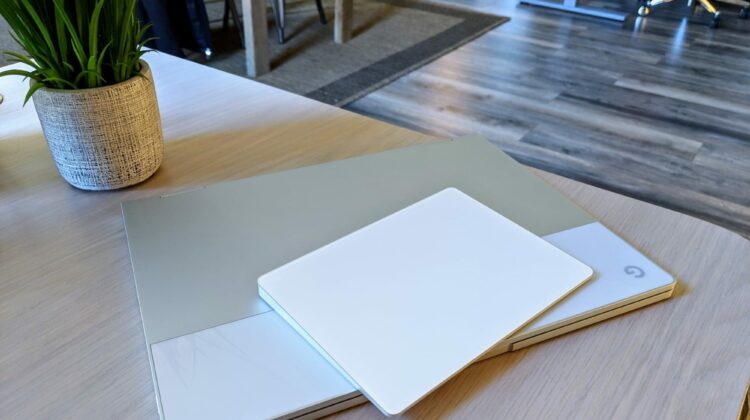
We found a commit just the other day that pointed to full support coming for the Apple Magic Trackpad 2. This device is – without doubt – the nicest wireless trackpad you can get. It is large, glass and outfitted with Apple’s shockingly-good haptics. Even though it has no moving parts, the haptics create a 100% realistic click feeling that needs to be experienced to be believed.
We were curious to see this in action, so we jumped over to the Dev Channel on the Pixelbook, paired up the Magic Trackpad 2, and were off and running. No flags, no settings, no drivers, no installation. The device worked exactly as you’d expect, every gesture, click and movement executed with perfection. I even worked from it for an hour or so with no issues whatsoever.
We fully expect this support to work its way down to the Stable Channel very soon, so you won’t have long to wait if you are in the market for a wireless trackpad. The best news? Even though we only have one option at this point, it is the best possible trackpad you can get. Large, all glass, responsive, Bluetooth and wired operation with support for all Chrome OS gestures. Oh, and you can find them as low as $70 brand new on Ebay, too.
Buy The Apple Magic Trackpad 2 on Ebay
Buy The Apple Magic Trackpad 2 on Amazon
What more could you want in a wireless trackpad? For me, not much. Check out the video below to see it in action.

