


Support our independent tech coverage. Chrome Unboxed is written by real people, for real people—not search algorithms. Join Chrome Unboxed Plus for just $2 a month to get an ad-free experience, access to our private Discord, and more. Learn more about membership here.
START FREE TRIAL (MONTHLY)START FREE TRIAL (ANNUAL)
Acer recently made their much-anticipated 14″ Chromebook refresh official and even though it’s still not available for purchase, two new variations have popped up on their website.
We haven’t had a chance to get hands-on time with the Acer Chromebook 514, yet. However, based on the specs (that are everything we’ve longed for) this could be the perfect device for the average consumer that isn’t interested in a convertible device.
The three available options don’t stray very far from each other but there are some distinct differences including the price.
So, which one should you buy?
To answer that we need only look at a couple of things. First, the internals of each model. The base model sports an Apollo Lake N3350 dual-core processor. While I wasn’t a fan of these chips when they first appeared on Chromebooks, they have proven themselves a worthy successor to the Braswell lineup in aging devices such as the Acer Chromebook R11. The next model up gives you the quad-core Apollo Lake N3450 but it’s tough to say if moving up to the N3450 is of any benefit.
Side-by-side, the two processors paired with 4GB of RAM produce nearly that same benchmark scored with the N3350 occasionally trumping the N3450.
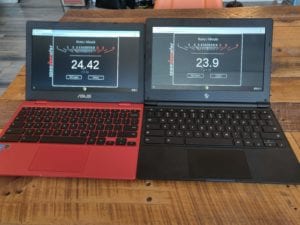
Right – N3450 Quad-core
We can honestly call this a wash when it comes to the processor. So, let’s look at what does matter. The mid-tier model will get you a touch display and double the storage at 64GB. This is handy with the addition of Android apps as well as Linux apps. While not a convertible, I find having a touchscreen is useful even when in clamshell mode and I find myself missing it when I’m on a non-touch device.
That leads up to price. The touch-equipped Apollo Lake model is only $50 more than the entry-level that comes in at $349. Unless you just don’t care about touch and have no need for the extra storage, my pick would be the $399 model. But, that’s just me.
Don’t worry, I didn’t forget that there is a third iteration to consider.
The “high-end” Acer Chromebook 514 features the same Pentium N4200 found in their latest 15.6″ device that debuted in New York earlier this year. The Pentium gets the job done but it is a serious step down from the Pentium from the Skylake era of Chrome OS. Many benchmarks put the N4200 right in line with the Apollo Lake chips and again I think the differences are negligible.
Where this $499 model wins is in the RAM department. You’ll still get the touch-display and the 64GB of storage but Acer has doubled the RAM to 8GB. That may not sound like a big deal considering comparable Windows PCs come with 16GB and even 32GB all day long. The difference here is that Chrome OS thrives in the 8GB RAM arena. I operate mostly from and Acer Chromebox and the Spin 13. Both of which have 8GB of RAM.
With Linux apps running, an IDE, Allo and multiple tabs, I can see a very noticeable decline if performance when using a Chromebook with 4GB. My 8GB devices never really bat an eye. Don’t get me wrong, for casual use the 4GB models will be more than enough. However, if you plan on putting a Chromebook to real work, 8GB is a necessity.
Sorry if this hasn’t helped you make a decision but long story short, I’m getting the 8GB Pentium model because, well, I want it. As far as my recommendation? I’d probably point most to the mid-tier $399 model. Either way, they aren’t technically available at the time of publication but a number of listings have it shipping within 2 weeks. Amazon has the $399 model on offer and it says it will ship within 1-2 months but I suspect it will be sooner than that.
You can check out all three models for comparison here.

