


Support our independent tech coverage. Chrome Unboxed is written by real people, for real people—not search algorithms. Join Chrome Unboxed Plus for just $2 a month to get an ad-free experience, access to our private Discord, and more. Learn more about membership here.
START FREE TRIAL (MONTHLY)START FREE TRIAL (ANNUAL)
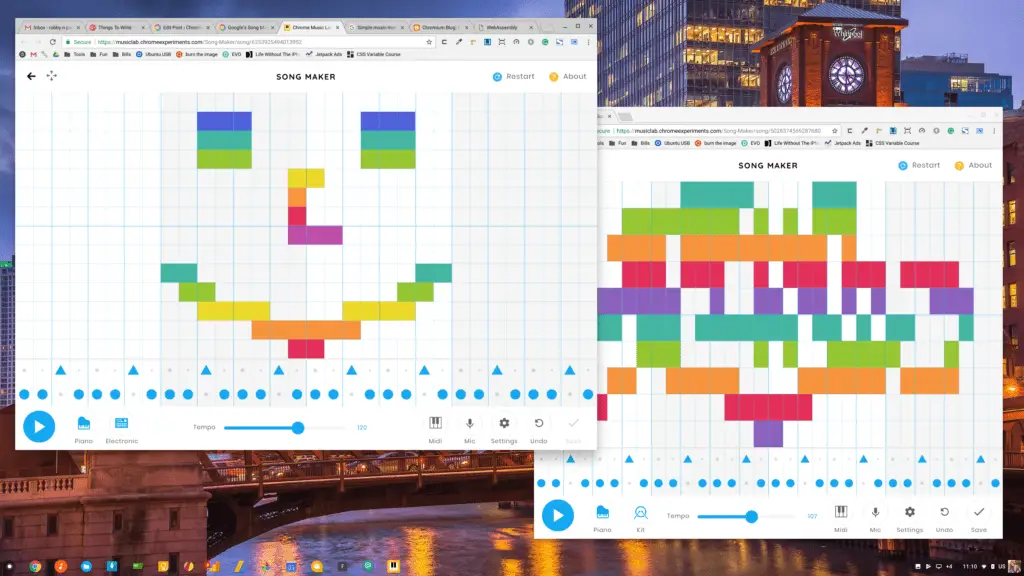 We’ve not talked expressly about Google’s Chrome Music Lab, but it falls into the same category that Chrome Experiments does: it is a place to showcase what is possible in Chrome from different perspectives. We have discussed Voice Experiments and the Music Lab is quite similar. Take really amazing web-based tech and push it as far as you can imagine in a particular category. None of these labs or experiments will stand alone as a piece of software, but they are fun examples of what is possible.
The Chrome Music Lab has been around for a bit, but the newest part of this collective is really, really impressive from a technical point of view. In one web-based application, Google manages to visualize making simple music while impressing users with a slick, simple and wonderfully-responsive UI.
I’m a musician, so I understand time signatures, scales, keys, tempos and the like. But for those who feel a bit intimidated by that stuff, this tool is a great example of why sequencers are powerful tools for music creation. You are limited to a single melodic instrument and a single rhythmic one, but the process of creating in this visual way is compelling and fun.
Exactly what Google was after.
I must admit, I wasted a good half-hour playing with the app this morning and creating a silly little song. All you have to do is touch squares on the screen to place “notes” with the instrument you’ve selected. One at a time or string them together by dragging your finger or mouse pointer across the screen, there’s no wrong way to make an entry. If you don’t like what you’ve done, simply click/touch that entry again and it is gone.
There’s not a lot you can do with it after you make your sequence. This is all about the creative process of making music, not about production. If you like, you can share it via shortlink, Facebook, Twitter or embed it on a website. Even cooler, you can jump into someone else’s creation and start editing it on your own. There’s no saving, only sharing. Your creation lives at a unique URL until it is edited. At that point, when you save/share again, you end up sharing a new and unique URL. That means my smiley face song could get edited, shared, edited, shared…on and on forever. No logins, no files, no saves.
It is kind of brilliant.
Check out my “song” below that is the musical equivalent of a smiley face with a little beat (and a quick music lesson that any notes played solo or together in a pentatonic scale sound good!).
More of a Technical Marvel
Look, I had fun making that. I did. I made something much more intricate before that, but I wanted to show something a bit more fun and spontaneous to illustrate: this is why things like this lab exist. Fun. Visuals. Ease of use.
Not for writing symphonies.
That being said, the technical parts on display here make people like me wonder what is possible with this sort of web technology. There are a few things worth noting here that should not go unnoticed.
Smooth UI: First and foremost, this doesn’t feel like a web application. Smooth, responsive, and beautiful; Song Maker feels like something that is installed locally on your device. It is a perfect example of what can be done with web technologies and the cleanliness of it all gets me so excited about the future of the web.
Unique Save States: As I mentioned above, the idea that your creation lives in a unique state that is accessed via URL only is very progressive. Sure, behind the scenes, this is what is happening with things like Docs or Calendar, but to do it in this way makes me so curious about what collaboration would look like with this type of system. When I save my work, I keep the latest URL. If someone else takes that URL and builds on my work, it doesn’t affect my work at all, but it gives others a way to see/edit my creation without need of usernames or passwords. It is all based on the unique URL.
I know this wouldn’t work for all things, but I want to see more collaborative, creative work happen like this.
MIDI Sequencing: To this point, we’ve only talked about note entry via touch or mouse. If you have a MIDI keyboard, you could plug it into USB and enter your notes that way as well. Though not really useful for this Lab, the thought that a web app can cleanly leverage MIDI input is a great sign for music creation tools down the road that don’t require any sort of download.
Voice Recognition: This one was probably the most impressive. You can click the mic and sing your notes in. Granted, you have to have some decent pitch to pull this off, but as long as you can hum your not for a second or two, the app will enter it. You even get a little graphic showing you if you are above or below the pitch.
The fact that this is all happening in my browser is literally blowing my mind. It all works on your phone, too.
Folks, we’re in a very, very interesting point in the evolution of the open web. Dieter Bohn wrote a brilliant piece on the difference in the web and the internet you should go read. Afterwards, you should be very excited about the efforts of Google, Apple, Mozilla, and Microsoft to embrace these encompassing standards. With WebAssembly and Progressive Web Apps becoming standardized, we are on the edge of seeing the web blossom into what many people have wanted it to be for many years.
Exciting times.

