

Support our independent tech coverage. Chrome Unboxed is written by real people, for real people—not search algorithms. Join Chrome Unboxed Plus for just $2 a month to get an ad-free experience, access to our private Discord, and more. Learn more about membership here.
START FREE TRIAL (MONTHLY)START FREE TRIAL (ANNUAL)
 You’d be forgiven for seeing an enormous price tag like the one in the title and clicking in here just to find a reason to say nothing focused on a meeting room is worth that much money.
You’d need more details to really make that judgement (as I did) and you’ll likely feel different after knowing those details.
So, let’s chat about what comes in the box for just shy of $2K.
Included Hardware
I’m going to list this stuff first just so you can get an idea of what we are dealing with and we’ll talk about each part afterwards.
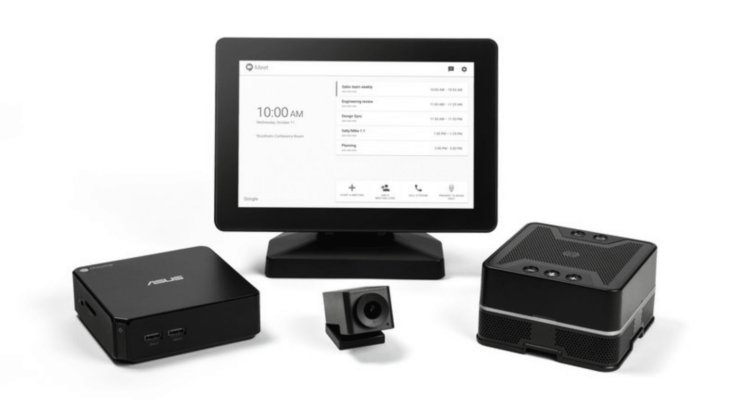
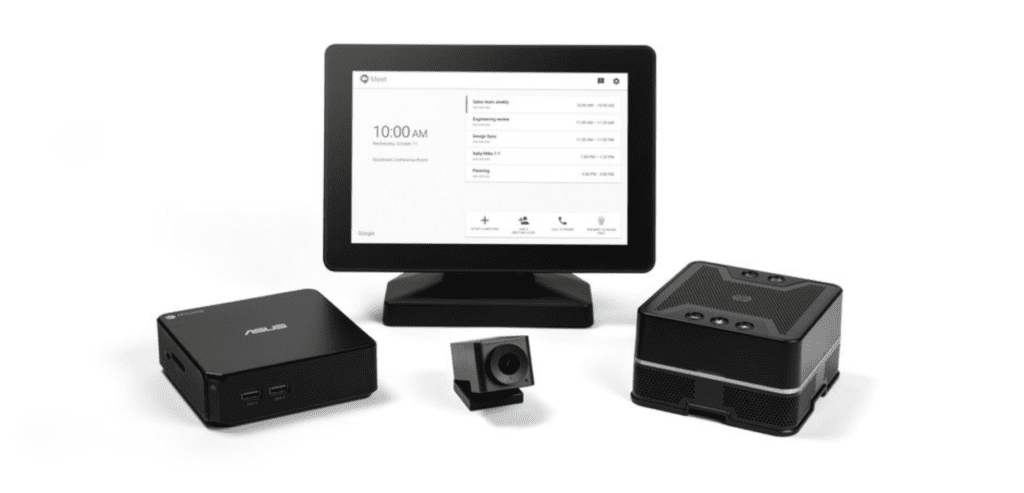
A single kit comes equipped with:
- ASUS Chromebox CN62 (i7 Model)
- 4K Wide Angle HUDDLY Web Cam
- MIMO 10.1-inch IPS Touchscreen
- Google-designed Speaker/Mic
Now, if you are like me, you see an older Chromebox, a small touch panel, conference mic/speaker, and a webcam. How could that cost $1999?
If you are discounting this package so quickly, like me, you’d be mistaken.
Once you look just under the overview of components, you’ll see what would make this an amazing conference room experience.
The Chromebox
Sure, the ASUS CN62 isn’t the latest-greatest in Chrome OS hardware, but it is still one of my most favorite pieces of hardware. If I could get a consumer model of the i7, I’d still have that as my desktop device of choice. The hardware is dead-simple to upgrade. Seriously, you could add up to 16GB of RAM in all of 15 minutes.
The SSD could be swapped while you were in there, too. Both of the upgrades are pretty affordable, too, so the 4GB of RAM this thing ships with could be remedied in a very small amount of time.
For what it is worth, with this device being positioned as a video chatting tool, the 4GB of RAM it ships with will do just fine.
With plenty of ports, a nice design and dual monitor outputs, the ASUS CN62 will do quite well here. That second output could be used to display whatever other things that are pertinent to your meeting, as well, on another screen. It is Chrome OS, after all, so what you use that other screen for becomes pretty limitless.
The Camera
The camera, from a quick bit of research, looks amazing! Made by a company called HUDDLY, the device isn’t even publicly available yet. You can check their website and see for yourself all the tech and awesome that is built into this little dude. If you do nothing else, scroll down to their demo where you can see the difference in standard webcams and the HUDDLY.
It is striking and clearly shows that this is no ordinary webcam.
The Touch Panel
Made by a MIMO, the touch panel will work in conjunction with the Chromebox. I’ve never used a 3rd-party, standalone touchscreen with a Chrome OS device, so I can’t say how well it works.
The concept makes sense and lots of kiosks out in the wild use touch panels and Chromeboxes, so I’d assume the integration can be tight.
This particular screen is pretty bright at 350 nits with wide viewing angles thanks to its IPS makeup. As a quick and easy way to control the meeting room, this makes good sense. As I said above, you could also send the ASUS’ second monitor output to another, larger screen for just about anything you’d want to do.
For most meetings, I imagine this screen will do well.
The Speaker/Mic
This part of the package doesn’t have quite as clear of a product page. As a matter of fact, it was made by (or more likely, for) Google and in conjunction with their team, so there’s no 3rd-party site to check out.
What it does boast, however, sounds reminiscent of how Google Home works, allowing far-field voice recognition, 360-degree sound output, echo-cancellation, and background noise management.
Additionally, the speaker/mic can be daisy-chained with 4 additional speaker/mics to fully cover very large rooms with only a single wire connection between each.
Complete Package
So, if you take each item at sticker price, you get right at or over $2K if you were to get each part separately.
Keep in mind that the $1999 also comes with the first year of the Chrome Enterprise License, which costs $249, taking the hardware cost down to $1750.
At $500 each for the display and the camera, at least $700 for the Chromebox (though some retailers have it near $1000 online), and likely a few hundred dollars to buy a very nice speaker/mic. A fluctuation here or there, and right at face value, this combo is actually priced really well.
Combined and made to work together, there is obvious value in opening the box and having a minimal setup process. Having hardware made to work together in tandem reduces stress and time it would take to research all the parts on your own to create a similar setup.
So, after seeing all that is on offer here, I have to revoke my first-glance thought that $1999 was a crazy price. It really isn’t for what you are getting. And, keep in mind, any company dropping this much for a conference room would likely love to not have to pay an IT professional to come in and set all this up. With all this hardware made to work together, that wouldn’t really be necessary.
Source: The Keyword

