


Support our independent tech coverage. Chrome Unboxed is written by real people, for real people—not search algorithms. Join Chrome Unboxed Plus for just $2 a month to get an ad-free experience, access to our private Discord, and more. Learn more about membership here.
START FREE TRIAL (MONTHLY)START FREE TRIAL (ANNUAL)
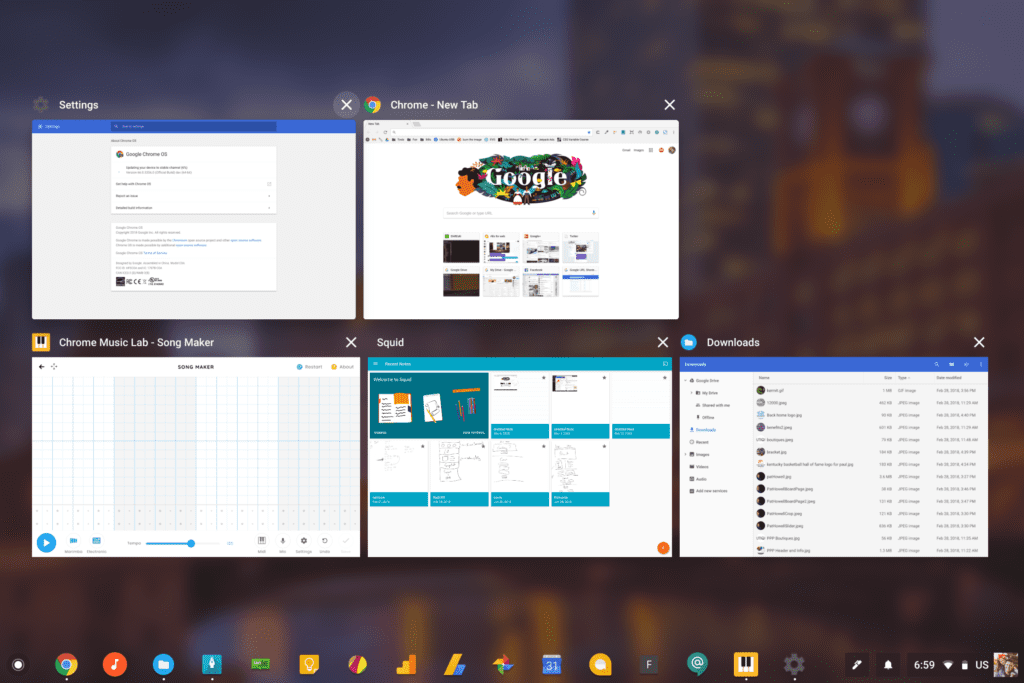 Another day, another Chrome OS UI tweak. If I’m being honest, the frequency of these UI changes probably excites me more than anything at the moment when it comes to being a Chromebook user.
I love the idea that our OS is evolving and changing right under our feet. I also love that Google is updating things in ways that feel more slick, responsive, and worthwhile. I rarely get the feeling that things in Chrome OS are changing just for the heck of it, and I like that.
Just like many other UI updates, today’s update isn’t a game-changer. It is, however, a shift to a smoother, cleaner and more cohesive look to a feature that I use countless times every day.
Overview mode.
If you don’t use this, you are missing out! There’s even a key on every Chromebook keyboard dedicated to this feature. For most, it is the 6th key on your top row (5th if you are a Pixelbook user) and the behavior is simple and useful. Hit that key (or swipe up with 3 fingers on your trackpad, swipe down if you don’t use Australian scrolling) to see all your open windows at once.
Desktops get cluttered in real life and in digital life. Overview mode gives you the ability to scoot everything back and snag the one window you really need quickly and effectively. When I’m not on an extended display, this feature is not only a lifesaver: it is a standard part of my workflow.
What’s Changing
The changes here are subtle, but useful. You’ll need to be on the Dev Channel to utilize the flags for now, but I’m sure all this will move down to Beta and then Stable within a short time. If you are on Dev or plan on moving there, you can enable the new look with two flags by typing chrome://flags into your omnibar and then simply searching for “overview.”
You’ll then enable the flags called enable new overview UI and enable new overview animations.
Once you’ve done this and restarted, you’ll be able to see what the Chrome team is working on. While likely still being developed, there are a few quick things you’ll notice as you watch the old and new UI. For your convenience, I’ve dropped a video of each below.
Old Overview UI
UPDATED Overview UI
First off, you can see that the info bar at the top of each window has changed. The text is larger and bolder and the logo for the app is also displayed. This should make it a bit easier to see what you are dealing with once you see all your open windows spread out. You’ll also notice the circle highlight that appears as you hover the “X” on each window. Nice touch.
Second, you’ll notice the blurred background. Similar to what you see on the sign-in screen and the app drawer, Chrome OS will blur out the background when you move into overview mode.
Last – and probably most notable from a performance standpoint – is the difference in how the OS handles animating windows when you are full screen. You will notice in both videos I hit the overview button with all windowed apps and then with one full screen. You’ll see a difference in how the animation functions.
When you have the focused app full screen, the OS doesn’t bother animating the other non-expanded apps when you enter the overview UI. Honestly, it makes a lot of sense. If I can’t see all the windows behind my full-screen window, they might as well all be small when I see the overview animation. There’s little sense expending the resources to re-animate them every time if I’m jumping from one full-screen app to the next.
Additionally, when in tablet mode, this is exactly what needs to be happening. Whether using full-screen apps or split screen, animating all your open apps each time you need to switch is just a waste of processor power and a needless invitation for slowdown.
If you use overview mode at all, you know that you are using it to get the job done, not to fuss over what is or isn’t animating. I, for one, just want to get into the UI quickly so I can select the window I need to continue my task. The faster, smoother and more responsive all that is, the better.
We’ll likely see a few minor tweaks to this before it makes its way to Stable, but so far, I like what I’m seeing. Changes that make Chrome OS look better, work faster, and run smoother are always welcome.
Special thanks to Piggeh Person for the tip!

