


Support our independent tech coverage. Chrome Unboxed is written by real people, for real people—not search algorithms. Join Chrome Unboxed Plus for just $2 a month to get an ad-free experience, access to our private Discord, and more. Learn more about membership here.
START FREE TRIAL (MONTHLY)START FREE TRIAL (ANNUAL)
 In general, Chrome OS is an operating system that just works and gets out of your way. Sure there are limitations and there are things that don’t work from time to time, but for the most part, if your workflow can exist inside a Chromebook’s limitations, you will find yourself loving the experience of operating in Chrome OS.
Even though most of my feature wants are already met with Chrome OS, there are small things here and there that I wish it would do better. One of those things looks to be getting remedied very soon.
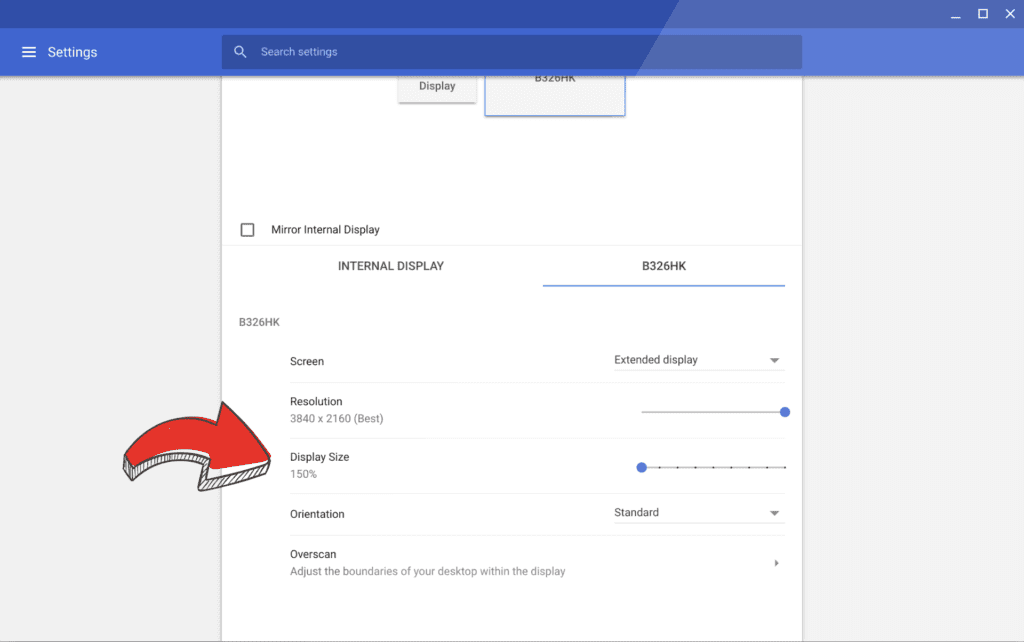
According to this post by Chrome evangelist +François Beaufort, display scaling for external monitors is now live in the Dev Channel of Chrome OS. It is currently behind a flag for now, but if you are in the Dev Channel, I don’t think that will be stopping you.
For those of you wanting to give this a whirl, you’ll need to switch to the Dev Channel (no need for Developer Mode, here) by going to settings > hamburger menu > about Chrome OS > detailed build information > change channel > Developer. Your device will begin downloading the update and prompt you for a reboot when complete. Please note this will not wipe your device, but returning to Stable Channel via this same method will wipe your device clean.
Once you are rebooted in the Dev Channel, you can simply copy this into the omnibar: chrome://flags/#enable-display-zoom-setting. Simply click the enable box, restart, and you’ll have a new settings screen in your display settings if you have an external display connected.
What Is This Doing?
Right now, if you have a high DPI Chromebook like the Pixelbook/Samsung Chromebook Plus/Pro or one of a few 1080p devices with smaller screens like the Acer R13 or ASUS Flip C302, your device can achieve display scaling via changing the screen resolution. We’ve talked about this in detail before, but all this is doing is changing the display scaling when you change the ‘resolution’ on your device.
If you do the math, on a 1920×1080 device like the Flip C302, scaling up everything on the display by 125% would be the equivalent of changing the effective resolution to 1536×864. When you select this resolution, though it isn’t the native resolution of the display, Chrome OS keeps everything tack-sharp while making everything on screen the size it would be on this lower resolution.
The same thing is happening at a 200% clip on devices like the Pixelbook, Macbooks, or high-res Windows machines.
The problem has been external displays up to this point. Say, for instance, you went out and purchased a 27-inch 4K monitor. Assuming you have a Chromebook/Chromebox that can support this resolution, you’d be left with some pretty tiny elements on your screen. I’m using a 25-inch QHD (2560×1440) monitor right now, and sometimes I need to lean forward to see everything easily. If I went with a 4K display, I’d have to get a much larger screen in order for everything to be a usable size.
But not much longer.
Now, this Display Size setting we’re discussing above will alleviate this issue for many high-res monitors. According to the screenshot François Beaufort shared, you’ll be able to scale up the screen size with a quick slider for your external displays. For me, I’d love to simply bump things up by 10% just to make functioning at my desk a little easier on my eyes. I’d love to scoot my monitor back a few inches as well, but that’s just not an option right now. It soon will be, though!
My hope is this same scaling comes to the standard display settings as well. As I said above, it is technically there already, but handling display scaling by listing a bunch of random display resolutions doesn’t feel user-friendly at all. I’d much rather have my set resolution and the option to scale up or down from that point by percentages, and I think that would make it much clearer for most users as well.

