


Support our independent tech coverage. Chrome Unboxed is written by real people, for real people—not search algorithms. Join Chrome Unboxed Plus for just $2 a month to get an ad-free experience, access to our private Discord, and more. Learn more about membership here.
START FREE TRIAL (MONTHLY)START FREE TRIAL (ANNUAL)
 With all the new features swirling last month around Linux apps on Chromebooks with Crostini, it felt a bit like we’d all temporarily forgotten the original container app solution for Chrome OS: Android.
That’s a bit hyperbolic, but it has been a bit since we’ve seen anything major shift for Android Apps on Chromebooks as the overall experience is really starting to smooth out a bit and feel more native. As more time goes by, we’ll have fewer articles like this as all the expected functions of Android will be in place, working, and not exactly news-worthy any longer.
With there still being a few lingering issues here and there with Android apps on Chromebooks, we’ll enjoy these announcements while we can.
A Big Addition for Most Users
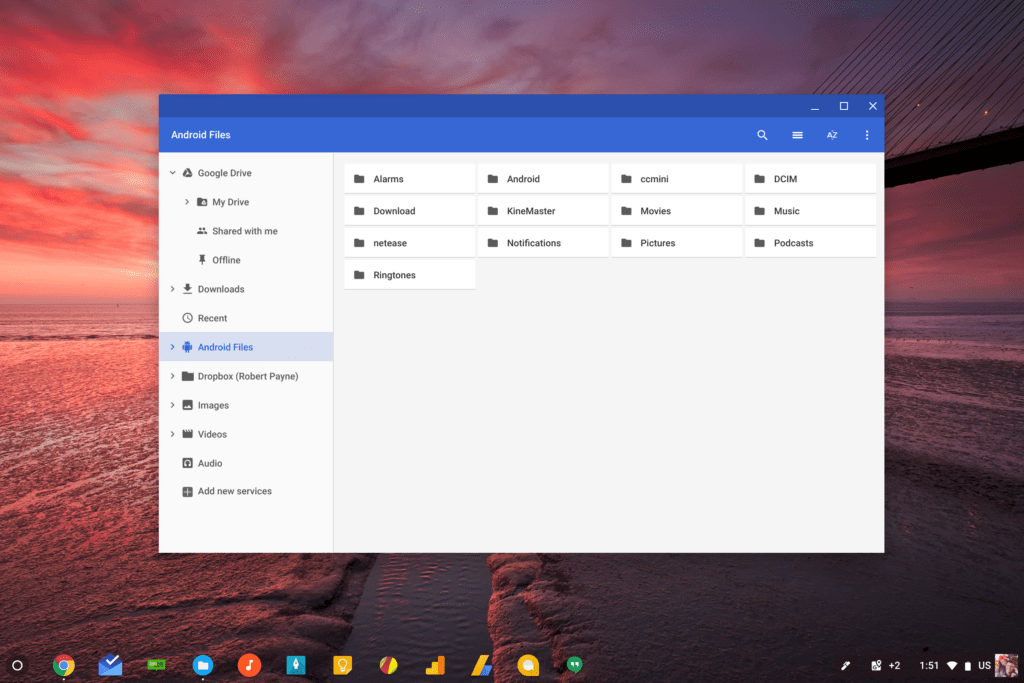
What we are seeing today is the availability of file browsing and manipulation of Android files via the Chrome OS Files app.
This is an important step in the right direction for Chromebooks as more and more users are taking advantage of the Play Store and don’t fully realize all the moving pieces that go into making all this work. A new user that picks up a Chromebook only sees the Play Store and apps ready to download and use. They don’t consider all the mess we’ve come through to see this all happen.
As such, when they have a few apps up and running and want to look at their files for those apps, they surely won’t understand why those files are simply non-existent in the Chrome OS files app.
To be honest, those of us who’ve been around for the whole Android-to-Chromebook merger don’t understand this, either.
As one of the biggest gripes surrounding Android apps on Chromebooks, it is fantastic to finally see this feature come along.
How To Try It Now
First things first, you need to be in the Dev Channel to see the flag at this point. You can get there by going to settings > About Chrome OS > Detailed build information > Change channel > Dev Channel.
You’ll download the update and restart when prompted to arrive in the non-stable Dev Channel. Keep in mind that if/when you return to the Stable Channel via the same process, you’ll be forced to power wash and will lose any locally stored data.
After you’ve made it to the Dev Channel, simply paste this in your omnibar: chrome://flags/#show-android-files-in-files-app. After that, select Enable and agree to the necessary restart and you will now see a section in your Files app labeled Android Files.
Just as you’d expect to see, all your necessary (non-root level) Android files will be there. I’ve checked and you get full read/write access here, meaning you can copy/paste files in and out of these folders just like you would for Chrome OS folders.
There’s no way for us to know when this will make it down to Stable, but everything seems to be working quite well, so I’d imagine we’ll see this one trickle down in the 67 or 68 update.
SOURCE: About Chromebooks via François Beaufort

