

Support our independent tech coverage. Chrome Unboxed is written by real people, for real people—not search algorithms. Join Chrome Unboxed Plus for just $2 a month to get an ad-free experience, access to our private Discord, and more. Learn more about membership here.
START FREE TRIAL (MONTHLY)START FREE TRIAL (ANNUAL)
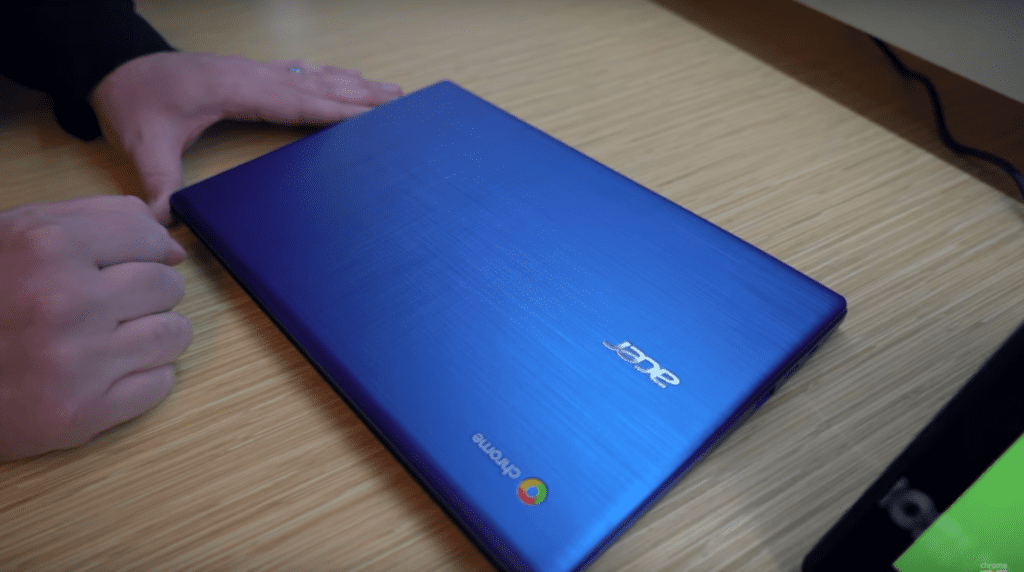 While the overwhelming Google presence at CES 2018 has clearly been Google Assistant related, there are a few new Chrome devices here at the show that we’re getting to get our hands on. One of these is the newest entry-level consumer device from Acer, the Acer Chromebook 11 (CB331).
As these lower-end Chromebooks tend to go, there’s nothing here that will blow your socks off, but there is a lot to like about this portable, light Chromebook Acer has put together.
Build
One of the best parts of the whole package is the build. Now, I’m not saying the build quality is the most amazing thing I’ve ever seen, but when we consider the $249 starting price for this little guy, the fit and finish are pretty impressive. The textured, blue lid, reinforced hinges, textured deck, spacious trackpad and overall feather-light chassis all come together to make – by far – the most attractive Chromebook in this lower price bracket.
Even compared to any of Acer’s earlier devices, this thing stands out in the best ways and just feels good all around.
Screen
The panel is good, not great. My two knocks are brightness and resolution. 1366×768 is decent, but feels dated. The IPS panel on board has good colors, but looks like maybe 250 nits is the top end on brightness. Dim and low-res aren’t great descriptors for displays, but we need to remember the price and the target audience. The screen is definitely passable and a far cry better than the terrible TN panels that used to ship on Chromebooks in this price segment.
Viewing angles are good and the touch capability is smooth and quick, too. Overall, nothing to get hyped for, but also not a reason to avoid this Chromebook.
Inputs
This is where Acer did quite well. You get a larger-than-average trackpad that feels great and clicks well (you all know my pickiness when it comes to trackpad click and travel) accompanied by a keyboard with great travel and well-spaced keys.
The ports include 2 USB-A, 2 USB-C, and a microSD card slot. Both USB-C ports can handle charging and display duties and all ports are USB 3.1 for fast transfer speeds.
Speakers, unfortunately, aren’t very good. While not surprising, you just never know from device to device which ones will surprise you.
Internals
Right now, Acer is saying this device will come with both the dual and quad core versions of Intel’s Apollo Lake processors. When these processors first came out, the experience was pretty poor. While we’ve not spent much time on an Apollo Lake device in the past few months, benchmarks definitely paint a picture of ongoing improvement. We were seeing Octane scores get over 12,000, so that has me hopeful that Apollo Lake – much like Braswell before it – will end up being a very servicable processor for Chromebooks moving forward.
All models at this time will also employ 4GB of RAM and 16GB or 32GB of internal storage. We’re very glad to see 2GB models out of the question, but the same needs to happen with the 16GB option. Seriously, with devices that are shipping with Google Play access – and this device is – 16GB shouldn’t even be a thought. I was hoping we were past that point, but I suppose we aren’t just yet.
Value
All things considered, we’re looking at a decent setup here, but not for $249. The $249 model will likely be the 16GB model, and I simply cannot recommend that any longer. Hopefully the 32GB choice won’t be much more expensive. At $299, this Chromebook is still a good device. With Acer’s other offerings like the very good Chromebook 15 hitting the $299 price point already, I can’t see where this device will fully fit in for budget-minded buyers.
If they can get the 32GB quad-core model in that $249-$279 range, I think this device will sell very well. Time will tell, and we’ll have much more on this device before its planned April release once we have a review unit in hand.

