

Support our independent tech coverage. Chrome Unboxed is written by real people, for real people—not search algorithms. Join Chrome Unboxed Plus for just $2 a month to get an ad-free experience, access to our private Discord, and more. Learn more about membership here.
START FREE TRIAL (MONTHLY)START FREE TRIAL (ANNUAL)
One of my favorite things about Chromebooks in general is the plug-and-play nature of these devices. Without too much thought, I can see a new accessory and immediately feel very confident that it will work well with my Chromebook without the need of drivers, setup, and other technical bits. Just plug it in and start using it.
That’s the case with my new, portable, USB-C monitor I just snagged from Amazon. The brand is not one you’ve likely heard of and the way it works isn’t something you’ve likely been on the lookout for until you know you need it; but I can confidently tell you that this is one of the best Chromebook accessories I’ve ever purchased – and it is changing my workflow pretty dramatically.
My very particular 2nd screen needs
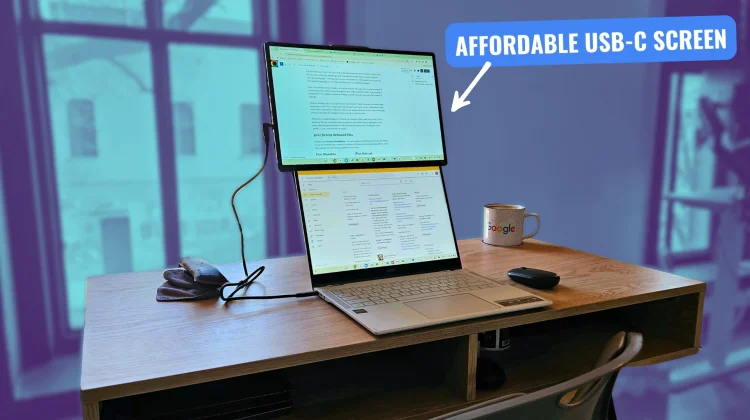
Let me start first by explaining why I was on the lookout for this exact type of second screen. After well over a decade of reviewing Chromebooks, I’ve found that the best way to use these devices at the desk with a second screen is in a vertical setup.
With my extended display over the top of the Chromebook, I have the ability to leverage 2 screens while still utilizing the Chromebook’s built-in keyboard, trackpad, and screen. It’s a setup that clearly lends itself well to on-the-go workflows, and it’s something I’ve deeply missed since becoming a digital nomad for work once again.
An affordable, vertical option
I’ve only seen one other company offer a built-in stand like this for their portable screen (Espresso), and that entire setup is pretty pricey. I’ve been considering it for sure, but I kept holding out hope that one of the myriad of Amazon brands would eventually make a portable screen that could be stood up to go above a laptop. And just the other day, I found one.
It is called the Domyfan 16.1” Laptop Screen Extender and unlike it’s unoriginal name, this screen is an impressive, affordable revelation for anyone who needs a couple screens on the go.
The screen itself is a nice 1920×1200 16:10 IPS display that gets bright enough at 300 nits and provides very solid viewing angles and colors. It won’t win any awards, but working from it the past week has been a total treat with the overall screen real estate on offer.
The case/stand is where the magic is
But the real magic lies in the stand that is also the cover case for this screen. Pop it open and you get a magnetic attaching stand that raises the screen high enough to eclipse even 16-inch laptops. The magnetic mount also allows for free rotation, too, so you can leverage the Domyfan screen in portrait, landscape or anywhere between.
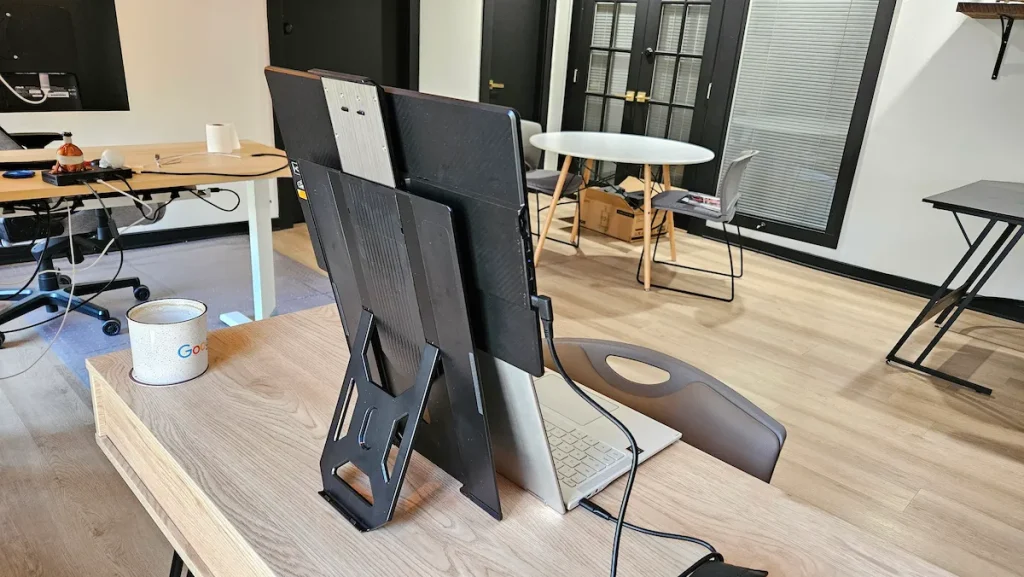
One cord connects things together, and without much fuss, you have a very functional 2-screen setup that takes up very little space left-to-right or front-to-back. It goes without saying that I’m incredibly impressed already, and this thing is now a full-time resident in my bag.
Perhaps the best part of it all is the price – currently $119.98 at Amazon and worth every single penny of it. No, it’s not a touch screen and it doesn’t come with a super-high refresh rate – but it does exactly what I need, gives me a dual screen setup I can carry easily in my bag, and gives me back the setup I’ve been missing for months.
There is an included magnetic kickstand for a simpler side-by-side setup without the elevation, but if you’re anything like me, having the ability to get your main monitor up at eye level is a life saver; and having the flexibility to set it up over the top of my Chromebook is just perfect. I can’t recommend it enough!
SUBSCRIBE TO UPSTREAM
Get Chrome Unboxed delivered straight to your inbox
Upstream is our flagship, curated newsletter with the top stories, most click-worthy deals, giveaways, and trending articles from Chrome Unboxed sent directly to your inbox a few times a week. Join 31,000+ subscribers.

